User guide overview
The AutoAir builder consists of the canvas where a DAG is drawn, the inspector where tasks are configured, the code views, the validation pipeline, and the lifecycle features: versions, deploy, reviews and runs. Below are the workbench layout and the guide page for each topic.
The workbench
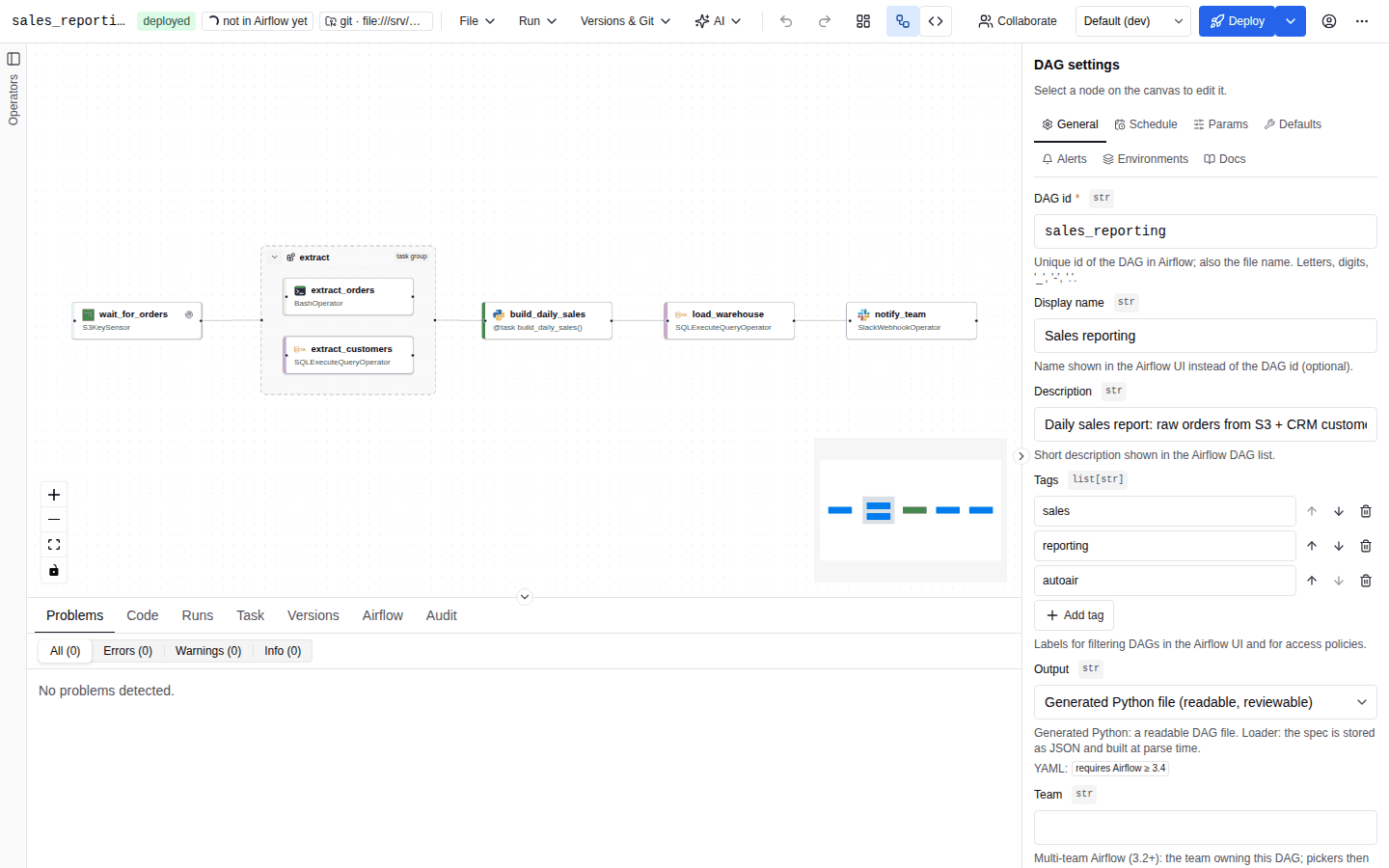
The builder is one page made of five areas:
| Area | Position | What it holds |
|---|---|---|
| Toolbar | Top | Product name, DAG id, status chips (unsaved, deployed, new, open pull request, deploy target, target Airflow version), the File, Run, Versions & Git and AI menus, undo / redo, auto layout, the Visual / Code editor-mode toggle, collaboration control, environment selector, the Deploy button, the user menu and the More (⋯) menu. |
| Palette | Left | Searchable list of everything that can be inserted: built-in nodes (@task variants, task group, note, extension nodes), operator templates, template fragments and every discovered operator, grouped by provider. |
| Canvas | Centre | The DAG graph: tasks, task groups, sticky notes and dependencies. See Canvas. |
| Inspector | Right | Settings of the selected node or dependency. With nothing selected it shows DAG settings (General, Schedule, Params, Defaults, Alerts, Environments, Docs). |
| Bottom panel | Below the canvas | Tabs Problems, Code, Runs, Task, Versions, Airflow and Audit. Runs and Airflow need a reachable Airflow server (features.airflow; Runs also needs features.runs); Audit needs the audit:read permission. |
Every side panel and the bottom panel can be hidden, resized and restored; the layout is remembered per browser. See Panels: collapse and resize.
When the builder is narrower than 1100 px the inspector opens as an overlay drawer instead of a docked panel; below 720 px the palette does too. The width that counts is the builder's own width, not the browser window's: inside Airflow the builder is narrower than the page.
Map of the user guide
Building a DAG
| Page | Covers |
|---|---|
| Canvas | Palette, canvas, inspector, bottom panel, task groups, notes, context menu, insert popover, alignment guides, auto layout, copy / paste / duplicate, undo / redo, minimap, search. |
| Keyboard shortcuts | Complete shortcut table for macOS and Windows/Linux, the command palette and the shortcuts sheet. |
| Code mode | Editing the generated Python file and syncing it back to the canvas. |
| Field editors | Code editors, built-in IntelliSense, the optional IDE language server, the Validate button and the Markdown editor. |
| Operators and parameters | Operator catalog, parameter forms, type badges, required and optional parameters, connection and pool pickers. |
| Jinja, XCom and Python | Templated fields, upstream outputs, Python references, inline functions and inline scripts. |
| TaskFlow and loops | @task decorators, dynamic task mapping, branching, task groups, task loops, trigger rules, setup and teardown. |
| Scheduling and assets | Schedule editor, cron presets, timetables, asset conditions, time zones, catchup, start and end dates, outlets and inlets. |
| Params and trigger forms | DAG params, the Airflow trigger form preview and the trigger dialog. |
| Human-in-the-loop | HITL operators and their dedicated editor. |
| Callbacks, retries and deadlines | Notifier callbacks, retries, backoff, exception retry policies and deadline alerts. |
| Connections and Variables | Connection pickers, creating connections, Variables and per-environment aliases. |
| Validation | The Problems panel, live checks, the server validation pipeline and severities. |
Reuse, lifecycle and teamwork
| Page | Covers |
|---|---|
| Operator templates | Reusable, pre-configured tasks with locked and required fields. |
| Templates and fragments | DAG templates and reusable groups of tasks. |
| Marketplace | Installing templates from configured marketplaces. |
| Versions and diff | Version history and comparing versions on the canvas. |
| Deploy | Writing the DAG to its deploy target. |
| Reviews and approvals | Four-eyes approvals before deployment. |
| Runs | Test runs, triggers, backfills and the run overlay. |
| Environments | Per-environment overlays and promotion. |
| Import and export | Importing Python, YAML and Airflow DAGs; exporting Python, YAML, dag-factory and spec JSON. |
| Collaboration | Real-time co-editing and presence. |
| Multi-team | Team-scoped DAGs, pickers and deploy targets. |
Plugin and standalone UI
AutoAir ships one frontend that runs in two hosts. The builder itself (canvas, inspector, panels, dialogs, shortcuts) is identical; the differences are in how it is reached, themed and signed into.
| Aspect | Airflow plugin | Standalone (autoair serve) and local mode (autoair local) |
|---|---|---|
| Where it opens | Airflow 3.1 and later: a navigation entry named DAG Builder (plugin.nav_name, in the menu set by plugin.nav_category, default browse) rendered inside Airflow's own UI. Airflow 3.0: a full page at /autoair/ui/. | Its own page at /ui/ on the AutoAir server (the root URL redirects there). |
| DAG tab | An AutoAir tab on every DAG page (plugin.dag_tab, plugin.dag_tab_name; on Airflow 3.4 and newer plugin.dag_tab_tags limits it to tagged DAGs). It opens that DAG in the builder; for a DAG that exists only as Python in Airflow it offers to import it. | Not applicable. |
| Light and dark mode | Follows the Airflow UI theme. There is no light/dark toggle in the builder and the Toggle light / dark mode command is not offered. | The user chooses light or dark from the More (⋯) menu or the command palette; the choice is stored in the browser. The initial mode follows the operating system preference. |
| Page title | Airflow's. | ui.title (default AutoAir). |
| Sign-in | The Airflow UI session. AutoAir watches the session, warns before it expires and shows Sign in to Airflow when it ends. | A sign-in screen: Airflow username and password, an Airflow access token, or Sign in with Airflow when available. autoair local can require a token (autoair local --token). |
| Airflow features | Always available (pickers, DAG status, runs, import from Airflow). | Available when airflow_url points at a reachable Airflow API. In autoair local the Airflow-backed features (features.airflow) are off: connection, pool and Variable pickers fall back to free text and the Runs and Airflow tabs are hidden. |
The following settings change the shell in both hosts: ui.banner_text and ui.banner_color show an environment banner above the builder (for example PRODUCTION), ui.accent_color adds an accent strip, ui.default_language (en or tr) sets the language for users who never chose one, and ui.default_timezone / ui.date_locale control how times and dates are displayed. See the ui settings and the plugin settings.
# Rename the navigation entry and hide the DAG tab (plugin mode)
AUTOAIR_PLUGIN__NAV_NAME="Pipelines"
AUTOAIR_PLUGIN__DAG_TAB=false

# Show a red PRODUCTION banner above the builder
AUTOAIR_UI__BANNER_TEXT="PRODUCTION"
AUTOAIR_UI__BANNER_COLOR=red
Editor availability
Administrators decide which editors exist with features.visual_editor and features.code_editor (both on by default). With both on, the toolbar shows the Visual / Code toggle; with only one on, the builder opens directly in that editor and the toggle is hidden. See Code mode.
Language
The UI is available in English and Turkish. Change it from the More (⋯) menu under Language; the choice is stored in the browser.