Validation and the Problems panel
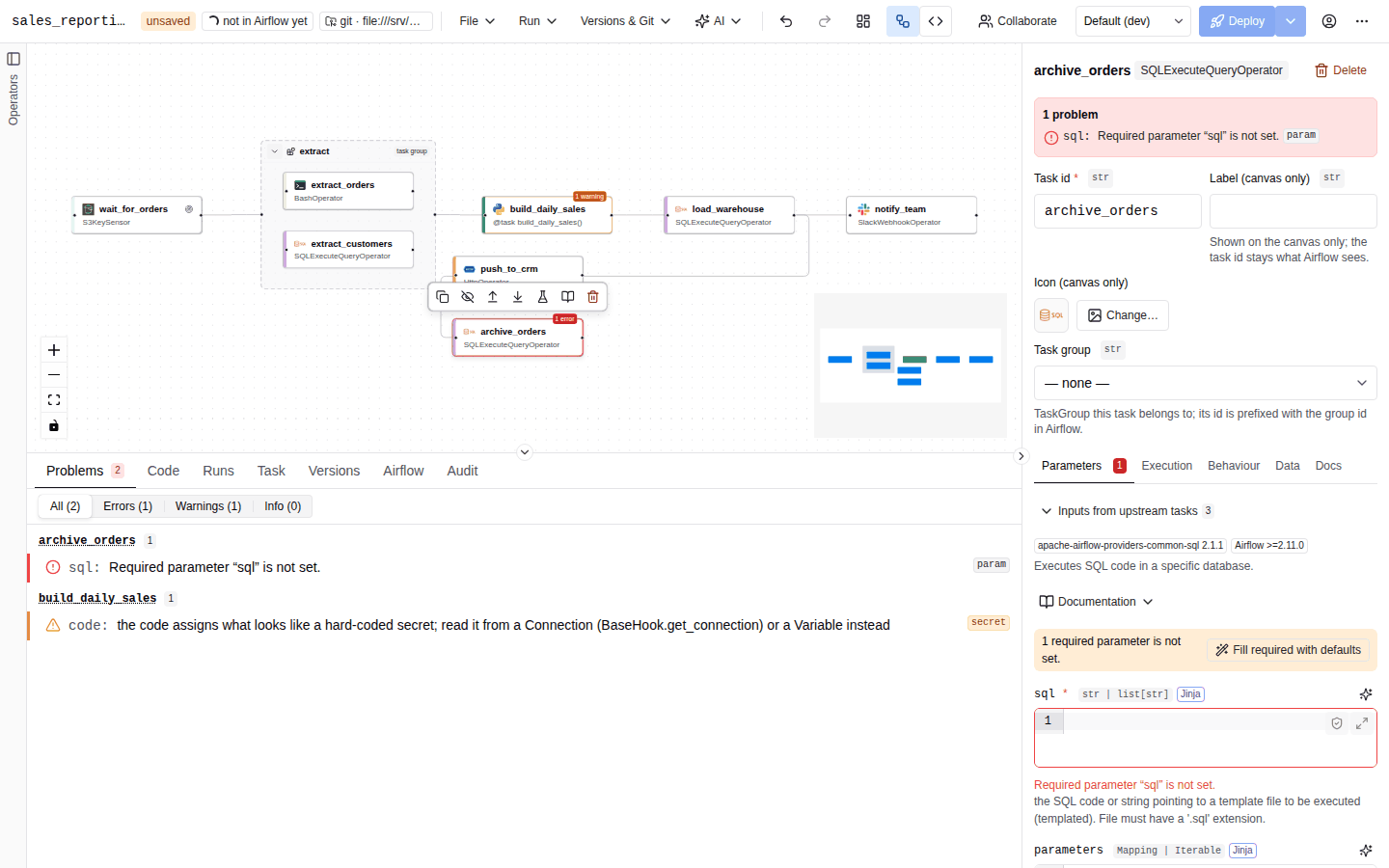
AutoAir validates the DAG continuously on the server, the single source of truth for validity. Every finding is a problem with a severity, a code, a message and, when possible, the node and field it belongs to. Problems appear in the Problems tab, on the canvas, in the inspector and in the editors, and errors block deployment.
Live checks
About 600 ms after each change to the DAG (longer on DAGs with more than 200 nodes, see Large DAGs), the builder sends the current spec to the server twice, in parallel:
POST /api/validateruns the validation pipeline described below, without the Airflow import check;POST /api/codegengenerates the Python file, which feeds the Code tab and code mode.
Selecting, moving the viewport or opening panels does not trigger a check; only changes to the document do. A newer change cancels a check that is still running. While a check runs, the Problems tab shows a spinner (Checking…).
Problems from both calls are merged. When a task already has an error (for example a syntax error in its body), the code generator's duplicate error for that task is dropped.
If the document does not even match the spec schema (an invalid value the server rejects with HTTP 422), the builder turns each schema error into a located problem, so clicking it still opens the right node and field. If the server cannot be reached, the request error is shown as one schema problem.
The validation pipeline
POST /api/validate runs these stages in order and reports every finding; a stage does not stop the next one.
| Stage | Checks |
|---|---|
| Structure | Duplicate node ids, task ids and function names, unknown parent groups, task group nesting cycles, an end date before the start date, a scheduled DAG without a start date (scheduled DAGs should define a start_date, warning). |
| Graph | Edges to unknown nodes, self-loops, edges to notes, duplicate edges, edges between a group and its own member, XCom references (unknown, to a group or note, to itself, to a disabled task), cycles with task groups expanded to their members, task groups that depend on each other in a cycle when each group counts as one unit (task_group_cycle, warning; see below). |
| Nodes | Operator parameters against the catalog (required, empty, unknown), the operator allowlist, privileged and forbidden operators, Python task syntax and ruff lint, decorator arguments, reserved argument names, dynamic task mapping values, extension node configuration. |
| Schedule | @once / @continuous combined with assets, batch_asset_events=False with AND conditions, providers needed by asset watchers and OpenLineage settings, catchup=True without max_active_runs (warning). |
| Behaviours | Notifiers of callbacks and deadline alerts, setup and teardown rules, retry policies. |
| Templates | Jinja syntax, unknown template variables, undeclared params, Jinja in non-templated fields. |
| Loops | Task loop rules, loop context, @task.stub and @result rules. |
| Policy switches | The flat policy settings: required owner, description, tags, minimum retries, maximum task count, dag_id and task_id patterns. |
| Python references, inline code | Allowed by allow_python_code and python_ref_allow, resolvable, parsable. |
| Secrets | Hard-coded secrets in parameters, task code, inline functions and scripts. |
| Shell | ShellCheck on bash commands, @task.bash return values and shell scripts. |
| AI operators | apache-airflow-providers-common-ai tasks: structured output models, agent toolsets, the LLM connection of @task.llm, @task.agent, @task.llm_branch and @task.llm_sql. See AI operator checks. |
| Airflow version | Features that need a newer Airflow than the target version. |
| Operator templates | Locked fields changed, required inputs empty, template missing or updated. |
| Organisation rules | Declarative policy.rules, then the Open Policy Agent decision when policy.opa_url is set. See Policy rules and OPA. |
If no stage reported an error, the server then renders the DAG file. A failure there is reported as a codegen error. With the import check on, the rendered file is finally imported with Airflow's DagBag (see Import check).
The same pipeline runs from the command line, with the import check on by default:
autoair validate orders.autoair.json            # prints one line per problem, then OK or FAILED
autoair validate orders.autoair.json --env prod --no-import-check
The command exits with status 1 when the DAG has errors. See CLI reference.
Validating for an environment
Validation always runs for one environment. The environment is taken from the deploy request, the Preview / deploy as environment selector in DAG settings → Environments (the live check follows it and re-runs when you switch), --env on autoair validate, or the environment query parameter of POST /api/validate; otherwise default_environment is used. When the DAG has an overlay for that environment, the overlay, including its connection and Variable mapping, is applied before any stage runs. A mapping that produces an invalid spec is rejected with HTTP 422 and shown as a schema problem.
Policy rules and OPA
The last stage evaluates the organisation's own policy, configured by an administrator in the policy section (see Policy):
- Declarative rules (
policy.rules) select DAGs and tasks by environment, team,dag_id, tags, schedule, operator class or parameter values, and check a condition such asforbid,min_retries,require_owner,tags_include,paramortask_field. Each finding has the codepolicy_rule, the rule's severity (errorby default, orwarning), and a message that ends with the rule id, for exampleBashOperator is not allowed in production [policy rule no-bash-in-prod]. Findings about a task are attached to that task (and to the field, for parameter and field checks), so clicking one selects the task. - Open Policy Agent (
policy.opa_url): the spec, after the overlay, is sent to OPA together with the environment, team, AutoAir and Airflow versions, and, for deploys and deploy previews, the user and action. Each violation OPA returns becomes apolicy_opaproblem. A barefalsedecision is reported asdenied by the OPA policy. When OPA cannot be reached,policy.opa_fail_modedecides:open(default) reports onepolicy_opawarning and lets the DAG pass,closedreports an error that blocks deploys until OPA answers again.
Rules that match on environments do not apply when the environment is unknown, so a DAG validated without any environment can pass a rule that would block its deploy to prod. Select the environment in the builder, or pass --env, to see the problems the deploy will report. Errors from either layer block deploys and deploy proposals like any other error.
AI operator checks
Tasks that use the common.ai provider (see AI operators) get these checks:
| Code | Severity | Message |
|---|---|---|
output_model | error | invalid output_model in '<param>': …: a structured output model is malformed, for example a class name that does not start with an upper-case letter, no fields, duplicate field names, or choices on a non-string field. |
toolset | error | invalid toolset in '<param>': …: an agent toolset is malformed, for example SQL-only options (allowed tables, schema, writes, row limit) on an MCP toolset. |
toolset | warning | the SQL toolset on '<conn_id>' lets the agent modify data (allow_writes). |
decorator | error | @task.<decorator> needs llm_conn_id (the LLM connection) for @task.llm, @task.agent, @task.llm_branch and @task.llm_sql tasks without an LLM connection. |
Severities
| Severity | Icon | Effect |
|---|---|---|
| Error | Red circle | The DAG cannot be deployed. The Deploy button is disabled with Fix N problems, and the generated code may be unavailable. |
| Warning | Orange triangle | Deployable. Something is probably wrong or risky (an unresolvable Python reference, a template in a non-templated field, a hard-coded secret, a ruff warning). |
| Info | Blue "i" | A hint (for example @task.virtualenv usually needs requirements, or a ShellCheck style note). |
The Problems panel
The Problems tab of the bottom panel lists every problem:
- Filter by severity with All (N), Errors (N), Warnings (N) and Info (N).
- Grouping: DAG-level problems come first under DAG, then one group per task or task group, named by its task id. Groups with errors come before groups with only warnings, and problems within a group are sorted by severity. Click a group name to select that node.
- Each problem shows its severity icon, the field it concerns (
retries:), the message in the UI language, and a chip with its code. Lint and ShellCheck chips link to the rule's documentation (… : open the rule documentation) and show the line number. - No problems detected. when there are none.
The tab label shows the problem count in red (errors) or orange (warnings only). When the bottom panel is hidden, the count stays visible on its bar.
Going to a problem
Click a problem, or focus it and press Enter or Space:
- A task problem selects the task, expands any collapsed group around it and zooms to it. A DAG-level problem clears the selection, so the inspector shows DAG settings.
- The inspector switches to the tab that owns the field: Execution for retries, pool, queue and trigger rule; Behaviour for callbacks, retry policy, setup and teardown; Data for mapping and assets; Docs for
doc_md; Parameters (or Code) for everything else. Task id, label and task group are above the tabs. - The field is focused.
The same navigation is available from the problem banner at the top of the task inspector (Go to field), from AI findings, and from Go to … links in DAG settings.
Where else problems appear
| Place | What you see |
|---|---|
| Canvas | N errors / N warnings badges on task nodes. |
| Inspector | A banner listing the node's problems; a red count on each tab that owns a problem; error text under the field. |
| Code editors | Lint problems with a line number are underlined in the task body editor and marked in its gutter. |
| Code mode | Problems of the code sync, located at their line. See Code mode. |
| Toolbar | The Deploy button is disabled while errors exist. |
Messages
The server reports messages in English. The UI rewrites the common ones into friendlier, translated text, and explains raw schema errors. For example:
| Server message | Shown as |
|---|---|
required parameter 'sql' is missing | Required parameter "sql" is not set. |
dependency cycle: a → b → a | These tasks depend on each other in a loop: a → b → a. |
String should match pattern '^\S+( \S+){4,5}$' on a schedule | A cron expression has 5 fields: minute hour day-of-month month day-of-week (e.g. 0 6 * * 1-5). |
String should match pattern … on an id | Use letters, digits, "_", "-" or "." only. |
an owner is required | An owner is required (Defaults → Owner). |
'api_key' looks like a hard-coded secret | "api_key" looks like a hard-coded secret: use an Airflow connection or variable. |
Messages without a translation are shown as the server sent them.
Cyclic task group dependencies
A dependency into or out of any task of a task group counts as a dependency of the whole group. A path that leaves a group and comes back into it is therefore a cycle between groups, although the task graph itself has none: with a and b in group g and bridge outside it, a >> bridge >> b makes g depend on bridge and bridge depend on g. Airflow 3.4 shows a DAG warning for such DAGs and Airflow 3.5 is planned to refuse to parse them, so AutoAir reports a task_group_cycle warning that names the groups and tasks involved, whatever the target Airflow version. Move tasks between groups (here: bridge into g, or b out of it) so that each group depends on the others in one direction only. Disabled tasks are bridged first, as in the generated code, and XCom references count as dependencies.
Problem codes
| Code | Meaning |
|---|---|
schema | The document does not match the spec schema. |
duplicate_node, duplicate_task_id, duplicate_function, bad_parent | Structural conflicts. |
edge_unknown_node, self_loop, duplicate_edge, cycle, group_cycle, group_edge, note_edge | Graph problems. |
task_group_cycle | Warning: task groups depend on each other in a cycle. Airflow 3.4 deprecates this and Airflow 3.5 is planned to reject the DAG. |
dates, start_date, catchup, schedule, watcher | Schedule and date problems. |
param, reserved_param, reserved_arg, config, unknown_handler | Parameters of operators, Python tasks and extension nodes. |
syntax, lint:<rule> | Python syntax errors and ruff findings in task code. |
shellcheck:<rule> | ShellCheck findings. |
decorator, branch, result, loop, mapping | TaskFlow, branching, loop and mapping rules. |
xcom_self, xcom_unknown, xcom_note, xcom_group, xcom_disabled | XCom references. |
template | Jinja templates. |
callback, retry_policy, teardown, lineage | Behaviours. |
python_ref, python_function, script_file | Python references, inline functions and scripts. |
secret | Hard-coded secrets (warnings). |
policy | Policy switches (allowlists, required fields, patterns). |
policy_rule | A declarative policy.rules rule; the message ends with [policy rule <id>]. |
policy_opa | A violation returned by Open Policy Agent, or OPA unreachable. |
output_model, toolset | common.ai structured outputs and agent toolsets. |
template_locked, template_required, template_missing, template_updated | Operator template constraints. |
airflow_version | A feature needs a newer Airflow than the target version. |
duration | A duration (retry_delay_seconds, execution_timeout_seconds, dagrun_timeout_seconds, a schedule interval, a timedelta argument) is infinite, not a number, or larger than a datetime.timedelta holds (999999999 days). |
function_name_reserved | A Python task's function name is also a name the generated file imports; the function is renamed in the code (warning). |
codegen | The DAG file could not be generated. |
import | The generated file failed to import in Airflow's DagBag. |
import_service | The validator service could not be asked; a warning by default (validator.fail_mode=open: the deploy goes ahead without the import check) or, with fail_mode=closed, an error that blocks deploys. |
Python lint
The body of every Python task is linted with ruff on the server. The body is wrapped in the function signature the code generator emits and linted (nothing is executed), and findings are mapped back to body line numbers. One ruff run lints every task body of a validation, and the server remembers the results of bodies it has already linted, so a DAG with hundreds of Python tasks is not slower to re-check than its changes require.
| Setting | Default | Effect |
|---|---|---|
editor.python_lint_select | ["F", "E9", "B006", "B008", "B012", "B018", "PLE"] | Rules checked. Overrides the built-in list. |
editor.python_lint_select_extra | [] | More rules, for example ["S"] for bandit. |
editor.python_lint_ignore | ["F401"] | Rules never reported. |
editor.python_lint_ignore_extra | [] | More ignored rules. |
editor.python_lint_timeout | 15 | Seconds per lint run (one run covers all bodies that changed since the last validation). |
Undefined names (F82x), syntax errors (E9) and PLE rules are errors; other findings are warnings. Ruff must be installed on the server (pip install 'autoair[format]'); without it, lint is skipped and only syntax errors are reported.
ShellCheck findings on bash_command values, @task.bash return values and shell scripts are reported as warnings (style notes as info) when ShellCheck is installed (pip install 'autoair[shell]') and editor.shellcheck_in_validation is on. editor.shellcheck_exclude (default ["SC1091", "SC2034", "SC2154"]) and editor.shellcheck_exclude_extra silence rules that are noise for Airflow commands. Jinja expressions are masked before ShellCheck runs. Like ruff, ShellCheck runs in batches (up to 50 scripts per run) over the scripts it has not seen yet (editor.shellcheck_timeout, default 5 seconds, per run); .shellcheckrc files are not read.
Import check (Validate in Airflow)
Live checks do not import the DAG. Run → Validate in Airflow runs the pipeline with the import check: the rendered file is imported with Airflow's DagBag in a warm worker process, and any import error becomes an import problem. The result is a notification, Valid ("The DAG imports cleanly in Airflow (DagBag).") or Validation failed with the problem count, and the bottom panel switches to Problems on failure.
The import check executes the generated file, including inline code, on the AutoAir host, so it needs the code:execute permission. Related settings:
| Setting | Default | Effect |
|---|---|---|
import_check_on_deploy | true | Import the DAG with a DagBag before every deploy. |
import_check_timeout | 60 | Seconds an import check may take. |
dagbag_pool | true | Keep warm DagBag worker processes. |
dagbag_pool_size | 2 | Number of warm workers. |
dagbag_pool_max_tasks | 50 | Checks per worker before it is recycled. |
target_airflow_version | unset | Validate against this Airflow version instead of the installed one. |
With validator.url set, the import runs in a separate validator service instead. When that service cannot be reached the check reports an import_service problem: a warning by default (validator.fail_mode=open), or an error that blocks deploys with fail_mode=closed.
Deployment runs the validation again on the server, with the import check when import_check_on_deploy is on, and refuses to deploy a DAG with errors. See Deploy.