Jinja, XCom and Python
A parameter value in AutoAir is more than a literal. It can be a Jinja template rendered by Airflow at runtime, the output of an upstream task, an importable Python object, a Python function written in the builder, or a script embedded in the DAG. Each form below comes with how to enter it, how it is validated and what the generated DAG file contains.
The value source of an operator parameter is chosen with the button next to its name; see Value sources.
Jinja templates
Airflow renders the template fields of an operator (its template_fields) with Jinja just before the task runs. AutoAir marks these parameters with a purple Jinja badge and edits them with a Jinja-aware editor.
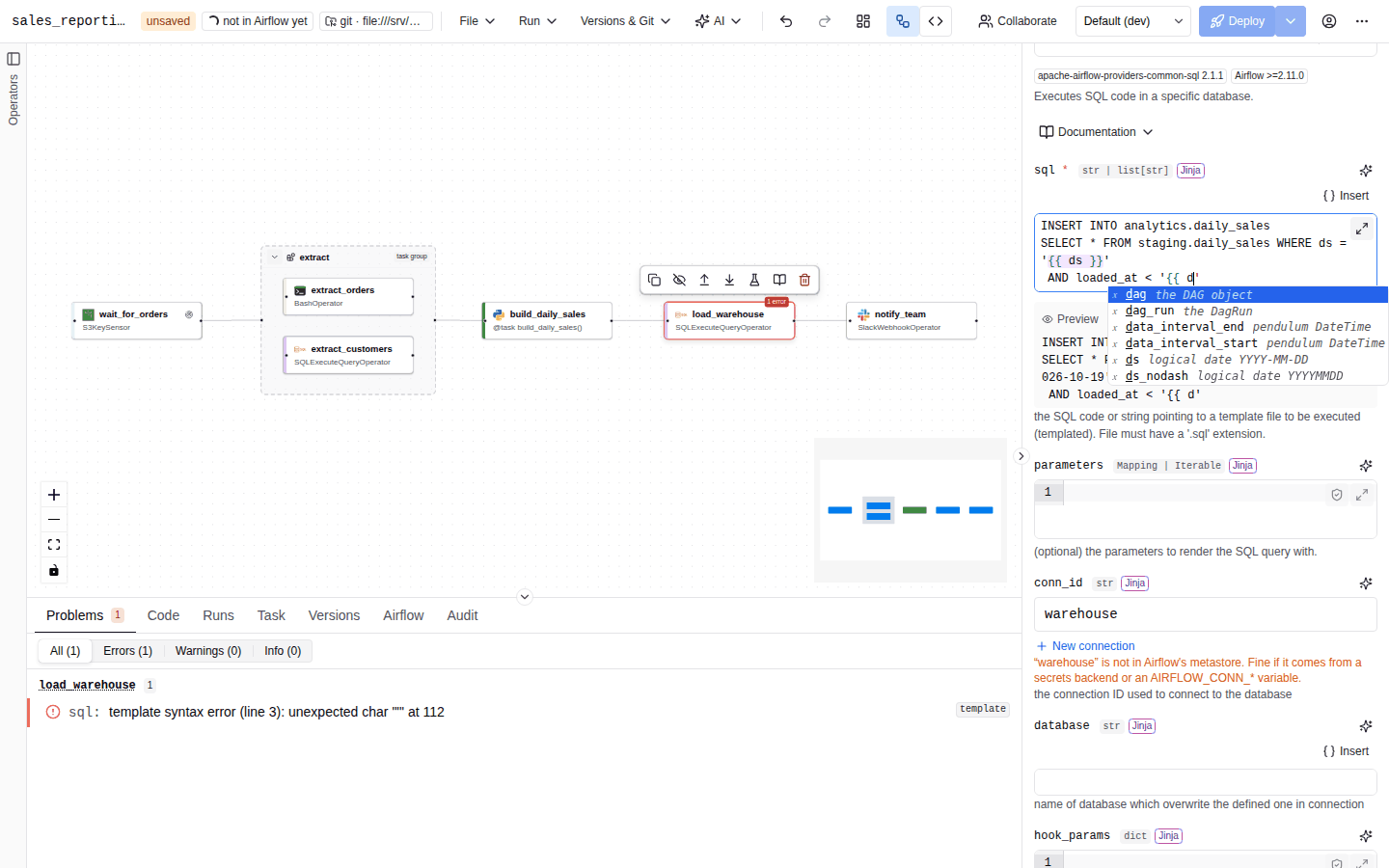
Highlighting and completion
{{ … }} expressions, {% … %} statements and {# … #} comments are highlighted in every editor, on top of the field's language (Python, bash, SQL, YAML, JSON, Markdown, Go, Java, JavaScript, TypeScript or plain text). Inside a tag, completion offers Airflow's template context:
| You type | Completion offers |
|---|---|
{{ | The task context: ds, ds_nodash, ts, ts_nodash, ts_nodash_with_tz, logical_date, data_interval_start, data_interval_end, run_id, dag, dag_run, params, var, conn, ti, task_instance, task, macros, conf, task_instance_key_str, partition_key, triggering_asset_events, outlet_events, inlet_events, expanded_ti_count, test_mode. |
params. | The DAG params you declared, with their types. |
var. then var.value. or var.json. | Airflow Variable keys. |
conn. | Airflow connection ids; after conn.<id>.: host, port, login, password, schema, conn_type, extra, extra_dejson. |
macros. | ds_add, ds_format, datetime, timedelta, time, uuid, random, dateutil, json. |
ti. or task_instance. | xcom_pull(task_ids='…') for every upstream task, one entry per known output key, plus task_id, dag_id, run_id, try_number, map_index. |
dag_run. | conf, run_id, run_type, logical_date, data_interval_start, data_interval_end, start_date, dag_id. |
logical_date. (and the other dates) | strftime, isoformat, add, subtract, start_of, end_of, year, month, day, hour, minute, timestamp. |
| after a value | Filters: upper, lower, title, capitalize, trim, string, int, float, abs, round, default, replace, length, join, list, first, last, sort, unique, tojson, quote, and Airflow's ds, ds_nodash, ts, ts_nodash, ts_nodash_with_tz. |
Variables and connections come from the Airflow REST API (team-scoped in a multi-team setup); they are empty when Airflow cannot be reached. Completion never appears inside string literals.
Insert menu
The Insert button above a templated field (and in its large editor) offers ready-made snippets in five groups: Run context & macros (for example {{ ds }} and {{ macros.ds_add(ds, 1) }}), DAG params, Upstream outputs (XCom), Airflow Variables and Connections. Each group lists at most 40 items; type in the field to autocomplete the rest. The snippet is inserted at the cursor.
Live preview
When a field contains a template, a Preview line under it renders the template against a sample run, entirely in the browser:
- The logical date is a sample date you pick (UTC); it is shared by every preview on the page.
ds,ts, the data interval,run_id,dag_run,params(declared defaults),ti.task_id, the macrosds_add,ds_format,datetimeandtimedelta, and the supported filters are evaluated.- Values that are only known when the task runs are shown as
⟨source⟩in italics, with the tooltip Only known when the task runs. These arevar(Variables),conn(connections),conf(configuration),partition_key,triggering_asset_events,outlet_events,inlet_events,ti.xcom_pull(…)without a sample value, the macrosmacros.time,macros.uuid,macros.randomandmacros.dateutil, and any name outside the template context. - Expressions that cannot be evaluated are shown in red with Cannot evaluate this expression.
The preview never executes code: it uses a small, whitelisted Jinja subset. Airflow's real rendering may differ for constructs the preview does not support.
Validation of templates
Templates are parsed on the server (never rendered) with a sandboxed Jinja environment:
| Finding | Severity |
|---|---|
| Template syntax error | error |
A name that is not part of Airflow's task context (unknown template variable '…') | warning |
params.<name> or params['<name>'] that is not a declared DAG param (checked when the DAG declares params) | error |
A logical-date variable (listed below) or dag_run.logical_date, dag_run.data_interval_start, dag_run.data_interval_end in a DAG scheduled on assets | warning |
A Jinja expression in a parameter that is not a template field ('…' is not a templated field; the Jinja expression will not be rendered) | warning |
If you use names that Airflow provides through user_defined_macros or plugins, add them to policy.jinja_names_extra so they are not reported:
AUTOAIR_POLICY__JINJA_NAMES_EXTRA='["company_macros", "env_name"]'
When the DAG is scheduled on assets, asset-triggered runs have no logical date in Airflow 3. Airflow then leaves logical_date, ds, ds_nodash, ts, ts_nodash, ts_nodash_with_tz, data_interval_start, data_interval_end, prev_data_interval_start_success and prev_data_interval_end_success out of the task context, so a template that uses them fails to render (DAGs use StrictUndefined by default), and dag_run.logical_date, dag_run.data_interval_start and dag_run.data_interval_end are None. The editor shows a warning under the field and validation reports the same names; prefer triggering_asset_events or run_id. task_instance_key_str, prev_start_date_success and prev_end_date_success are set for every run. The list is defined once in autoair.validation.jinja and copied into the frontend by scripts/gen_shared_constants.py.
Turn on Render templates as native Python objects in DAG settings → General (render_template_as_native_obj) to keep the type of a rendered result (list, dict, int) instead of a string.
XCom references
An XCom reference passes the output of an upstream task to a parameter. It is the visual equivalent of XComArg: Airflow resolves it at runtime and the dependency is implied by the value.
![The Inputs from upstream tasks panel listing the outputs of two upstream tasks, and a parameter showing the chip output of extract[rows]](/autoair/img/screens/xcom-picker-light.png)
Choosing an output
Connect the producing task upstream of the consumer on the canvas first. Then use one of these:
- Inputs from upstream tasks, at the top of the Parameters (or Code) tab, lists every task upstream of the selected one, through any number of steps and through task groups. Each entry shows the return value and, for Python tasks with Multiple outputs, each key detected in a
return {"key": …}orreturn dict(key=…)statement. When a run is shown on the canvas, the panel also lists the XCom keys and sample values of that run (values from run …).- Drag an output onto a parameter.
- Or focus a parameter and click Insert next to the output (the panel shows Insert into: …).
- The value-source button of a parameter: under Output of upstream task, pick a task or one of its keys.
The value then shows as a chip such as ⟵ output of extract[rows], with an optional key input to index into the output. A red chip means the referenced task no longer exists.
How the reference is stored depends on the field:
| Target field | Result |
|---|---|
| Templated field | A Jinja snippet is inserted at the cursor: {{ ti.xcom_pull(task_ids='extract', key='rows') }}. The task id includes group prefixes. Dropping onto a code editor inserts the snippet at the drop point. |
| Any other parameter, or a Python task argument | A structured reference {"$type": "xcom", "node": "<node id>", "key": "rows"}. |
Generated code
t_extract = SQLExecuteQueryOperator(task_id="extract", conn_id="warehouse", sql="SELECT …")

@task(task_id="transform", multiple_outputs=True)
def transform(rows):
    ...

t_transform = transform(rows=t_extract.output)        # output of an operator
t_report = EmailOperator(
    task_id="report",
    to="data@example.com",
    subject="Daily orders",
    html_content=t_transform["summary"],              # one key of a TaskFlow output
)
Each task is assigned to a variable named t_<task_id>. Operator outputs become <variable>.output, TaskFlow outputs are passed directly, and a key becomes [...]. The generator defines producers before their consumers.
Structured references point at the node, so they keep working when the producing task is renamed or moved into a group. Jinja snippets contain the task id as text: after renaming the producer, update them.
Validation
| Problem | Message |
|---|---|
| A task uses its own output | A task cannot use its own output. |
| The referenced node does not exist | Uses the output of "…", which does not exist. |
| A reference points at a note or a task group | Error (xcom_note, xcom_group). |
| References form a loop | circular XCom references at … (code generation) |
| A task outside a task loop reads an XCom of a task inside it | tasks outside a loop cannot read XComs of tasks inside it |
Python references
A Python reference names an importable object, package.module.name, that the generated DAG imports and passes as the value. Use it for parameters that take Python objects (python_callable, producer_function, stub_class, custom serializers) or any parameter whose value must be computed by your own code.
- Click the value-source button and choose Python reference (import). Parameters that only accept a Python object start in this mode.
- Enter the import path, for example
acme_ops.callables.notify_owner. Only identifiers and dots are accepted:Use an import path: package.module.name (letters, digits, _ and dots).
from acme_ops.callables import notify_owner

t_run = PythonOperator(task_id="run", python_callable=notify_owner)
The object must be importable where Airflow parses and runs the DAG: an installed package (including provider packages), or a module in Airflow's plugins or dags folder.
Python references are privileged, like Python task code:
| Check | Result |
|---|---|
allow_python_code (or features.python_code) is off | Error: Python reference … needs Python code to be allowed (allow_python_code). The field shows Python references are disabled on this server (allow_python_code). |
The path does not match python_ref_allow (fnmatch patterns, default ["*"]) | Error: Python reference … is not allowed by policy. |
| The module cannot be found on the AutoAir server, or does not define the name | Warning only: cannot find module … (not installed / not on path?) or '…' does not define '…'. The check is static (nothing is imported); modules with lazy attributes or star imports are not checked. |
# Allow references to your own package and to provider code only
AUTOAIR_PYTHON_REF_ALLOW='["acme_airflow.*", "airflow.providers.*"]'
Inline functions
For parameters that take a callable, Python function (write it here) lets you write the function in the builder instead of referencing it. The editor starts from a stub:
def notify(**context):
    """Called by the operator with the task context."""
    return None
Rules:
- The source may contain top-level
importstatements and exactly onedef(async allowed). A docstring or string expression is allowed; any other top-level statement is rejected with the problem "an inline function may only contain imports and one def at top level". - The function is emitted at module level of the generated DAG file, before the
with DAG(...)block, and passed by name. Its imports are hoisted to the top of the module. If the name is already used, the function is renamed; the same source used twice is emitted once. - Inline functions need
allow_python_code; otherwise validation reportsinline Python functions need allow_python_code. - Assignments that look like hard-coded secrets are reported as warnings. Read secrets from a Connection or a Variable instead.
Remove clears the function (when the parameter also accepts other values).
import requests


def notify(**context):
    requests.post("https://hooks.example.com/airflow", json={"run": context["run_id"]})


with DAG(dag_id="orders", ...) as dag:
    t_alert = PythonOperator(task_id="alert", python_callable=notify)
To write a whole task in Python, use a TaskFlow node (@task and its variants) instead: the function body is edited in the Code tab with the full editor.
Inline scripts
Script file (write it here) embeds a script (a PySpark job, a shell script, a SQL file) in the DAG. It is available for text, code and untyped parameters.
- File name: letters, digits,
.,_and-, starting with a letter or digit (Use a plain file name (letters, digits, . _ -).). The extension selects the editor language and the validator. - Run with: an optional interpreter such as
bashorpython. - Content: the script.
The starter content depends on the parameter: bash_command starts with script.sh (run with bash), parameters with sql in their name start with query.sql, and others start with a PySpark job.py.
The generated DAG contains the script as a string and a small helper that writes it to a content-addressed file when the DAG is parsed, on every scheduler and worker, so the file exists wherever the task runs:
def _script_file(name: str, content: str) -> str:
    """Write a script embedded in this DAG to a content-addressed file; return its path."""
    ...  # <tmp>/airflow-scripts/<dag_id>/<sha256 prefix>/<name>, mode 0755

t_etl = SparkSubmitOperator(task_id="etl", application=_script_file("job.py", "from pyspark.sql import …"))
t_run = BashOperator(task_id="run", bash_command="bash " + _script_file("load.sh", "#!/usr/bin/env bash\n…") + " ")
Without Run with the parameter receives the file's path; with it, "<run with> <path> ". The trailing space stops Airflow from treating a value ending in .sh as a template file to load.
Validation: an invalid file name is an error (invalid script file: …); a .py script with a syntax error is a warning; scripts need allow_python_code; bash scripts are checked with ShellCheck when it is installed; secret-looking assignments are warnings.
Python task code
TaskFlow nodes (@task and variants) hold a function body instead of parameters. Its arguments can be literals, templates or XCom references, exactly like operator parameters, and the body is linted with ruff. See TaskFlow and loops and Validation.