Real-time collaboration
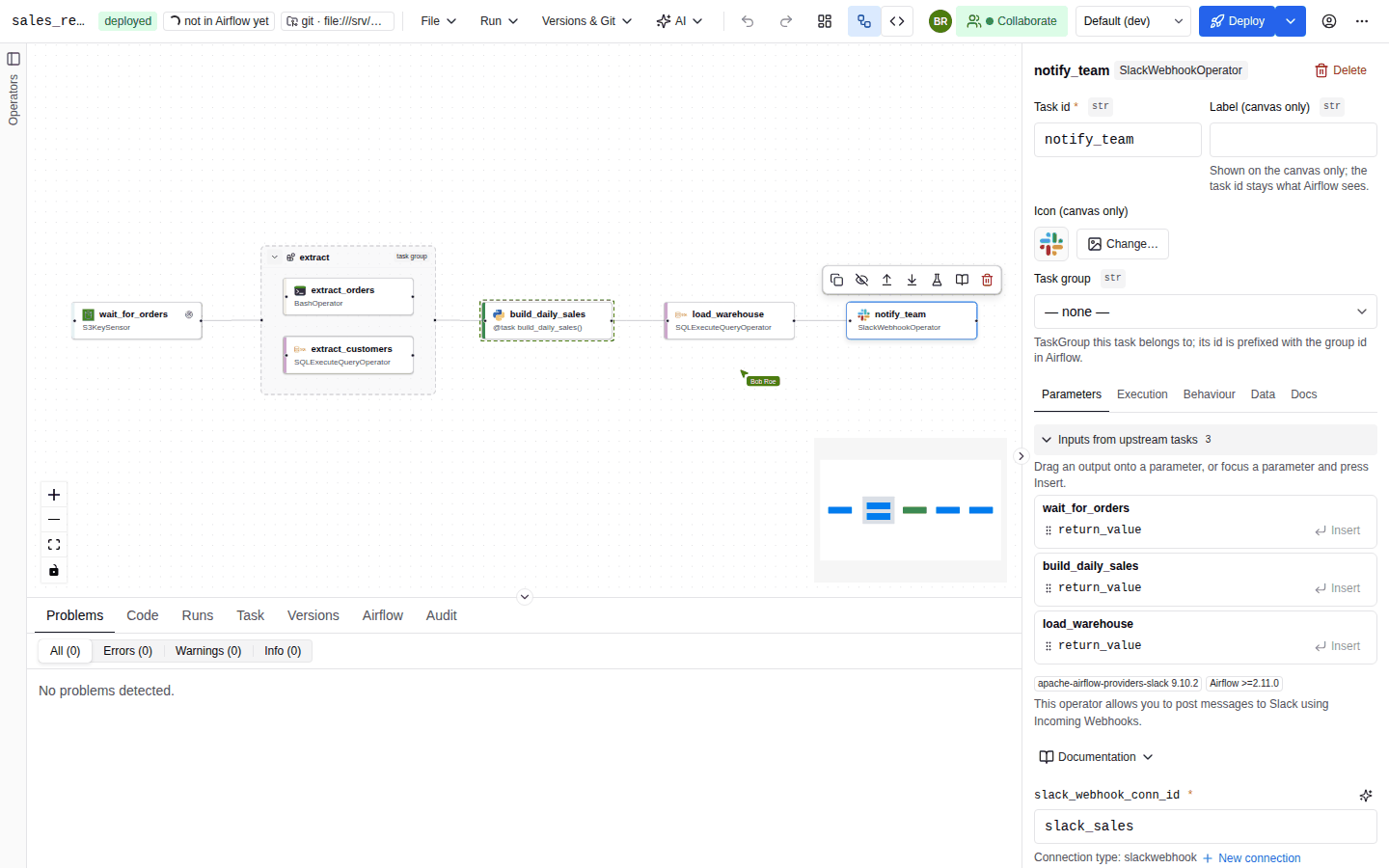
Several people can edit the same DAG at once. Each editor sees the others' avatars, mouse cursors and selected nodes, and every change to tasks, edges and DAG settings shows up in the other editors' browsers within moments. Collaboration only covers editing. Deploying still goes through the normal deploy path with optimistic locking, and the stored spec stays the source of truth.
Requirements
| Requirement | Detail |
|---|---|
| Python extra | pip install 'autoair[collab]' installs pycrdt and pycrdt-websocket. autoair[all] includes it. Without the extra the WebSocket endpoint is not mounted and the toolbar control is hidden. |
| Feature flag | AUTOAIR_FEATURES__COLLAB (features.collab, default true). |
| Permission | spec:write in AutoAir, plus Airflow edit access to that DAG. Of the built-in roles, only Author, Deployer and Admin hold spec:write. See IAM. |
GET /api/meta reports collab_enabled, which is true only when the feature is on and pycrdt can be imported. The admin panel's Overview tab shows the effective Co-editing sync mode (off, memory, database or redis).
There is no read-only watch mode. A user without spec:write, such as a Viewer, Reviewer or Operator, does not see the Collaborate control and cannot get a ticket.
Start and leave a session
Sessions never start on their own. Each editor joins explicitly:
- Open the DAG in the editor.
- Click Collaborate in the toolbar, between the editor-mode toggle and the environment selector. A popover titled Live collaboration opens.
- Optionally, type a display name in Your name (up to 40 characters). The browser remembers it (
localStoragekeyautoair.collab.name). The default is a randomUser-xxxx. Changing the name later updates it for everyone straight away. - Click the green Collaborate button in the popover.
A coloured dot on the toolbar button shows the connection state:
| Dot | Popover text | Meaning |
|---|---|---|
| Orange | Connecting… | Getting a ticket, opening the WebSocket, or reconnecting after a drop. |
| Green | Live — N other editor(s), or Nobody else is here yet | Connected and synchronised. |
| Red | The server's error message, or Cannot connect to the collaboration server | The ticket request failed (for example 403 without edit permission, or 404 when collaboration is disabled), or the first connection failed. |
Click Leave session to stop. A session also ends when you open a different DAG or leave the editor. Leaving is not remembered: you have to click Collaborate again the next time you open the DAG.
What happens when you join
- Empty room: if nobody is editing the DAG yet, your browser seeds the room with your current canvas, including any unsaved changes.
- Room in use: if others are already editing, the room's state replaces your local canvas. Before you join a busy room, deploy or copy any local changes you want to keep.
Changes are only shared after the first synchronisation with the room. Edits you make while the status is still Connecting… on the first join stay local.
Presence
| Element | Behaviour |
|---|---|
| Avatars | Up to five peer avatars appear next to the Collaborate button, then a +N badge. Each avatar is a circle in the peer's colour showing up to two initials (for example "Alice Doe" becomes AD). Hover an avatar to see the full name. |
| Colours | One of eight colours, assigned per connection. The same person can get a different colour after reconnecting or in a second tab. |
| Cursors | Each peer's mouse pointer is drawn on your canvas in their colour, with a name label. Positions are in canvas coordinates, so they stay correct when the two of you have panned or zoomed differently. A cursor disappears when its owner's mouse leaves the canvas. Updates are throttled to one every 50 ms. |
| Selections | Each node a peer has selected, including the task open in their inspector, gets a dashed border in that peer's colour. |
What is shared
The session shares one document per DAG:
| Shared | Not shared |
|---|---|
| Nodes: task id, type, position, group membership, every parameter set in the inspector, style | Which nodes you have selected, and which task your inspector shows (peers see your selection only as a highlight) |
| Edges and their labels | Measured node sizes and other view state (zoom, pan, open panels) |
| DAG settings: schedule, params, defaults, tags, documentation and every other DAG-level field | The text you are typing in code mode. Only when you click Apply to canvas does the resulting change reach the others. |
| The saved state after a deploy: DAG id, new version (ETag) and an open pull request URL | Local drafts kept in your browser |
Conflict resolution is last writer wins per node, per edge and for the DAG settings as a whole. Values are not merged inside a node. If two people edit the same task at the same moment, both browsers end up with one of the two versions, not a mix. If you edit different tasks, you never interfere with each other. Any change from a peer marks your document as having unsaved changes.
Undo and redo
While a session is active, Undo and Redo (toolbar buttons and Ctrl/Cmd+Z, Ctrl/Cmd+Shift+Z; see Keyboard shortcuts) only revert your own changes in this tab:
- A collaborator's edits never enter your undo history. If you delete a task and a peer renames another one, your undo restores the deleted task and keeps their rename.
- Edits made within 400 ms of each other are grouped into one undo step.
- Undo history is per tab. Your edits from another tab or another browser are separate.
Without a session, the editor's normal undo history applies (see Canvas).
Deploying during a session
Any participant with deploy rights can deploy. The deploy writes the shared document as it stands at that moment and runs the usual validation, governance context and approvals:
- After the deploy, the deploying browser publishes the new saved version (DAG id, ETag and, in git PR mode, the pull request URL) to the room.
- Every other participant adopts that version as their new base, so their next deploy does not hit a false conflict.
- A deploy from outside the session, such as another user who did not join, an API call or MCP, still moves the stored version. The next deploy from the session then gets the normal conflict dialog with a three-way merge.
Tickets and security
The browser never puts an Airflow token in the WebSocket URL:
- The browser calls
POST /api/collab/{dag_id}/ticketwith its normal credentials. The server checks Airflow edit access to the DAG andspec:write, then returns{"ticket": "...", "expires_in": 600}. - The browser opens
wss://<host>/collab/<dag_id>?ticket=...in standalone mode, or/autoair/collab/<dag_id>?ticket=...inside Airflow. - The server verifies the ticket's HMAC signature, that it was issued for this DAG and that it has not expired. A missing, forged, expired or wrong-DAG ticket closes the handshake with HTTP 403.
A ticket is only checked when the connection opens, so an established session survives the ticket's expiry. The browser fetches a fresh ticket every 4 minutes so it can reconnect at any time.
| Setting | Default | Description |
|---|---|---|
AUTOAIR_COLLAB_TICKET_TTL | 600 | Seconds a ticket is valid (10 to 86400). |
AUTOAIR_COLLAB_SECRET | unset | HMAC key for tickets. |
AUTOAIR_COLLAB_MAX_ROOMS | 500 | Live rooms (one per DAG being edited) per process. When the limit is reached, opening a new room is refused (HTTP 403, logged as collab: room limit reached). Rooms that are already open can still be joined. |
When AUTOAIR_COLLAB_SECRET is unset, the key is taken from the first of these that exists:
- A key derived from Airflow's
[api_auth] jwt_secret, so all Airflow API server replicas agree. - A key created once and stored in the SQL database, or in
<state>/collab.key(mode 0600) with the file backend. - A random per-process key, logged as a warning. In that case a ticket from one process is rejected by another.
Connection loss
The WebSocket reconnects on its own, with backoff capped at 10 seconds, and the status dot turns orange while it does. Edits you make while disconnected stay in your browser's copy of the document and are exchanged when the connection returns. Nothing is persisted across a page reload: if you reload during an outage, edits that were not yet shared or deployed are lost, except what the editor keeps as a local draft.
When the last editor leaves, the room is discarded on a single-process server. The next session starts from the stored spec. With shared sync (below), a room changed within collab.snapshot_ttl_seconds is restored from its snapshot.
Several workers or replicas
A room has to be visible to every participant's connection. With more than one worker or replica, pick one of these:
AUTOAIR_COLLAB__SYNC | How rooms are shared | Requirements |
|---|---|---|
memory | One process holds each room. | Sticky routing of /collab/<dag_id> per DAG, so all editors of a DAG reach the same process. |
database | Updates go through the SQL database: PostgreSQL LISTEN/NOTIFY, or SQLite polling every collab.poll_seconds. A replica opening a room asks the others for its state and waits up to collab.join_timeout. Changed rooms are snapshotted every collab.snapshot_seconds. | database.backend is postgresql (or sqlite on one host). |
redis | Updates go through Redis pub/sub on collab.redis_channel. | AUTOAIR_COLLAB__REDIS_URL and pip install 'autoair[collab-redis]'. |
auto (default) | redis if redis_url is set, else database with a SQL backend, else memory. |
Setting sync=redis without a URL, or sync=database without a SQL backend, is a startup error. Multi-replica standalone deployments should also set AUTOAIR_COLLAB_SECRET explicitly. For the full inventory of shared state, see Scaling, and for every collab.* option see the configuration reference.
Troubleshooting
| Symptom | Cause and fix |
|---|---|
| No Collaborate button | One of these: the feature is off, pycrdt is not installed (autoair[collab]), or you lack spec:write. |
| Red dot with a 403 message | You lack Airflow edit access to this DAG or spec:write, or the room limit is reached. |
| Red dot with "collaboration is disabled" | features.collab is false, or pycrdt is missing on the server. |
| Two people "connected" but not seeing each other | Their connections reached different processes with collab.sync=memory. Configure sticky sessions, or database/redis sync. |
| Reconnects fail after a restart or on another replica | The ticket key differs between processes. Set AUTOAIR_COLLAB_SECRET, or use a SQL database backend so the key is shared. |