Deploy
Deploying validates the DAG, generates the DAG file and writes it to the deploy target that Airflow reads from. Each deploy also records a new version. Depending on the target, a deploy is a file write, an object upload, a commit pushed to a branch, or a pull request that goes live once it is merged.
Deploy targets
The administrator chooses one deploy target per installation. With multi-team setups there can also be one per team.
| Target | AUTOAIR_STORAGE__MODE | Use with | When a deploy is live |
|---|---|---|---|
| Local folder | local (default) | A LocalDagBundle or a DAG folder on a shared volume | Right away. AutoAir asks Airflow to reparse the file. |
| Object storage | object | S3DagBundle, GCSDagBundle, or any fsspec URL (AUTOAIR_STORAGE__OBJECT_URL) | On Airflow's next bundle refresh. |
| Git | git | GitDagBundle or a git-sync sidecar | Push mode: after the next sync of the branch. PR mode: when the pull request is merged. |
Git targets support these hosts (AUTOAIR_STORAGE__GIT__PROVIDER): github, gitlab, bitbucket, azure (Azure DevOps), gitea (Gitea/Forgejo) and local (the git CLI against any remote). Credentials always come from an Airflow connection or the server settings. AutoAir never stores tokens it is given through the UI.
AUTOAIR_STORAGE__ALLOWED_TARGETS (default ["local", "git", "object"]) restricts which kinds can be chosen at all. For the server-side configuration, see Git bundles, Object storage and the configuration reference.
When the deploy target cannot be built
If the configured target cannot be set up when the server starts (for example the git provider's Airflow connection is missing, the token is rejected or the bundle configuration is unreachable), AutoAir still starts in a degraded state instead of exiting. The log says deploy target (storage.mode=…) unavailable, starting degraded: <reason>, and then:
- reads from the target are empty, so File → Open… lists no stored DAGs;
- deploys and deletes fail with
the <kind> deploy target is unavailable: <reason> (AutoAir retries building it on the next deploy); - the Current card of Versions & Git → Deploy target… shows the location
(unavailable), a read-only badge and the reason in red; GET /api/readyanswers HTTP 503 with"storage": "error: <reason>"inchecks(unlessAUTOAIR_SERVER__READY_CHECK_STORAGE=false), so a readiness probe on it keeps the instance out of rotation until the target works;GET /api/healthstill answers 200.
AutoAir retries building the target on reads at most every 10 seconds (including /api/ready) and on every deploy, so fixing the connection or credentials is enough; a restart is not needed. Team targets in AUTOAIR_TEAM_STORAGE behave the same way. See the FAQ for common causes.
Choose the target in the UI
Administrators with admin:deploy_target can set the target without a restart:
- Open Versions & Git → Deploy target…, or click the storage chip in the toolbar. The chip turns yellow with the warning "Airflow reads DAGs from git but deploys go to local files — set up the deploy target" when Airflow reads from git but AutoAir still writes locally.
- The Current card shows the active target, its mode (Push to branch or Pull requests), where it came from (set here or server settings) and whether it is writable.
- Under Options found in this Airflow, pick one of:
- DAG folder (local files).
- A
GitDagBundlefrom[dag_processor] dag_bundle_config_list: "Airflow reads DAGs from this repository (GitDagBundle). Deploy here so they go live." - Git repository of the DAG folder, when the DAG folder is a git checkout such as git-sync: "files written locally are overwritten; deploy to its repository."
- For git, set the mode (Pull requests or Push to branch), Git hosting, Repository, Branch Airflow reads, Folder in the repository and Credentials (Airflow connection). When the administrator set
storage.git.forced_conn_id, the connection is fixed and read-only. - Click Test, then Save & use.
The choice is stored in deploy-target.json in AutoAir's state store and overrides the server's storage and storage.git settings. Back to server settings removes it. With a SQL database backend, other replicas pick up the change within database.sync_seconds.
Deploy a DAG
There are two ways to deploy:
| How | What happens |
|---|---|
| The toolbar Deploy button, or Ctrl/Cmd+S | Deploys at once to the default environment, with no message. The commit or version message comes from storage.git.commit_message_template (default AutoAir: update DAG {dag_id}). |
| The chevron next to Deploy (More deploy options) → Deploy…, or the command palette entry Deploy with message… | Opens the deploy dialog. |
The toolbar button does not deploy when the canvas has errors. Instead it opens the Problems panel, and its tooltip reads "Fix N problems to deploy (click to see them)". The button is disabled for an empty DAG ("Add at least one task to deploy") and when you lack the permission.
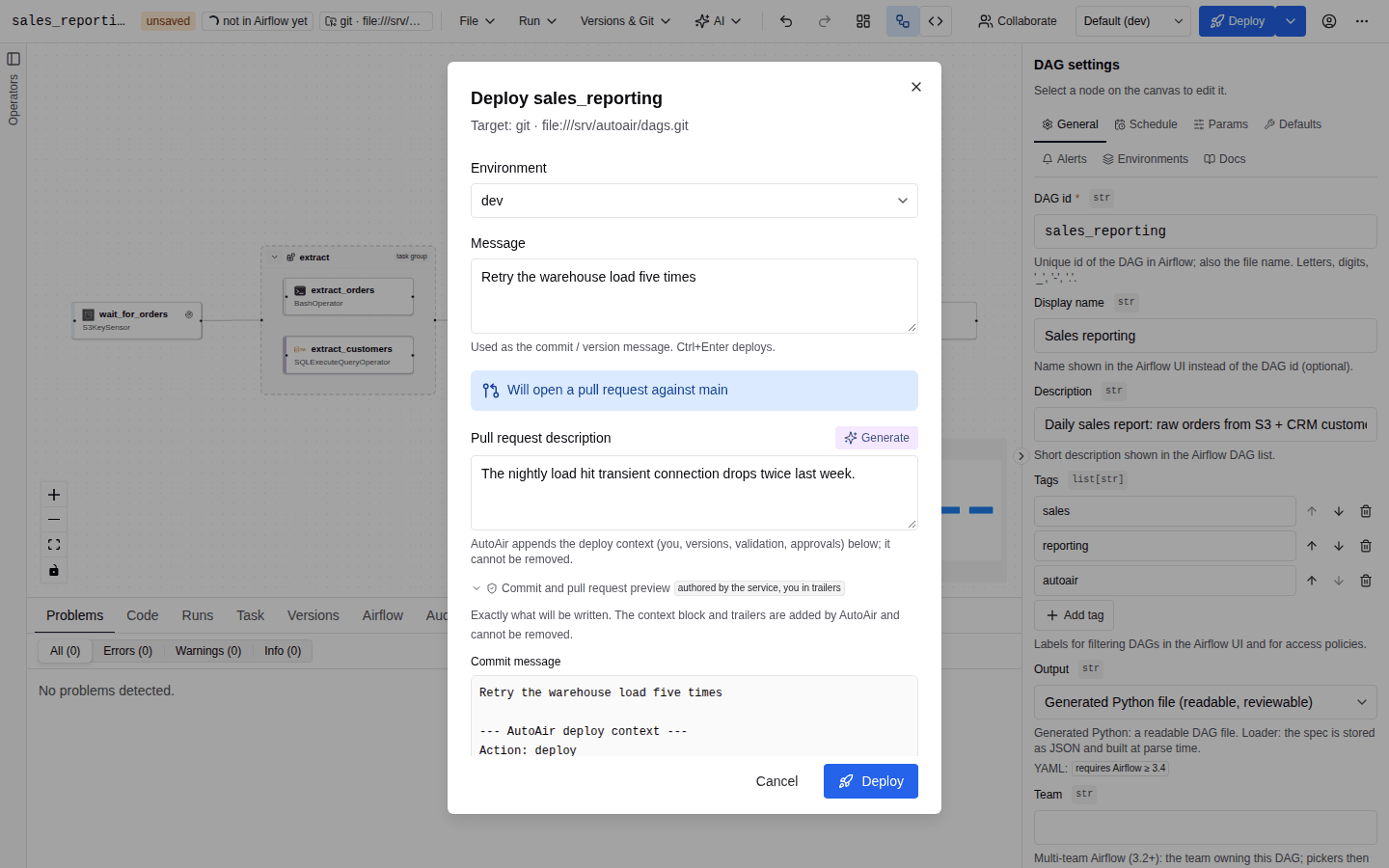
The deploy dialog
The Deploy <dag_id> dialog shows the target as "Target: <kind> · <location>" and has these fields:
| Field | Description |
|---|---|
| Environment | Default (<env>) or one of the configured environments. The environment's overlay is applied, and on git the environment's branch is used. See Environments. Without environments the dialog reads "No environments are configured; the base spec is deployed." |
| Message | The commit or version message. The first line is the subject. It is prefilled with a summary of your changes against the deployed version, such as "Add DAG etl_daily" or "Update etl_daily: add load, change extract, update DAG settings". Only tasks whose settings really differ are listed as changed: canvas positions, the order of fields and empty (unset) values are ignored. Ctrl+Enter deploys. A message is optional (up to 20,000 characters). |
| Effect line | Exactly what will happen: "Will open a pull request against <branch>", "Will push to <branch>" or "Will write to <location>". With four-eyes approvals it adds "Going live needs an approval of this version by another reviewer." |
| Push directly (skip the pull request) | Shown only in git PR mode, and only to users allowed to push directly. "Commits straight to the branch Airflow reads. Allowed for your role only." |
| Pull request description | Shown only when the deploy opens a pull request. Context for reviewers (up to 60,000 characters). AutoAir appends the deploy context below it, and that part cannot be removed. |
| Generate | Writes the PR description from your changes. See AI-generated deploy message. |
| Your git connection | Only with per-user git credentials. See Per-user git credentials. |
| Commit and pull request preview | A collapsible, live preview of the exact commit message and pull request, including the context block and trailers. It is marked authored as you or authored by the service, you in trailers. |
Click Deploy. While the deploy runs, the toast reads "Deploying <dag_id>…". The result is one of:
| Toast | Meaning |
|---|---|
| Deployed | Written live. The message says how Airflow picks it up: "reparse requested" (local), or "Airflow will pick it up on the next bundle refresh" (object, git push, or a local deploy whose reparse request Airflow refused; the message then quotes Airflow's answer, for example a 403 when the user may not edit the DAG or, on Airflow 3.4, may not reparse a file that has no registered DAG). |
| Pull request opened | The message contains the pull request URL ("review and merge … to release it"). |
| Not deployed | Nothing was written. The server message explains why: validation failed (status invalid); the version was stored as a deploy proposal, or is already proposed, and awaits approval (pending_approval, see Reviews and approvals); or a conflict that the merge dialog cannot show, such as a create-only deploy of a DAG id that already exists (conflict). |
| Deploy failed | A storage or network error, for example the git host refused the push. |
If you renamed the DAG id since the last deploy, the old DAG is deleted after the new one is written. A failure there shows "The previous DAG <id> could not be removed".
Pull request or direct push
On git targets the target's mode decides the default. The Push directly checkbox and the permissions decide the rest:
| Target mode | Your choice | Result | Permissions |
|---|---|---|---|
pr | (default) | Commit to the branch autoair/<dag_id> (storage.git.branch_template) and open or update a pull request | spec:write |
pr | Push directly | Commit to the branch Airflow reads | spec:write, deploy, deploy:direct_push |
push | (default) | Commit to the branch Airflow reads. With AUTOAIR_IAM__FORCE_PR_WITHOUT_DIRECT_PUSH=true, users without deploy:direct_push get a pull request instead. | spec:write, deploy |
| local / object | any | Written live | spec:write, deploy |
deploy:direct_push belongs to no built-in role. It is granted to the roles in AUTOAIR_IAM__DIRECT_PUSH_ROLES (default ["Admin"]), which a git target can override with storage.git.direct_push_roles ([] means nobody). Asking to push directly without the permission is refused with HTTP 403 ("pushing directly needs the AutoAir permission 'deploy:direct_push'") and audited. It is never silently downgraded to a pull request.
An Author holds spec:write but not deploy. Authors can therefore propose changes through pull requests, but cannot make a deploy go live on local, object or push-mode targets. See IAM for all roles.
Pull request options are server settings: storage.git.pr_labels, storage.git.pr_reviewers, storage.git.pr_draft, storage.git.delete_branch_after_merge, storage.git.pr_title_template and storage.git.pr_body_template (see the configuration reference). While a pull request is open, the toolbar shows PR open, and further deploys update the same branch and pull request.
Governance context and trailers
Every commit, pull request and stored version records who deployed what and what was checked. AutoAir appends a mandatory context block to your message. You cannot remove it, and the preview shows it before you deploy:
Add retries to the load step

--- AutoAir deploy context ---
Action: deploy
DAG: etl_daily (environment prod)
User: alice (Alice Smith <alice@acme.io>)
Spec version: 1a2b3c4d5e6f -> 9f8e7d6c5b4a
Validation: passed (0 errors, 2 warnings, 0 infos, import check ok)
Approved by: bob
Target: github:acme/dags@main (pr)
AutoAir: 0.9.0
Link: https://autoair.acme.io/ui/?dag=etl_daily

X-AutoAir-User: alice
X-AutoAir-Dag: etl_daily
X-AutoAir-Spec-Etag: 9f8e7d6c5b4a...
Approved-by: bob
- The block lists the action (
deploy,deleteorpromote), DAG and environment, the user with display name and e-mail, the spec version before and after, the validation summary, approvers and reviewers, the target, the AutoAir version, and a link back to the DAG. The link only appears whenAUTOAIR_SERVER__PUBLIC_URLis set. - The last paragraph holds git trailers:
X-AutoAir-User,X-AutoAir-User-Name,X-AutoAir-Dag,X-AutoAir-Environment,X-AutoAir-Spec-Etag,X-AutoAir-Base-Etag,X-AutoAir-Validation,X-AutoAir-Version, oneApproved-byper approver, andCo-authored-bywhen the service identity authors the commit.git log --format='%(trailers:key=X-AutoAir-User)'lists who deployed each commit. - Values you type are reduced to one line inside the context, so a message cannot forge trailers.
- The pull request body is
storage.git.pr_body_template(your message, your PR description, then "Opened by AutoAir."), with the context block appended. The PR description is not written into the commit message. - On local and object targets the same text is stored as the version message.
- The same context goes into the audit trail.
Who authors the commit is set by storage.git.commit_author: auto (the default: you with per-user credentials, otherwise the service identity), service or user. GitHub's API always commits as the token owner and credits you with Co-authored-by.
The preview comes from POST /api/specs/{dag_id}/deploy-preview. It runs static validation only and writes nothing.
Per-user git credentials
With AUTOAIR_STORAGE__GIT__CREDENTIALS_MODE=per_user, commits and pull requests use your own Airflow connection, by default git_<username> (storage.git.user_conn_id_template). The deploy dialog then shows Your git connection, as a choice if user_conn_id_pattern allows several. AutoAir reads the connection with your Airflow token, so Airflow's RBAC decides whether you may use it. Possible messages:
- "Airflow connection … does not exist or you may not read it: ask an Airflow admin to create it." The deploy is refused (403).
- "No connection … for you: the shared service credentials are used." This appears only with
user_credentials_fallback=true.
Your own git token
On a git target, the deploy dialog can take a token you type for this one deploy
(storage.git.request_token, set by your administrator):
- optional (the default): tick Use my own token to show the Git token field. The token replaces the configured credentials for this deploy only.
- required: the field is always shown and the deploy is refused while it is empty. Ctrl/⌘+S then opens the deploy dialog instead of deploying straight away. The same field appears when you promote an environment, delete a DAG, retry after a conflict or deploy a bulk import.
- off: no field.
The field is masked; the eye button (Show token / Hide token) toggles visibility. Below
it AutoAir says what to create on your git host, for example a GitHub fine-grained personal
access token with contents:write and pull_requests:write, a GitLab token with api, or a
Gitea token with write:repository.
AutoAir sends the token only in the X-AutoAir-Git-Token header of that request (over HTTPS),
never stores or logs it, and forgets it right after the deploy: type it again every time. The
browser keeps it only in the open dialog (no drafts, no local storage, no URL). If the git host
rejects it, you see "The git host rejected your token": check that it has not expired and has
the scopes shown; AutoAir does not retry with other credentials. When your administrator forces
a git connection, tokens are not accepted. The audit trail records credential: request-token
and, when the host tells it, the token owner's login.
Validation and the import check
Every deploy is validated on the server, whatever the UI showed:
- Spec validation, policy, operator template locks and code generation. Any error stops the deploy:
status: "invalid", "validation failed; nothing was written". The Problems panel then shows the server's findings. - The import check (
AUTOAIR_IMPORT_CHECK_ON_DEPLOY, defaulttrue) imports the generated file in a sandboxed DagBag, with a timeout ofAUTOAIR_IMPORT_CHECK_TIMEOUT(60 s). This executes DAG code. WithAUTOAIR_IAM__IMPORT_CHECK_REQUIRES_CODE_EXECUTE=true(the default), it runs only for users who holdcode:execute. Other users get the info problemimport_check_skipped, and their deploy is validated statically only.
To run the import check without deploying, use Run → Validate in Airflow. See Validation.
Conflicts and hand-edited files
A deploy carries the version you started from. If someone else deployed in between, nothing is written, and the Someone else changed this DAG dialog offers a three-way merge, Overwrite with mine, or loading the merge without deploying. If the DAG file was changed outside AutoAir ("ejected"), the deploy stops with The DAG file was changed outside AutoAir and offers to apply your change to that file; see Editing existing Python DAGs. AutoAir never overwrites a file it did not create. All three cases are covered in Versions and diff.
Deploy status in Airflow
After a deploy, the toolbar chip follows the DAG in Airflow:
| Chip | Meaning |
|---|---|
| not in Airflow yet | Waiting for Airflow to parse the file. On git this happens after the next sync, or after the merge. Polled every 5 s. |
| paused / active | Airflow has the DAG. Click to pause or unpause (needs run:manage). Unpausing asks for confirmation, because the scheduler starts creating runs and may catch up missed intervals. Polled every 30 s. |
The Airflow tab in the bottom panel shows parsed by Airflow or waiting for the DAG processor…, the last parse time, the file location, the latest runs, the DAG bundles and, if the file failed to import, Import error in <file> with the stack trace. Status is polled every 5 s and import errors every 10 s. To trigger and watch runs, see Runs.
AI-generated deploy message
When a deploy opens a pull request and AI is available (features.ai on, and you hold ai:use), a purple Generate button appears next to Pull request description ("Write the description from the changes since the deployed version").
- It calls
POST /api/ai/deploy-messagewith the current spec and environment. The server diffs it against the deployed version and sends only the diff summary to the model, or a compact spec for a new DAG, never the full DAG file. - It fills the Pull request description and shows the suggested subject as "Subject: …". The Message field is not changed.
- Without a configured model it still works: a deterministic summary ("Update etl_daily: …" with a "## Changes" list) is generated from the diff.
- On failure, a toast reads "Could not generate a description".
See AI assistance for models and guardrails.
Delete a DAG
File → Delete DAG (needs spec:delete, shown once the DAG is saved) asks "Delete <dag_id> from storage and the DAG folder?". On a git target that takes your own token, a Delete <dag_id> dialog asks for it instead. It removes the spec and generated files from the target. On git the delete is a commit with Action: delete in its context, and in PR mode it opens a pull request. AutoAir refuses to delete files it did not create (HTTP 409). Deletes are audited.
Permissions and API
| Action | Permission |
|---|---|
| Deploy that opens a pull request | spec:write + Airflow edit access to the DAG |
| Deploy that goes live (local, object, push, direct push) | spec:write + deploy |
| Push directly in PR mode | + deploy:direct_push |
| Delete | spec:delete |
| Change the deploy target | admin:deploy_target |
| Import check during deploy | code:execute (unless iam.import_check_requires_code_execute=false) |
features.deploy (AUTOAIR_FEATURES__DEPLOY) switches deploying, deleting and promotion off entirely.
| Method and path | Purpose |
|---|---|
PUT /api/specs/{dag_id} | Deploy. Body: spec, base_etag, environment, message, pr_description, direct_push, force, git_conn_id, source_resolution. |
POST /api/specs/{dag_id}/source-preview | What the deploy writes as the DAG file (source policy, diff); see Editing existing Python DAGs. |
POST /api/specs/{dag_id}/deploy-preview | Commit and PR preview |
DELETE /api/specs/{dag_id} | Delete |
GET /api/deploy-target, PUT, DELETE, POST /api/deploy-target/test | Deploy target |
GET /api/deploy-target/git-credentials | Which connection your deploys use |
POST /api/ai/deploy-message | Generated description |
See the REST API reference.