Operators and parameters
AutoAir does not ship a fixed list of operators. It builds an operator catalog from the Airflow providers and operator libraries installed next to it, and generates a parameter form for each operator from its constructor signature and docstring.
Operator catalog
What is discovered
At startup the server scans, without importing them by default:
- every installed Airflow provider package. With
scan_provider_packageson (default), every module of a provider is scanned, not only the ones declared in itsprovider.yaml, which also finds third-party and undeclared operators; - the operator libraries you add with
extra_operator_modules,extra_operator_packages,extra_operator_distributionsandextra_operator_paths; - custom operator folders in
custom_operator_pathsand, withdiscover_airflow_folderson (default), Airflow'splugins_folderanddags_folder; - notifiers (used by callbacks and deadline alerts), TaskFlow decorators and connection types.
Classes become palette items when they look like operators, sensors or notifiers. Internal TaskFlow implementation classes, tests, examples and vendored code are skipped (see the discovery settings).
catalog_strategy chooses how classes are read: static (default) parses provider source code without importing it; import imports and inspects the classes. Building the catalog can take time with many providers installed; autoair catalog build -o autoair-catalog.json precomputes it (for example in a Docker build) and AUTOAIR_CATALOG_FILE points the server at the file. The catalog is cached in cache_dir. Users with the catalog:refresh permission can rebuild it through POST /api/catalog/refresh.
Administrators narrow what users see with fnmatch patterns over class paths:
AUTOAIR_OPERATOR_ALLOW='["airflow.providers.standard.*", "airflow.providers.amazon.*", "acme_ops.*"]'
AUTOAIR_OPERATOR_DENY='["*.DockerOperator"]'
AUTOAIR_EXTRA_OPERATOR_PACKAGES='["acme_ops"]'
An operator that is not in the catalog or not allowed is reported by validation as operator '…' is not in the catalog / allowlist. forbidden_operators and the privileged-operator policy are enforced separately by validation; see Policy.
Adding your own operators is described in Custom operators and Catalog sources.
Palette entries
Each operator is listed under its provider with its class name and summary. It is categorised as an operator, a sensor or a transfer, which the palette tabs filter on. Deprecated operators carry a deprecated badge. An operator the builder cannot configure is listed but disabled, with the reason in its tooltip.
Operators that take Python objects (parameters typed as a callable or a class, such as python_callable or producer_function) can be inserted; those parameters are given as Python references. When the server forbids Python code (allow_python_code off), they are disabled with Needs Python code permission on the server (allow_python_code) for …. For the standard provider's callable operators, the hint names the equivalent TaskFlow node; see TaskFlow and loops.
The Parameters tab
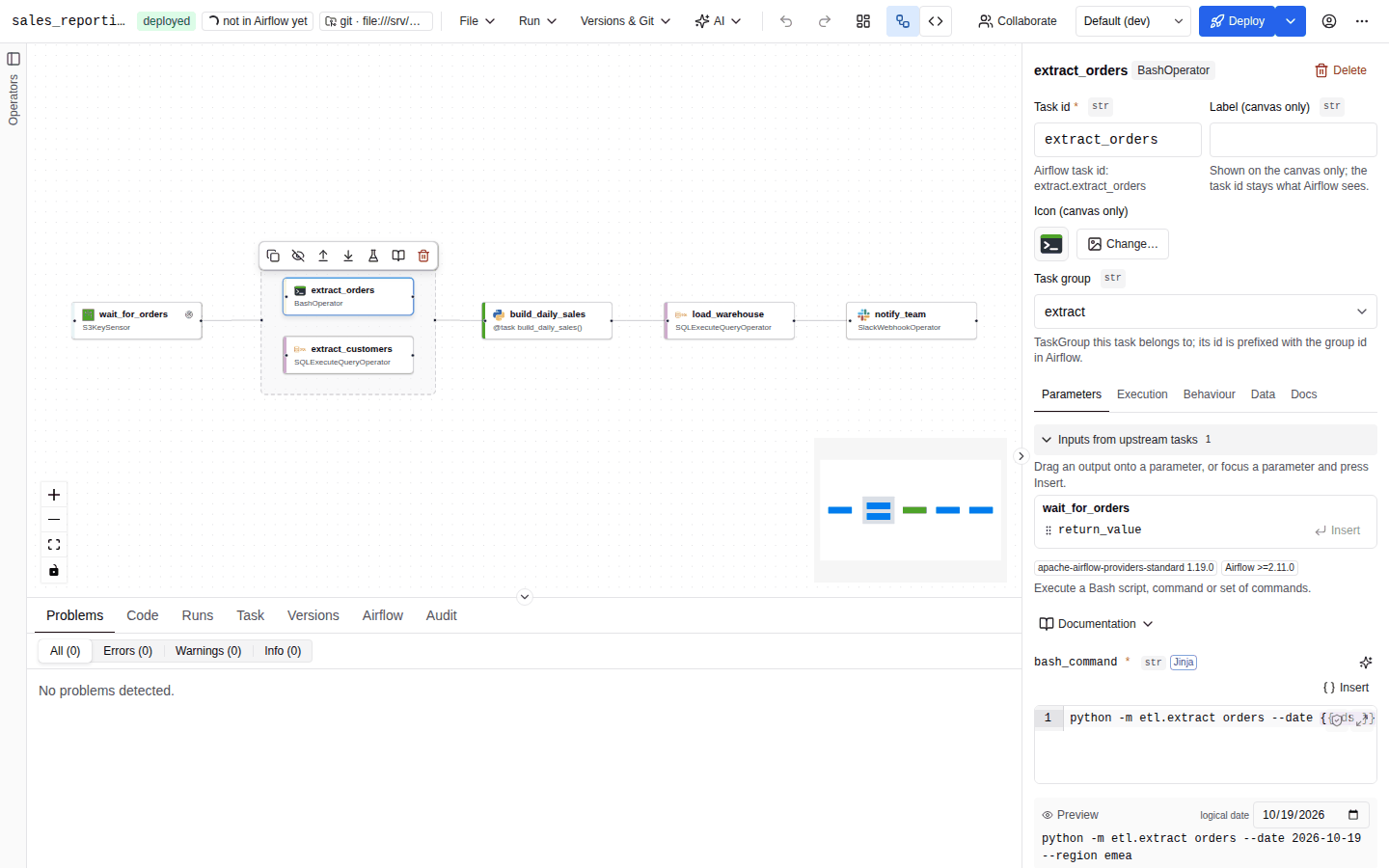
When you select an operator task, the Parameters tab shows, from top to bottom:
- Inputs from upstream tasks: the outputs of upstream tasks, ready to drag onto a parameter. See XCom references.
- Header badges: the provider and its version, sensor, human-in-the-loop, deprecated, and Airflow X.Y when the provider requires a minimum Airflow version. The operator summary follows.
- Documentation: expands the operator's docstring. The same documentation is in the Docs tab and behind the book icon in the node toolbar.
- The human-in-the-loop editor for HITL operators. See Human-in-the-loop.
- The parameter form.
- Raw parameters (JSON): the operator's
paramsobject as JSON, for values the form cannot express. It accepts tagged values such as{"$type": "xcom", "node": "…"}.
Field order and visibility
- Required parameters come first and are always shown, marked with a red
*. - Up to four featured optional parameters are shown without expanding: connection fields, code fields (templated fields with a renderer from the operator's
template_fields_renderers, or whose name ends inbash,sql,py,json,yamlormd) and the first templated fields. They are what makes, for example,SparkSubmitOperatororHttpOperatorusable without opening anything. - Any optional parameter that has a value is shown. A parameter you start filling in under N more parameters stays there while you edit it (it does not jump into the main list after the first character), and clearing a shown parameter does not hide it either. The list is regrouped the next time the task is opened.
- The rest are behind N more parameters. With more than six of them, a Filter parameters… box searches names and descriptions.
- Sensors get a Sensor section with the
BaseSensorOperatorparameters:mode,poke_interval,timeout,soft_fail,exponential_backoff,max_wait,silent_fail,never_fail.pokekeeps a worker slot while waiting;reschedulereleases it between checks. - Operators with a
deferrableargument get a Deferrable (run in the triggerer) switch at the top. Deferrable tasks free their worker slot while waiting and need a running triggerer. Ifdeferrableholds a template, the switch shows only the literal state and a warning explains it.
Settings that belong to every task are not parameters: they live in the Execution, Behaviour and Data tabs. Putting one of these names in raw params is reported as 'retries' is set via the task settings, not operator params: task_id, retries, retry_delay, execution_timeout, pool, pool_slots, queue, owner, doc_md, outlets, inlets, trigger_rule, task_group, dag, retry_policy, priority_weight, weight_rule, executor, executor_config, on_success_callback, on_failure_callback, on_retry_callback, on_execute_callback and on_skipped_callback.
Type badges
Every parameter shows its Python type next to its name, in a small grey monospace badge:
| Badge | Source |
|---|---|
The parameter's annotation, for example timedelta, str | list[str], dict[str, Any] | Taken from the operator's signature when the catalog has it. |
str, int, float, bool, dict, list | Derived from the JSON schema type when there is no annotation. |
list[str] and other list[…] | Arrays with a known item type. |
datetime | Strings with the date-time format. |
Literal | Parameters with a fixed set of allowed values (rendered as a drop-down). |
A | B | Unions. |
None and Airflow's "argument not set" sentinels are left out of the badge: whether a value is needed is shown by the red * instead. Settings fields elsewhere in the inspector use the same badges (str, int, float), and the human-in-the-loop response timeout shows timedelta (s).
A purple Jinja badge marks templated fields (the operator's template_fields): their value is rendered with Jinja at runtime. See Jinja templates.
Input widgets
| Parameter | Widget |
|---|---|
| Text | Single-line input; templated text fields are Jinja-aware editors with completion and preview. |
| Code (SQL, bash, Python, YAML, JSON, Markdown renderers) | Full code editor with highlighting and the Validate button. See Field editors. |
| Integer, number | Number input. |
| Boolean | True / False drop-down, with the default shown as default: …. |
| Enumeration | Drop-down of the allowed values. |
Connection id (*_conn_id) | Connection picker. See Connection pickers. |
| Pool | Pool picker. |
| List of strings | One input per item. |
| Anything else (objects, unions, lists of objects) | JSON editor. For unions that accept a string, plain text is taken as a string and only text that looks like JSON is parsed. |
Defaults, required and empty values
- An unset optional parameter is omitted from the generated code, so the operator's own default applies. The default is shown as a placeholder (default: …).
- Clearing a field removes the parameter.
- When required parameters are missing, a bar reports N required parameters are not set. with Fill required with defaults. It fills each missing required parameter with its schema default,
Falsefor booleans, or the only value of a one-value enumeration. Parameters without a real default are left empty and listed (No default available for …: enter a value.): an empty placeholder would hide the problem and deploy a task that fails at runtime. - Validation reports
Required parameter "…" is not set.,Required parameter "…" is empty.and"…" is not a parameter of <Operator>.on the parameter itself.
Value sources
The small button to the right of each parameter name chooses how its value is expressed. The options depend on the parameter:
| Option | Stored as | Available for |
|---|---|---|
| Value | A literal (string, number, boolean, list, object). | Every parameter except those that only take a Python object. |
| Jinja template | A string containing {{ … }} or {% … %}. | Non-text parameters (text parameters accept templates directly). A warning appears if the parameter is not a template field: Airflow passes the text verbatim. |
| Output of upstream task | An XCom reference to an upstream task, optionally with a key. | Every parameter, once the task has upstream tasks. |
| Python reference (import) | An importable object path, package.module.name. | Every parameter. |
| Python function (write it here) | A function written in the builder and emitted into the DAG file. | Parameters that take Python callables. |
| Script file (write it here) | A script embedded in the DAG and written to a file on the worker. | Text, code and untyped parameters. |
The last three need Python code to be allowed on the server. They are described in Jinja, XCom and Python.
Locked parameters
Tasks inserted from an operator template can have locked parameters. They are shown with a lock icon, cannot be edited, and validation reports any change. See Operator templates.
Connection and pool pickers
Parameters named like *_conn_id use the connection picker:
- It lists connections from Airflow, filtered to the connection types the operator's hook accepts (shown as Connection type: … under the field), plus the hook's default connection names (for example
postgres_default), labelled default … connection. - Each suggestion shows the connection type, host and description.
- Free text is always accepted. Connections defined in environment variables or a secrets backend are not visible to the Airflow REST API, so an id missing from the list is not an error. Set
airflow_secrets_backendwhen your Airflow resolves connections from a secrets backend. - New connection opens a dialog that creates the connection in Airflow with your permissions (needs
connection:write). See Connections and Variables.
The pool picker lists Airflow pools with their slot counts; an empty value means default_pool.
Pickers need a reachable Airflow (features.airflow). In autoair local, or when Airflow cannot be reached, they fall back to free text.
Other tabs of a task
| Tab | Contents |
|---|---|
| Execution | Identity (display name, owner), Dependencies (trigger rule, depends on past, max active instances per run), Retries (retries, retry delay, exponential backoff, execution timeout), Resources & priority (pool, pool slots, queue, priority weight, weight rule, executor, executor config). Empty fields show the DAG default they inherit. |
| Behaviour | Disabled, OpenLineage, setup and teardown, callbacks and the retry policy. See Callbacks, retries and deadlines. |
| Data | Dynamic task mapping, assets produced (outlets) and consumed (inlets). See TaskFlow and loops and Scheduling and assets. |
| Docs | The task's doc_md (Markdown editor) and the operator or decorator documentation. |
The trigger rules offered in Execution are listed in TaskFlow and loops.