Marketplace
A marketplace is a signed index of DAG templates, fragments and extensions that an organisation publishes. For example, a platform team might publish one for every Airflow installation in the company. In AutoAir you browse the configured marketplaces and install entries into your template gallery. Each installed entry becomes an ordinary saved template.
To build, sign and host a marketplace, see Publishing a marketplace.
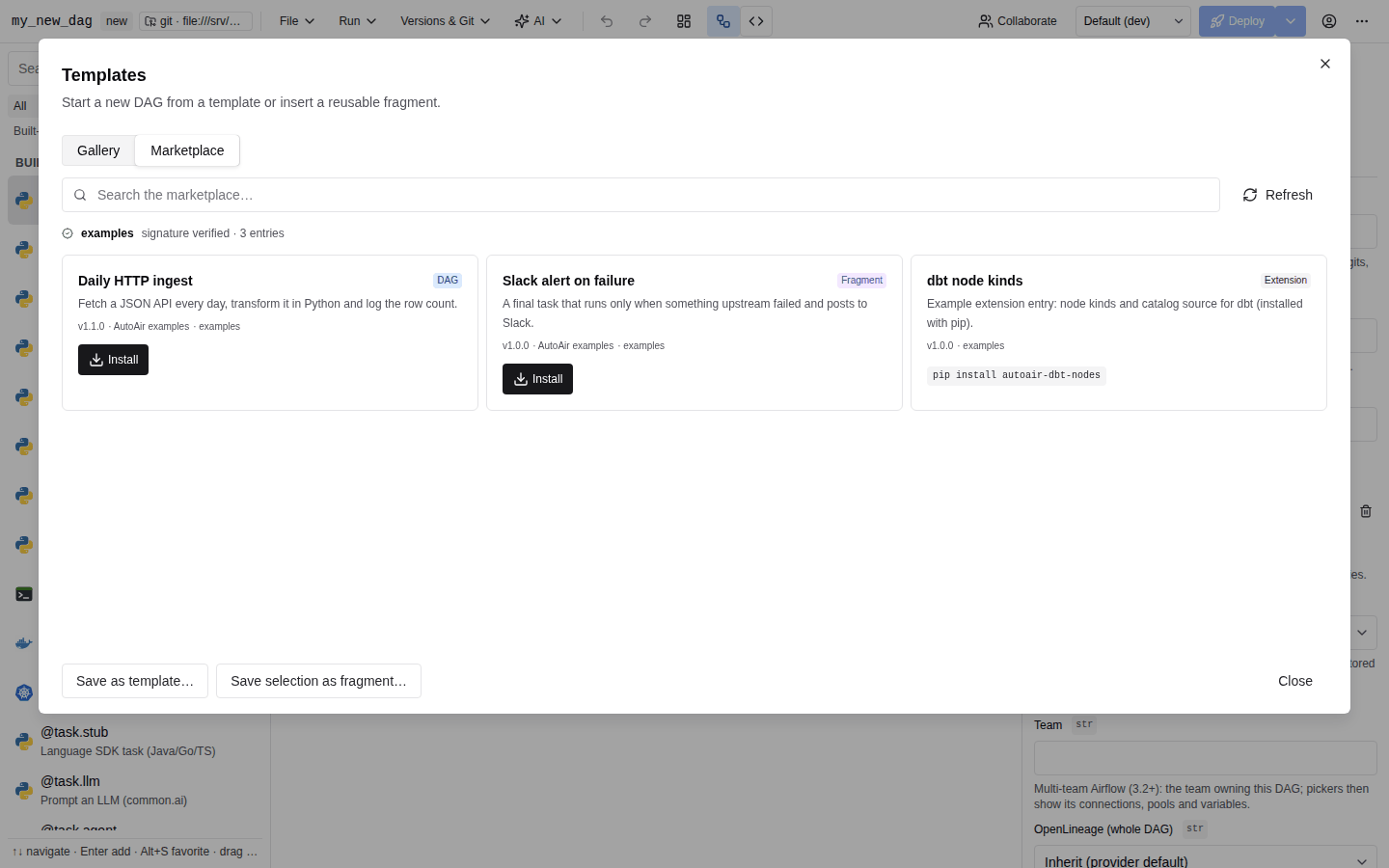
Open the marketplace
- Choose File → New from template….
- Click Marketplace at the top of the Templates dialog. The switch is hidden when
AUTOAIR_FEATURES__MARKETPLACEisfalse.
The view shows:
- Search the marketplace… and a Refresh button. Refresh fetches the indexes again instead of using the server's cached copy.
- For each source: its name and a trust badge.
- signature verified · N entries (green): the index is signed with the key the administrator pinned for that source.
- UNSIGNED · N entries (orange): the administrator explicitly allowed an unsigned index for this source (
require_signature: false). Treat its content as unreviewed. - An error line: the index could not be fetched, is too large, or its signature is missing or invalid ("index signature is missing or invalid"). None of that source's entries are listed.
- For each entry, a card with its title, kind badge (DAG, Fragment or Extension), description,
v<version> · <author> · <source>, and the minimum Airflow version (Airflow ≥ X) when the entry declares one.
If no source is configured, the view reads "No marketplace sources configured (AUTOAIR_MARKETPLACE_SOURCES)."
Install an entry
- Find the entry and click Install. If it is already in your gallery, the button reads Reinstall / update.
- The server downloads the payload and checks it (see below). It then saves it as a template, adding the tag
marketplace:<source>. - The toast reads "Installed “Title” into the gallery". The dialog switches back to Gallery with the new template selected.
You can then use it like any other template: Use template for a DAG template, Insert into canvas for a fragment.
Installing needs template:write (TemplateManager or Admin; see IAM). Without it, Install is disabled and its tooltip names the missing permission. Browsing only needs builder:use.
Installing writes into the shared template store, so it is visible to every user of the installation, not only to you. An install is audited like any template save (template_save). Reinstall / update overwrites the gallery copy with the marketplace's current version, including any local edits made to a template with that id. DAGs created from the template earlier are not changed.
Extensions
Extension entries describe Python packages, such as custom node kinds or operators. Their card shows a pip install <package> line instead of an install button, with the note "Python extensions are installed by the administrator, never at runtime". AutoAir never installs Python code from a marketplace. Ask your administrator to add the package to the image. See Extras and Custom operators.
Operator templates cannot be distributed through a marketplace. Entry kinds are dag, fragment and extension only.
What the server checks
Nothing is installed unless every check passes:
| Check | Failure message (toast Install failed) |
|---|---|
The index is signed with the source's pinned Ed25519 public key (unless the source sets require_signature: false) | The source shows "…: index signature is missing or invalid" and lists no entries. |
The entry exists in the index and is a dag or fragment | "no entry …" / "… is a Python extension: install it with pip install …" |
| The payload path is relative and stays inside the index location | "entry path … must be relative to the index" / "… escapes the index location" |
The payload size is within AUTOAIR_MARKETPLACE_MAX_BYTES | "larger than N bytes" |
| The payload's SHA-256 matches the digest in the signed index | "payload hash mismatch (…)" |
| The payload is a valid template whose id and kind match the index | "invalid template: …" / "payload id/kind does not match the index" |
| The id is not a built-in template id | the template store's error |
Because the index is signed and pins each payload's hash, a compromised file server cannot swap a payload without the install failing.
Configuration (administrators)
| Setting | Default | Description |
|---|---|---|
AUTOAIR_MARKETPLACE_SOURCES | [] | JSON list of sources: name (letters, digits, _, ., -, up to 64 characters), url (https://, file://, s3://, gs:// or any fsspec URL), public_key (base64 raw Ed25519 key) and optional require_signature (default true). |
AUTOAIR_MARKETPLACE_TIMEOUT | 15 | Seconds to fetch an index or payload. |
AUTOAIR_MARKETPLACE_CACHE_TTL | 300 | Seconds a fetched index is reused before it is fetched again. |
AUTOAIR_MARKETPLACE_MAX_BYTES | 5242880 | Largest index or payload accepted. |
AUTOAIR_FEATURES__MARKETPLACE | true | Turns the marketplace on or off. When off, /api/marketplace* answers 404. |
AUTOAIR_MARKETPLACE_SOURCES='[{"name": "acme", "url": "https://dags.acme.io/market/index.json", "public_key": "<base64 ed25519>"}]'
Index caches are kept in memory per replica. Clear them with Refresh in the UI, or with Marketplace indexes → Clear in the admin panel's caches tab (admin:config). Outbound TLS and proxy settings for marketplace traffic can be overridden with the marketplace client in AUTOAIR_OUTBOUND__CLIENTS (see TLS and headers).
| Method and path | Permission |
|---|---|
GET /api/marketplace (?refresh=true bypasses the cache) | builder:use |
POST /api/marketplace/install with {"source": "...", "entry_id": "..."} | template:write |