Callbacks, retries and deadlines
When tasks fail, finish or run late, AutoAir can retry them with a fixed or exponential delay, apply an exception-based retry policy, call notifiers and raise deadline alerts. All of it is configured in the inspector and generated as standard Airflow arguments.
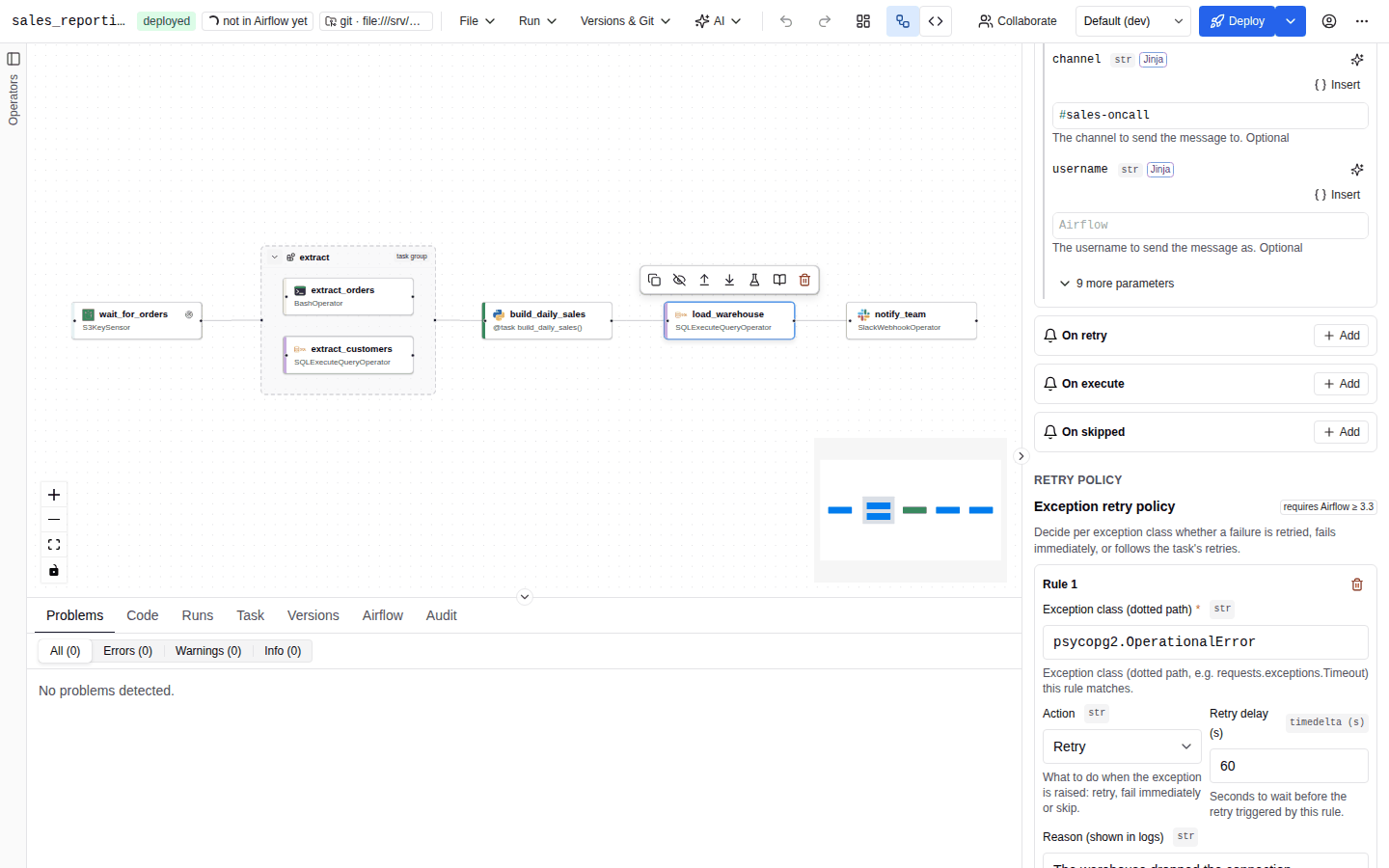
Retries
Per task
Retry settings are in the task's Execution tab under Retries:
| Field | Generated argument | Meaning |
|---|---|---|
| Retries | retries | How many times the task is retried before it is marked failed. |
| Retry delay (s) | retry_delay=timedelta(seconds=…) | Seconds to wait before each retry. |
| Exponential backoff | retry_exponential_backoff | Multiplier applied to the retry delay on each attempt; 0 turns it off. |
| Execution timeout (s) | execution_timeout=timedelta(seconds=…) | Kill and fail the task if it runs longer than this. |
Empty fields inherit the DAG default, shown as DAG default: ….
The backoff multiplier needs Airflow 3.2 or later. On a target Airflow before 3.2, retry_exponential_backoff is an on/off switch whose backoff doubles the delay, so the generated code writes True for any value above 0. A value other than 0 or 2 there is reported as an airflow_version warning on the field, because the DAG would retry with base 2 instead of the multiplier you set; set it to 2 or target Airflow 3.2+.
max_retry_delay (the cap on the delay when exponential backoff is on) has no field in the builder, and it is not part of DAG defaults:
-
Operator tasks: it is a
BaseOperatorargument, so it is not in the operator's parameter list. Adding it to an operator's parameters (for example in code mode or the spec JSON) is reported as the errorunknown parameter 'max_retry_delay' for <Operator>. -
Python (TaskFlow) tasks: set it in Other decorator arguments (JSON) with a timedelta value, which is generated as
@task(max_retry_delay=datetime.timedelta(seconds=3600)):{"max_retry_delay": {"$type": "timedelta", "seconds": 3600}}
DAG defaults
DAG settings → Defaults sets values applied to every task unless the task overrides them. They are generated as the DAG's default_args:
| Field | default_args key |
|---|---|
| Owner | owner |
| Retries | retries |
| Retry delay (s) | retry_delay |
| Execution timeout (s) | execution_timeout |
| Pool | pool |
| Queue | queue |
| Depends on past | depends_on_past |
| Notification e-mails | email |
| E-mail on failure | email_on_failure (needs SMTP configured in Airflow) |
with DAG(
    dag_id="orders",
    default_args={"owner": "data-eng", "retries": 2, "retry_delay": datetime.timedelta(seconds=300)},
    ...
) as dag:
Administrators can require a minimum: with AUTOAIR_MIN_RETRIES=1, every task must have at least one retry (directly or through the defaults), otherwise validation reports Retries must be at least 1. See Policy.
Environment overlays can override the default arguments per environment. See Environments.
Exception retry policy
An exception retry policy (Airflow 3.3 or later) decides per exception class whether a failure is retried, fails immediately, or follows the task's normal retries. Configure it in Behaviour → Retry policy → Exception retry policy. With an older target Airflow the section shows The target Airflow version (…) does not support retry policies.
Each rule has:
| Field | Meaning |
|---|---|
| Exception class (dotted path) | The exception the rule matches, for example requests.exceptions.Timeout or builtins.ValueError. |
| Action | Retry, Fail immediately or Default behaviour. |
| Retry delay (s) | Delay before the retry this rule triggers; empty uses the task's delay. |
| Reason (shown in logs) | Message recorded in the task log when the rule applies. |
| Also match subclasses | On by default. |
Other exceptions sets the action for exceptions no rule matches (default: Default behaviour).
t_fetch = HttpOperator(
    task_id="fetch",
    retries=5,
    retry_policy=ExceptionRetryPolicy(
        rules=[
            RetryRule(exception="requests.exceptions.Timeout", action=RetryAction.RETRY,
                      retry_delay=datetime.timedelta(seconds=30)),
            RetryRule(exception="builtins.ValueError", action=RetryAction.FAIL,
                      reason="bad payload, retrying will not help"),
        ],
    ),
    ...
)
Validation: the exception must be a dotted path (Use a dotted Python path, e.g. requests.exceptions.Timeout.), and a policy on a task with retries=0 is reported as retry policy has no effect with retries=0 (warning).
Callbacks
Callbacks run notifiers, BaseNotifier subclasses from the operator catalog such as SlackNotifier or SmtpNotifier, when an event happens. Several notifiers can run per event, in order.
Task callbacks
In the task's Behaviour → Callbacks, add notifiers for:
| Event | Generated argument |
|---|---|
| On success | on_success_callback |
| On failure | on_failure_callback |
| On retry | on_retry_callback |
| On execute | on_execute_callback |
| On skipped | on_skipped_callback |
DAG run callbacks
In DAG settings → Alerts → DAG run callbacks, add notifiers for On success and On failure of the whole DAG run. Other events are task-level only; a DAG-level on_retry, on_execute or on_skipped is reported as DAG-level … callbacks are not supported.
Configuring a notifier
- Click Add (Add notifier for …) under the event.
- In Notifier class, search the catalog by class name or type the full class path. Notifiers the builder cannot configure are listed but disabled, with the reason.
- Fill in the notifier's parameters. The form is generated from the notifier's constructor, like an operator form: connection pickers, type badges, Jinja templates. Upstream outputs (XCom) are not available in notifier parameters.
t_load = SQLExecuteQueryOperator(
    task_id="load",
    ...,
    on_failure_callback=[
        SlackNotifier(slack_conn_id="slack", text="{{ ti.task_id }} failed in {{ dag.dag_id }}", channel="#alerts"),
    ],
)
Validation reports a notifier that is not in the catalog (notifier '…' is not in the catalog) and problems in its parameters, located on the callback field.
Deadline alerts
A deadline alert (Airflow 3.1 or later) calls a notifier when a DAG run has not finished by a deadline computed from a reference time. Configure them in DAG settings → Alerts → Deadline alerts with Add deadline. With an older target Airflow the section shows The target Airflow version does not support deadline alerts.
| Field | Meaning |
|---|---|
| Name | Name of the alert, shown in Airflow (optional). |
| Reference | Run queued at (DAGRUN_QUEUED_AT), Run logical date (DAGRUN_LOGICAL_DATE), Fixed date & time (FIXED_DATETIME) or Average runtime (AVERAGE_RUNTIME). |
| Fixed date & time | For the fixed reference: the run must finish before this moment. |
| Runs to average | For the average-runtime reference: the number of recent runs averaged. |
| Interval, Unit, Before / after | How far from the reference the deadline is, in days, hours, minutes or seconds, before or after it. A summary sentence under the fields restates the deadline, for example Deadline: 2 hours after “Run queued at”. |
| Notifier | The notifier class and its parameters, as for callbacks. |
| Run callback synchronously | Execute the notifier in the scheduler instead of the triggerer (SyncCallback instead of AsyncCallback). |
with DAG(
    dag_id="orders",
    deadline=[
        DeadlineAlert(
            reference=DeadlineReference.DAGRUN_QUEUED_AT,
            interval=datetime.timedelta(seconds=7200),
            callback=AsyncCallback(SlackNotifier, kwargs={"text": "orders is late", "channel": "#alerts"}),
            name="orders-sla",
        ),
    ],
    ...
) as dag:
An interval "before" the reference is generated as a negative timedelta. The fixed reference requires a date (fixed_datetime reference needs a fixed_datetime).
Round-tripping
Importing a Python DAG (or applying code mode) does not read DAG callbacks or deadline alerts back, and task-level callbacks, retry delays, backoff and retry policies are not read from code either. Re-enter them in the builder after an import. See Code mode.