Runs
Once a DAG is deployed and parsed by Airflow, you can operate it from the builder. You can trigger and backfill runs, pause and unpause the DAG, clear a run, watch task states on the canvas, and read logs and XComs. Every one of these calls goes to Airflow's REST API with your own credentials, so Airflow's RBAC applies on top of AutoAir's permissions. Before deploying, you can also test a task or the whole DAG in a sandbox on the AutoAir server, without involving Airflow.
Requirements
| Feature | Flag | Permission |
|---|---|---|
| Runs list, overlay, logs, XComs, DAG status | features.airflow | airflow:read |
| Trigger, asset test events | features.runs + features.airflow | run:trigger |
| Pause/unpause, scheduling state, clear, backfill | features.runs + features.airflow | run:manage |
| Asset materialize | features.runs + features.airflow | run:trigger |
| Test a task or DAG | features.test_runs | run:test and code:execute |
All flags default to true (AUTOAIR_FEATURES__RUNS, AUTOAIR_FEATURES__TEST_RUNS, AUTOAIR_FEATURES__AIRFLOW). In autoair local there is no Airflow, so runs and test runs are off. When a feature is off, its menu items and tabs are hidden and its API routes answer 404. Built-in roles: Operator has run:trigger and run:manage, Deployer has run:trigger, and Author has run:test. The default Authenticated baseline also includes run:trigger and run:manage, which leaves the decision to Airflow. See IAM.
Trigger and backfill need the DAG in Airflow. Until it is there, they are disabled with "Deploy the DAG first: this needs it in Airflow." A missing permission shows "You don't have permission for this (<permission>). Ask an AutoAir admin."
Where to find run operations
| Place | Contents |
|---|---|
| Run menu (and the command palette, Ctrl/Cmd+K) | Validate in Airflow, Test selected task…, Test whole DAG…, Trigger…, Backfill… |
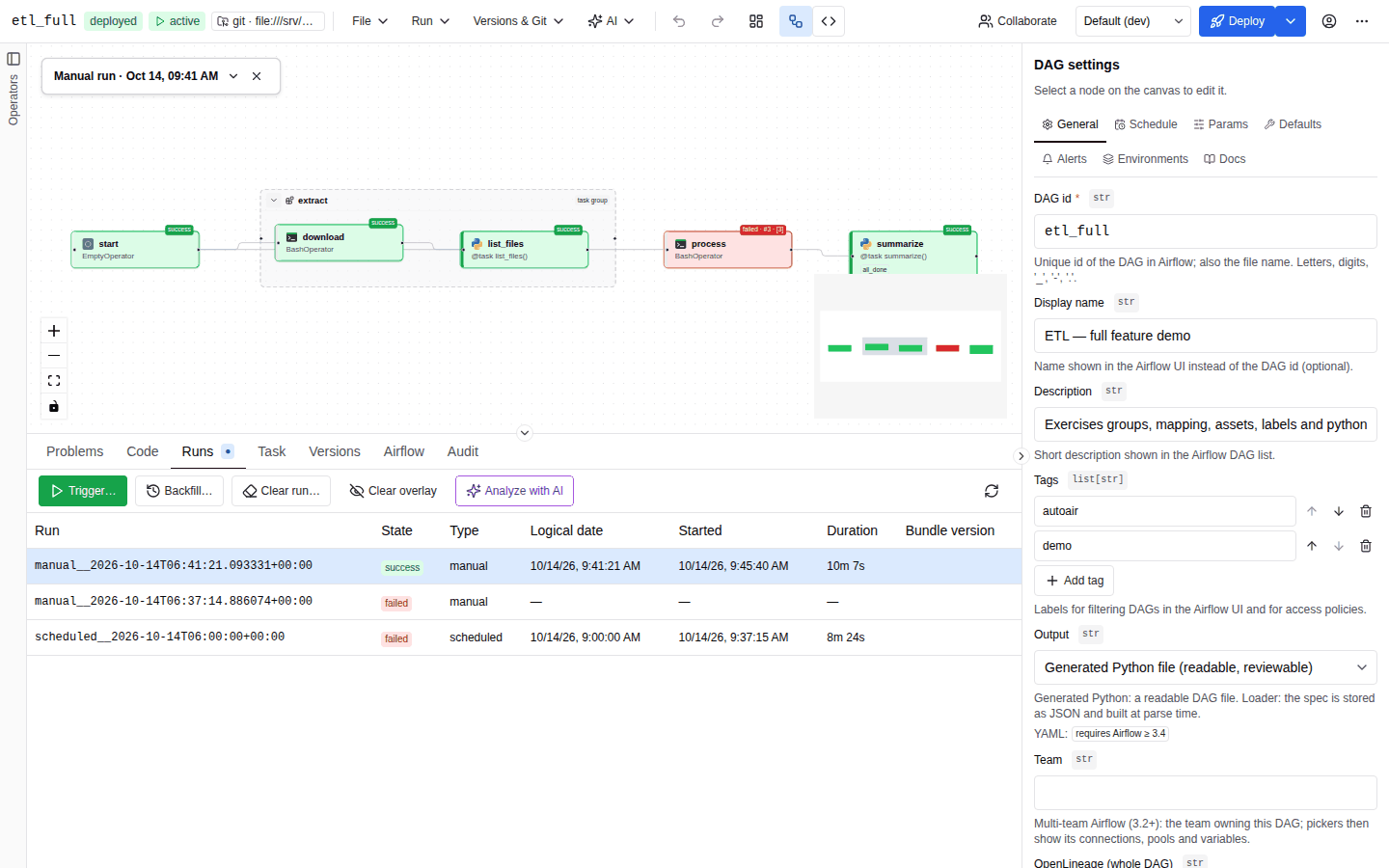
| Runs tab (bottom panel) | Recent runs, with Trigger…, Backfill…, Clear run…, Clear overlay, Analyze with AI and refresh |
| Task tab | Logs and XComs of the selected task in the selected run |
| Airflow tab | Parse status, import errors, latest runs, DAG bundles, Trigger…, the Scheduling selector (Airflow 3.4+) and the Trigger endpoint snippets |
| Toolbar status chip | paused / active. Click to toggle. |
Trigger a run
-
Choose Run → Trigger…, or Trigger… in the Runs or Airflow tab.
-
In Trigger DAG run ("Start a run of <dag_id> in Airflow."), fill in:
Field Description Run configuration A form generated from the DAG's params, prefilled with their defaults. If an environment is selected, its param overrides are prefilled too. Edit as JSON switches to raw JSON. A DAG without params shows a plain conf (JSON) editor: "Run configuration (dag_run.conf). Keys matching DAG params override their defaults." Logical date Now (the trigger time), Specific date (interpreted in your local time zone) or None (no logical date, for Airflow 3 asset- or partition-style runs) Partition key Optional, for partitioned DAGs Note Stored on the run in Airflow Unpause the DAG if paused On by default. A paused DAG's runs would otherwise not start. -
Click Trigger. On "DAG run triggered", the new run is selected in the Runs tab and its overlay appears on the canvas. On failure, the toast Trigger failed carries Airflow's error message.
Follow a run on the canvas
The Runs tab lists the 50 most recent runs and refreshes every 10 s. The columns are Run, State, Type, Logical date, Started, Duration and Bundle version. For git bundles, the bundle version is the commit the run is pinned to. Click a row, or press Enter or Space on it, to show that run on the canvas. Click it again to deselect.
While a run is shown:
- Each task's border and background take its state colour. When the task has more than one try, the task chip adds the try number (
#2for the second try), and[n]for a mapped task. - Mapped tasks show one combined state, the worst one first: failed, upstream failed, up for retry, restarting, running, awaiting input, deferred, up for reschedule, queued, scheduled.
- A legend panel shows the run ("<type> run · <when>") with Show the state legend / Hide the state legend, and a Hide run overlay button. Clear overlay in the Runs tab does the same.
- While the run is active, the overlay is polled every 3 s. A run counts as active when its state is running or queued, or when any task is running, queued, scheduled, deferred, up for retry, up for reschedule, restarting or awaiting input.
- A blue dot on the Runs tab title shows that an overlay is active.
Task states
| State | Label | Colour |
|---|---|---|
success | success | green |
failed | failed | red |
running | running | blue, pulsing |
restarting | restarting | light blue, pulsing |
queued | queued | grey |
scheduled | scheduled | teal |
skipped | skipped | pink |
up_for_retry | up for retry | yellow |
up_for_reschedule | up for reschedule | cyan |
upstream_failed | upstream failed | orange |
deferred | deferred | purple |
awaiting_input | awaiting input (human-in-the-loop) | light purple, pulsing |
removed | removed | light grey |
| none | no status | light grey |
Task logs and XComs
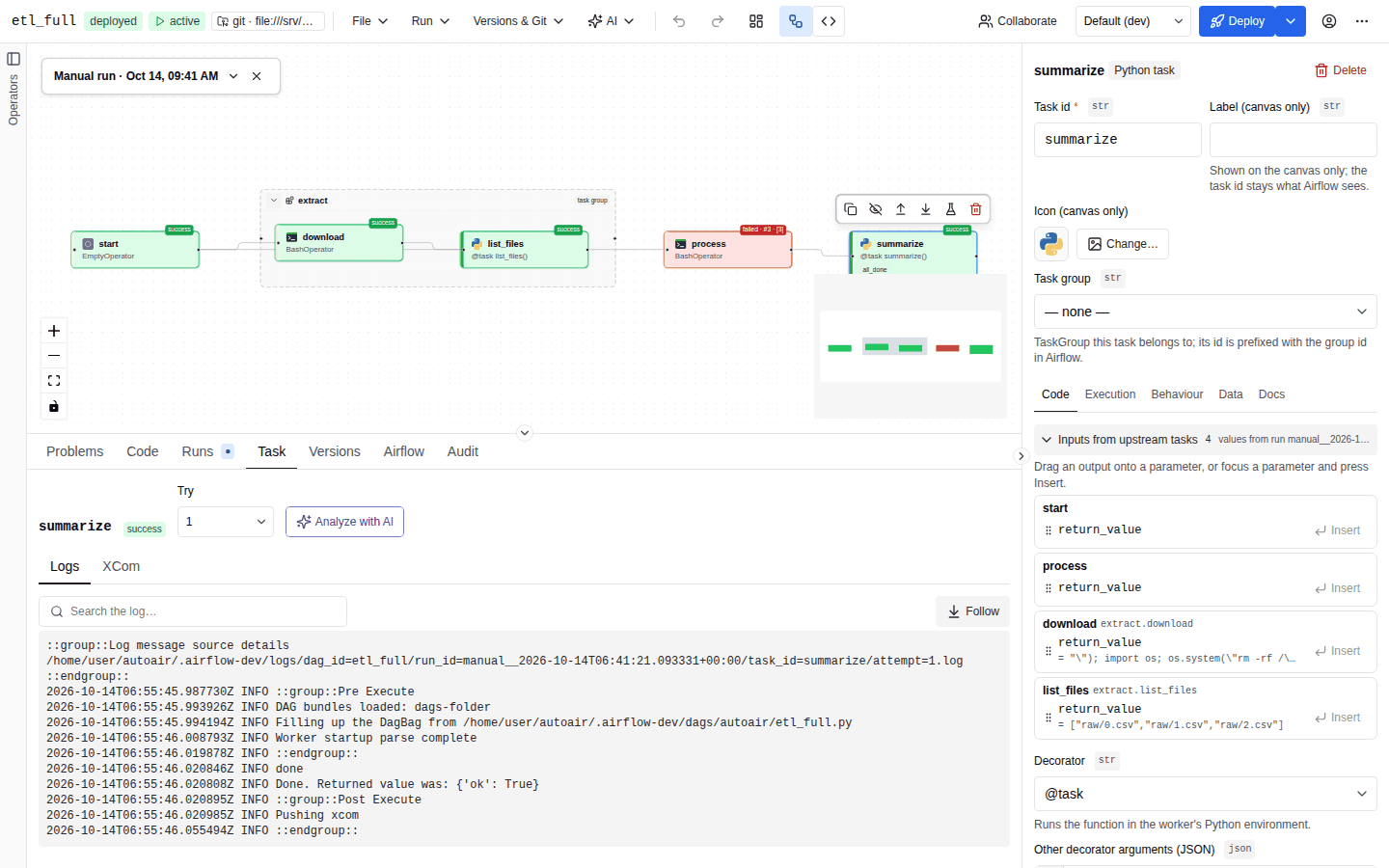
- Select a run in the Runs tab ("Select a run in the Runs tab.").
- Click a task on the canvas ("Select a task on the canvas to see its logs and XComs.").
- The Task tab shows:
- A Try selector, from 1 to the latest try. It defaults to the latest.
- A Map index selector for mapped tasks.
- Logs: the full log of that try. Search the log… filters matching lines and shows the count ("N matching lines"). Follow keeps the view scrolled to the end.
- XCom: the values the task pushed ("No XCom values." if none).
Logs are fetched in full and refreshed every 3 s (XComs every 5 s) while the task is still active and the run is active. They are not streamed. A task that has not started yet shows "<task> hasn't started in this run yet" and "Logs and XComs appear here once the scheduler starts it."
When AI is available (ai:use), Analyze with AI in the Runs and Task tabs opens the troubleshooting assistant on the selected run or task instance.
Clear a run
Select a run and click Clear run…. Clear DAG run re-queues task instances of that run ("Cleared task instances are scheduled again.").
| Option | Default | Shown when | Effect |
|---|---|---|---|
| Only failed tasks | on | always | Clear only the failed tasks. Turn it off to clear every task of the run. |
| Only new tasks | off | Airflow 3.2+ | Queue only the tasks added in the latest DAG version. Turning it on turns off Only failed tasks and Keep task state. |
| Keep task state | off | Airflow 3.4+ | Keep the tasks' state store so the next attempt resumes where it stopped. AutoAir then calls Airflow's clearTaskInstances endpoint for the run instead of the DAG run clear endpoint. Cannot be combined with Only new tasks. |
| DAG version | Default (DAG / Airflow setting) | Airflow 3.1+ | Which bundle version the re-run uses: Default (DAG / Airflow setting), Latest version or The run's original version (run_on_latest_version null, true or false). |
- Choose the options.
- Click Preview for a dry run listing the affected task instances (task id, map index, state). Changing an option discards the preview.
- Click Clear. The toast reads "Run <run_id> cleared" or "Clear failed" with Airflow's message.
Backfill
Run → Backfill… or Backfill… in the Runs tab ("Create runs of <dag_id> for a past date range."):
| Field | Default | Description |
|---|---|---|
| From / To | the last 7 days | The end must be after the start. |
| Reprocess existing runs | None (only missing runs) | Or Failed runs, or All completed runs. |
| Max active runs | 10 | Concurrent backfill runs. |
| Run backwards (newest first) | off | |
| DAG version | Default (DAG / Airflow setting) | Airflow 3.1+ only. Which bundle version each backfilled run uses, as in Clear DAG run. |
| Drain the DAG | off | Airflow 3.4+ only. No new scheduled runs during the backfill; the DAG pauses once its unfinished runs finish. Ignored by the dry run. |
| conf (JSON, optional) | Passed to every backfilled run as dag_run.conf. Must be a JSON object. |
Click Dry run first. It lists the "Runs that would be created". Create backfill stays disabled until a dry run has been done ("Preview the runs with a dry run first"). The toast reads "Backfill created" or "Backfill failed".
Pause and unpause
The toolbar chip shows paused or active once Airflow has parsed the DAG, and not in Airflow yet before that. Click it to toggle (run:manage). Unpausing asks for confirmation: "The scheduler will start creating runs for it (and catch up missed intervals if catchup is on)."
Scheduling state (Airflow 3.4+)
Airflow 3.4 replaces the paused flag with a three-way scheduling state. When the connected Airflow supports it, the Airflow tab of the bottom panel shows a Scheduling selector next to Trigger for a parsed DAG:
| State | Meaning |
|---|---|
| active | The scheduler creates runs as usual. |
| draining | No new scheduled runs are created; runs already started finish, and the DAG pauses once its unfinished runs finish. The tab also shows an orange draining badge. |
| paused | No runs are scheduled. |
Changing it calls PUT /api/airflow/dags/{dag_id}/scheduling-state and needs run:manage and features.runs; the selector is disabled without the permission. The toast reads "Scheduling state changed" or "Changing the scheduling state failed". The selector is hidden on Airflow versions before 3.4.
Airflow version capabilities
Options that only newer Airflow versions accept are shown only when the connected Airflow has them, because Airflow's request bodies are strict: an unknown field fails the whole call. AutoAir reads the server's version from Airflow's GET /api/v2/version through GET /api/airflow/capabilities (cached for five minutes in the browser). If the Airflow server cannot be asked, it falls back to the version of the Airflow installed next to AutoAir ("source": "installed"); if neither is known, every optional feature is off ("source": "unknown").
| Capability | Airflow | Where in the UI | API |
|---|---|---|---|
materialize | 3.0+ | Materialize on a registered asset (Asset events) | POST /api/airflow/assets/{asset_id}/materialize |
clear_run_on_latest_version | 3.1+ | Clear DAG run → DAG version | run_on_latest_version on POST /api/airflow/dags/{dag_id}/runs/{run_id}/clear |
clear_only_new | 3.2+ | Clear DAG run → Only new tasks | only_new (not with only_failed or keep_task_state) |
keep_task_state | 3.4+ | Clear DAG run → Keep task state | keep_task_state |
backfill_run_on_latest_version | 3.1+ | Backfill → DAG version | run_on_latest_version on POST /api/airflow/dags/{dag_id}/backfill |
scheduling_state | 3.4+ | Scheduling selector; Backfill → Drain the DAG | PUT /api/airflow/dags/{dag_id}/scheduling-state; drain_dag on the backfill |
{
  "version": "3.4.0",
  "source": "server",
  "materialize": true,
  "clear_run_on_latest_version": true,
  "clear_only_new": true,
  "keep_task_state": true,
  "backfill_run_on_latest_version": true,
  "scheduling_state": true
}
Operations that Airflow's own UI offers per task, such as marking a task success or failed, clearing a single task, or deleting a run, are not available in AutoAir. Use the Airflow UI for them.
Trigger snippets
To trigger the DAG from a script, CI job or webhook, use the Trigger endpoint card in the Airflow tab: it shows Airflow's POST /api/v2/dags/<dag_id>/dagRuns endpoint with copyable curl, Python requests, JS fetch and Airflow CLI snippets, the conf prefilled from the param defaults. See Trigger snippets. AutoAir's own POST /api/airflow/dags/{dag_id}/trigger ({"conf": {...}, "logical_date": "now", "unpause": true}) is an alternative when the caller authenticates against AutoAir instead of Airflow.
Test a task or the DAG before deploying
Run → Test selected task… or Test whole DAG… runs the current, possibly unsaved, document in a sandbox: on the validator service when one is configured, otherwise on the AutoAir server. Nothing is written to Airflow, and no deploy is needed.
- Single task: choose the Task. Under Upstream XCom values, provide mock values for the XComs it reads. They are prefilled from the run shown in the overlay ("prefilled from run …"). Mock another upstream task… adds more. Click Run task.
- Whole DAG: choose the Mode. In memory (no metadata DB) runs without Airflow's database. dag.test() (writes a run) uses Airflow's
dag.test(). Auto triesdag.test()and falls back to in-memory. Click Run DAG.dag.test()is off by default; see dag.test() mode. - conf / params (JSON) is prefilled with the param defaults.
Results show the state, duration, return value, XCom pushes, skipped downstream tasks and the captured log. For a whole DAG, the results are a table with one row per task. The possible states are success, failed, skipped, upstream_failed, deferred, timeout, import_error, not_found and error.
A mapped task runs only map_index=0. Because a test executes DAG code, it needs run:test and code:execute, and Python tasks need allow_python_code. Every test run is recorded in the audit trail (action test_run: kind, mode, state, where it ran: local, validator or none, and process_isolated); the result returns where and process_isolated as well.
Where the code runs
| Configuration | Task tests and in-memory DAG tests | dag.test() |
|---|---|---|
AUTOAIR_VALIDATOR__URL (or __RUN_URL) set, validator.test_runs on (default) | On the validator service (POST /v1/run), in its sandbox. No DAG code runs on the AutoAir server or the Airflow api-server. | On the AutoAir server (the validator has no metadata DB) |
| No validator | In a sandboxed child process on the AutoAir server | On the AutoAir server |
When the validator cannot be asked, validator.fail_mode decides, differently from import checks: local runs the test on the AutoAir server instead; open and closed both fail the test with state error ("the test-run service is unavailable"). A test run is never moved to the local server silently, because in plugin mode that is the Airflow api-server.
The local sandbox
A local test run is a fresh interpreter in its own process group and its own folder below <tmp>/autoair-runs-<uid>. The whole process group is killed at the timeout. The child:
- gets an environment without AutoAir's secrets, Airflow's secrets (metadata DB, Fernet key, JWT secret,
AIRFLOW_CONN_*/AIRFLOW_VAR_*) and cloud credentials; - gets a private
AIRFLOW_HOMEwith a copy ofairflow.cfgwithout its secrets (Airflow's sensitive options such as the Fernet key, JWT and API secrets and the metadata DB URL, and every option named like a password, secret or_cmdindirection); the rest of the configuration still applies. Reading the realairflow.cfg,airflow.db,webserver_config.pyand the simple auth manager's password file is denied, and Airflow's DAG and plugin folders and AutoAir's DAG folder are read-only, so a test cannot plant a DAG file that skips review and validation; - runs as PID 1 of its own PID, user and mount namespaces with a fresh
/proc(AUTOAIR_RUNNER__PROCESS_ISOLATION). No other process is visible to the task, so neither Python code nor a command in a BashOperator can read the environment or memory of the server that started it; in the namespace the secret files are also hidden, the DAG folders mounted read-only and other runs' folders masked, for subprocesses too.auto(the default, in every mode, the Airflow plugin included) uses the namespaces when the kernel allows them and otherwise runs the test with the protections below;requiredrefuses the run ("process isolation is required") where the namespaces are not available;offnever uses them; - sets
PR_SET_NO_NEW_PRIVS(sudoand setuid programs do not gain privileges), disables core dumps and is made non-dumpable, so other runs cannot read its memory; - installs a Python audit hook (
AUTOAIR_RUNNER__AUDIT_HOOK, default on) that denies reading other processes'/proc/<pid>entries (environ,cmdline,memand the rest) and other runs' folders.
Unlike the import-check sandbox, a test run may start processes, open network connections and write files: BashOperator commands and HTTP calls work as in Airflow.
Ubuntu 24.04 and later restrict unprivileged user namespaces through AppArmor (kernel.apparmor_restrict_unprivileged_userns=1), and most container runtimes block them with their default seccomp profile. Then auto runs without the namespaces: the result shows Not fully isolated ("Configure validator.url for isolated test runs"), the log of each run says so, the result and the audit record have process_isolated: false, and the server logs one warning per process. The audit hook still stops Python code from reading another process's /proc entry or the secret files, the DAG folders stay read-only and the run reads the secret-free copy of airflow.cfg, but a subprocess (for example cat /proc/$PPID/environ in a BashOperator) is not covered. In the plugin the parent is the Airflow api-server, which AutoAir does not change: configure the validator service for isolated test runs, or set AUTOAIR_RUNNER__PROCESS_ISOLATION=required to refuse local runs without the namespaces.
dag.test() mode
dag.test() writes a DAG run to Airflow's metadata DB, so the DAG code runs with the metadata DB connection and the Fernet key, that is with access to every Airflow connection and variable. It is therefore off by default:
AUTOAIR_RUNNER__ALLOW_DB_MODE=trueturns it on. It is read for every request.- Even then, only callers holding
admin:config(in addition torun:testandcode:execute) may choose it. Others get403. - Auto picks
dag.test()only for those callers; for everyone else it runs in memory.
The Mode selector disables dag.test() (writes a run) and says why when it is not available to you.
| Setting | Default | Description |
|---|---|---|
AUTOAIR_RUNNER__DEFAULT_TASK_TIMEOUT | 120 | Seconds per task test |
AUTOAIR_RUNNER__DEFAULT_DAG_TIMEOUT | 300 | Seconds per DAG test |
AUTOAIR_RUNNER__MAX_TIMEOUT | 600 | Largest timeout a request may ask for |
AUTOAIR_RUNNER__MAX_LOG_CHARS | 64000 | Captured log size |
AUTOAIR_RUNNER__MAX_VALUE_CHARS | 4000 | Size of each returned value shown |
AUTOAIR_RUNNER__ALLOW_DB_MODE | false | Allow mode=db (dag.test()) for callers with admin:config |
AUTOAIR_RUNNER__PROCESS_ISOLATION | auto | PID + user + mount namespaces per local run: auto, required, off |
AUTOAIR_RUNNER__AUDIT_HOOK | true | Audit hook against reading other processes' /proc entries and other runs' folders |
Test runs are rate-limited per user (limits.rate_limits, group test_runs). See the configuration reference.
API
| Method and path | Permission |
|---|---|
GET /api/airflow/dags/{dag_id}/runs?limit= | airflow:read |
GET /api/airflow/dags/{dag_id}/runs/{run_id}/overlay | airflow:read |
GET /api/airflow/dags/{dag_id}/runs/{run_id}/tasks/{task_id}/log?try_number=&map_index= | airflow:read |
GET /api/airflow/dags/{dag_id}/runs/{run_id}/tasks/{task_id}/xcom?map_index= | airflow:read |
GET /api/airflow/dags/{dag_id}/status | airflow:read |
POST /api/airflow/dags/{dag_id}/trigger | run:trigger |
POST /api/airflow/assets/{asset_id}/events | run:trigger |
POST /api/airflow/assets/{asset_id}/materialize | run:trigger |
GET /api/airflow/capabilities | airflow:read |
PUT /api/airflow/dags/{dag_id}/paused | run:manage |
PUT /api/airflow/dags/{dag_id}/scheduling-state | run:manage |
POST /api/airflow/dags/{dag_id}/runs/{run_id}/clear | run:manage |
POST /api/airflow/dags/{dag_id}/backfill (dry run by default) | run:manage |
POST /api/runner/test-task, POST /api/runner/test-dag | run:test and code:execute; mode=db also admin:config and runner.allow_db_mode |
See the REST API reference.