Environments
One AutoAir DAG can be deployed to several environments, such as dev, staging and prod. The DAG has a single base definition. For each environment it can also have an overlay that changes a few things: the schedule, paused state, tags, default task arguments, max_active_runs, param defaults, and the connection and Variable ids the DAG uses. When you deploy to an environment, AutoAir applies its overlay before generating the DAG file. On git targets, the deploy also writes to that environment's branch. Promotion copies a deployed DAG from one environment's branch to another's through a pull request.
Configure environments (administrators)
| Setting | Default | Description |
|---|---|---|
AUTOAIR_ENVIRONMENTS | [] | Known environments, for example ["dev", "staging", "prod"]. They are offered in the toolbar, the deploy dialog and the overlay editor. |
AUTOAIR_DEFAULT_ENVIRONMENT | unset | The environment preselected in the UI and used by deploys that name none. |
AUTOAIR_STORAGE__GIT__ENVIRONMENTS | {} | Git targets: environment → branch, for example {"dev": "dev", "prod": "main"}. |
AUTOAIR_STORAGE__GIT__BRANCH_TEMPLATE | {branch_prefix}{environment_path}{dag_id} | PR mode: the pending-change branch. {environment_path} is <env>/ or empty. |
AUTOAIR_STORAGE__GIT__PROMOTE_BRANCH_TEMPLATE | {branch_prefix}promote/{from_env}-to-{to_env}/{dag_id} | Branch of a promotion |
AUTOAIR_STORAGE__GIT__PROMOTE_MESSAGE_TEMPLATE | AutoAir: promote DAG {dag_id} from {from_env} to {to_env} | Commit message and PR title of a promotion |
AUTOAIR_ENVIRONMENTS='["dev", "staging", "prod"]'
AUTOAIR_DEFAULT_ENVIRONMENT=dev
AUTOAIR_STORAGE__MODE=git
AUTOAIR_STORAGE__GIT__ENVIRONMENTS='{"dev": "dev", "staging": "staging", "prod": "main"}'
What an environment means depends on the deploy target:
| Target | Effect of the environment |
|---|---|
| Git | The deploy goes to the environment's branch from storage.git.environments, or a pull request against it. If an environment has no branch mapping, the deploy fails with "no branch configured for environment '…'". Without an environment, base_branch is used. |
| Local folder, object storage | The overlay is applied to the generated file, and the environment is recorded with the version. There is only one location, so one installation of AutoAir normally serves one environment. Set AUTOAIR_DEFAULT_ENVIRONMENT to that environment. |
Overlays
An overlay is stored in the DAG's spec under environments.<name>. Every field is optional, and a field that is not set inherits the base value.
| Overlay field | Effect |
|---|---|
schedule | Replaces the schedule. |
is_paused_upon_creation | Replaces the paused state used when Airflow first creates the DAG. |
tags | Replaces the tag list. |
default_args | Replaces the DAG's default task arguments as a whole. It is not merged key by key, so repeat any base defaults you want to keep. |
max_active_runs | Replaces it (at least 1). |
params_defaults | Replaces the default of each named param. A name that is not declared adds a new param with that default. |
connections | Connection aliases: logical id → this environment's Airflow connection id. See below. |
variables | Variable aliases: logical key → this environment's Variable key. |
{
  "dag_id": "orders_daily",
  "schedule": {"type": "cron", "expression": "0 6 * * *"},
  "environments": {
    "dev": {
      "schedule": {"type": "none"},
      "is_paused_upon_creation": true,
      "params_defaults": {"sample_rows": 1000},
      "connections": {"warehouse": "warehouse_dev"},
      "variables": {"orders_bucket": "orders_bucket_dev"}
    },
    "prod": {
      "tags": ["orders", "tier-1"],
      "default_args": {"owner": "data-eng", "retries": 3, "retry_delay_seconds": 300},
      "max_active_runs": 1,
      "connections": {"warehouse": "warehouse_prod"}
    }
  }
}
In this example dev has no schedule ({"type": "none"}). Leaving schedule out, or setting it to null, inherits the base schedule instead.
Edit overlays in the UI
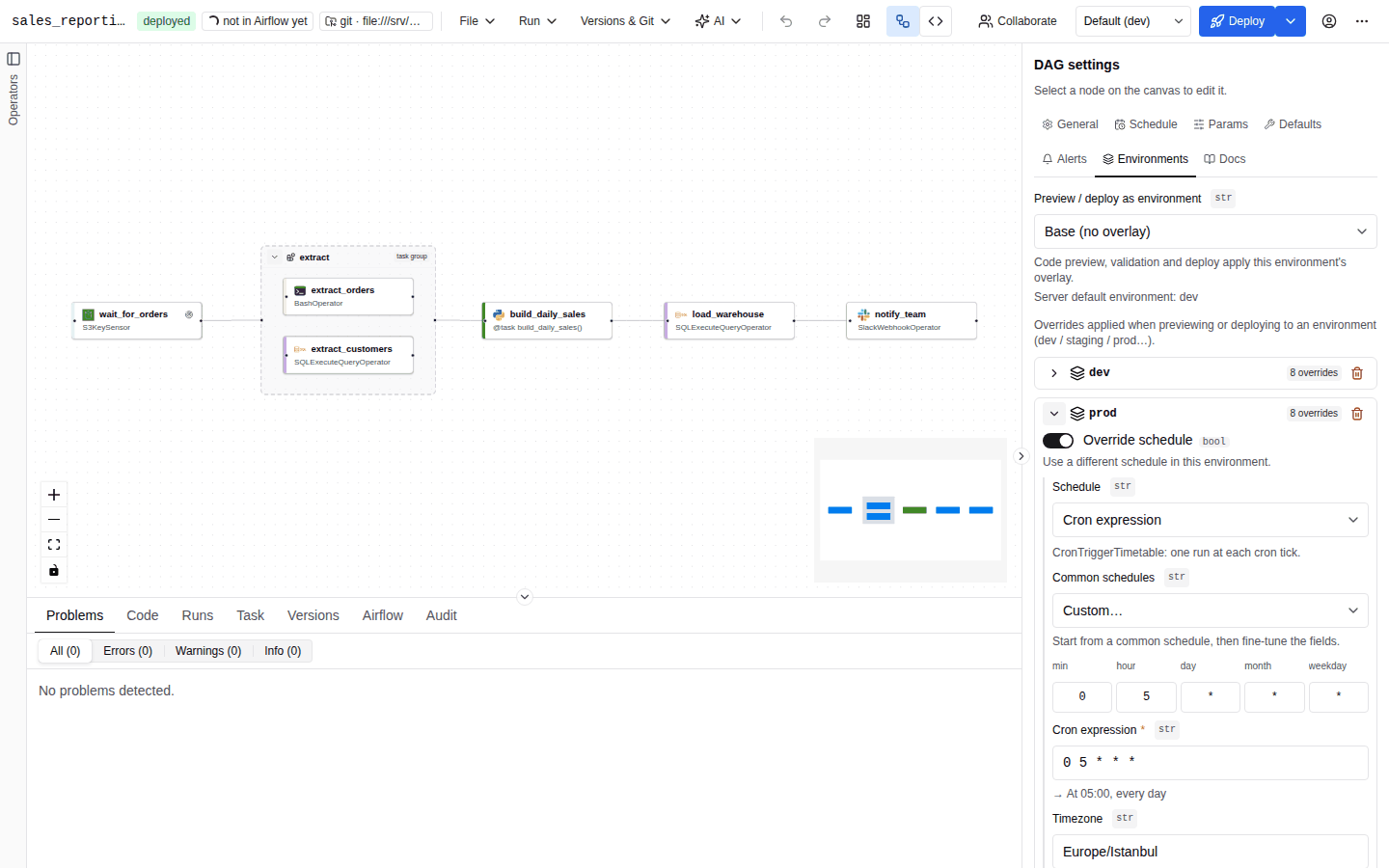
Open DAG settings → Environments:
- Under Preview / deploy as environment, choose the environment to work with, or Base (no overlay). Environments without an overlay are listed as "<env> (no overlay defined)". The hint "Server default environment: …" names
AUTOAIR_DEFAULT_ENVIRONMENT. - To create an overlay, type a name in Environment (it autocompletes from
AUTOAIR_ENVIRONMENTS; letters, digits,.,_and-) and click Add environment. A name the server does not know is marked unknown ("Not configured on the AutoAir server."). You can still keep it, but deploying to it fails. - Expand an overlay. Its badge counts its overrides ("N overrides"). Then set:
- Override schedule, then the schedule editor
- Paused upon creation: inherit, Paused or Active
- Override tags, then Tags
- Max active runs (empty means inherit)
- Default task arguments: owner, retries, retry delay, pool, queue
- Param defaults, shown when the DAG declares params ("Leave empty to inherit.")
- Connection & Variable mapping: the connection and Variable aliases of this environment; see Connection and Variable aliases
- Remove an overlay with its remove button.
The toolbar's Environment selector (hidden when no environments exist) chooses the environment for deploys and for the trigger dialog, which prefills the overlay's param defaults. Its first entry is Default (<env>).
Editing any overlay field in the UI keeps the overlay's other fields, including its connection and Variable mapping. Empty values (an empty mapping, cleared default arguments) are removed from the overlay so that it inherits again.
Where overlays apply
| Operation | Overlay applied |
|---|---|
| Deploy (toolbar, deploy dialog, API) | Yes: the chosen environment, or default_environment |
Server-side validation during deploy, including policy rules that match on environments | Yes |
| Trigger dialog param defaults | Yes |
| Promotion | Yes. The spec is validated (policy rules and OPA included) and the files are re-rendered for the target environment. |
| Loader-mode DAGs | At parse time, from AUTOAIR_ENVIRONMENT on the dag-processor and workers |
| Live validation in the editor (Problems panel) | Yes: the environment chosen under Preview / deploy as environment, else default_environment. Policy rules that match that environment apply too. |
| Code tab and code mode in the editor | Only in the read-only Preview of an environment. Editing always shows the base DAG, because code mode applies edited code back to the base definition. |
| Raw code DAGs | Never. The same file is deployed to every environment. |
CLI autoair validate --env <name> | Yes (overlay and environment-specific policy rules) |
CLI autoair generate | No (base definition) |
The live validation runs POST /api/validate?environment=<env> and re-runs whenever you switch the environment, so overlay- and mapping-specific problems (for example a mapping that produces an invalid id) appear in the Problems panel.
Preview the code of an environment
The Python view of the Code tab and the code mode header have a Preview selector. Base shows the code generated from the base DAG; this is the code you edit. Choosing an environment renders the file through POST /api/codegen?environment=<env>, with that environment's overlay and connection and variable mapping applied, and shows it read-only, labelled Preview: <env> (read-only).
Editing always happens on the base. Code mode applies edited code back to the spec's base definition, so applying code rendered for one environment would copy that environment's values (schedule, connection ids, variable keys…) into every environment. Switch back to Base to edit. The deploy dialog's commit preview is also rendered and validated with the overlay applied.
POST /api/codegen answers 400 (unknown environment '…') for an environment the DAG does not define.
Raw code DAGs
Environment overlays and the connection and variable mapping do not apply to raw code DAGs: AutoAir deploys the file as written, so every environment gets the same file and the Preview selector is not offered. Read environment-specific values at run time instead, from Airflow Variables and Connections (which differ per Airflow deployment) or from environment variables. Promotion copies the raw code DAG unchanged.
Deploying to an environment that the DAG's spec does not define, while the spec defines others, fails with HTTP 400 "unknown environment '…'". A spec without any overlays deploys its base definition to any configured environment.
Loader-mode DAGs
When a DAG's output is JSON spec + runtime loader, the deployed Python file is a stub (from autoair.loader import load_dag; dag = load_dag(__file__)) next to <dag_id>.autoair.json. The overlay is then applied when Airflow parses the file, using the overlay named by the AUTOAIR_ENVIRONMENT environment variable of the dag-processor and workers. An unknown or unset name means the base definition. This lets one artifact serve several Airflow deployments, each with its own AUTOAIR_ENVIRONMENT.
Connection and Variable aliases
Aliases let the DAG refer to a logical connection or Variable name, which each environment maps to its own real id. With "connections": {"warehouse": "warehouse_prod"} in the prod overlay, deploying to prod rewrites these literal references:
| Where | Example before → after |
|---|---|
Parameters named conn_id or ending in _conn_id | postgres_conn_id: "warehouse" → "warehouse_prod" |
| Jinja connection references | {{ conn.warehouse.host }} and conn['warehouse'] → warehouse_prod |
Jinja Variable references (variables) | {{ var.value.orders_bucket }}, var.json.… |
| Python task code, inline functions | postgres_conn_id="warehouse", Variable.get("orders_bucket"), the first argument of get_connection(...) / get_hook(...) |
Only literal references are rewritten. Ids built at runtime, such as f"warehouse_{env}", are left as they are. The mapping never imports or executes code. The overlays themselves are kept unchanged in the stored spec.
Edit the mapping in the UI
Each expanded overlay has a Connection & Variable mapping panel with a Connections and a Variables list:
- Click Map a connection (or Map a variable) to add a row.
- In Connection id in the DAG (Variable key in the DAG) enter the logical id. Suggestions list the ids the DAG already references.
- In Connection id in <env> (Variable key in <env>) enter the id in that environment's Airflow. Suggestions list Airflow's connections (with type and host) or Variables; they need
features.airflowandairflow:read, and follow the DAG's team in a multi-team setup. - Remove a row with its delete button.
Ids may contain letters, digits, ., _ and -. A row with an invalid id is marked Use letters, digits, '.', '_' or '-'. Not saved until valid., and a half-filled row is kept only in the editor; only complete, valid rows are written to the spec. A logical id that appears twice is marked This id is mapped twice.
Mapping check
While the mapping is not empty, the panel checks the mapped ids against the Airflow AutoAir is connected to (POST /api/airflow/mapping-check with the spec and the environment name). Its header badge shows:
| Badge | Meaning |
|---|---|
| all found in Airflow | Every mapped connection and Variable exists in Airflow's metastore. |
| N not in Airflow's metastore | Some ids are missing. Each missing row shows Connection '…' is not in Airflow's metastore. or Variable '…' is not in Airflow's metastore., and the hint below the lists explains that such ids can still come from a secrets backend or environment variables. |
| not checked | Airflow could not be asked (unreachable, or no permission to list connections or Variables). |
The check is advisory: it never blocks a deploy. It is not shown when airflow_secrets_backend is on (ids missing from the metastore are expected then) or when features.airflow is off, as in autoair local. The check uses the connected Airflow; if an environment deploys to a different Airflow, verify its ids there. See also Connections and Variables.
Promote between environments
Promotion copies the DAG as deployed on one environment's branch to another environment's branch, through a pull request. It is available on git targets only.
- Deploy the DAG to the source environment and merge it there.
- Choose Versions & Git → Promote environment… (needs
promote, and the DAG must be deployed). - In Promote environment ("Copy <dag_id> from one environment to another through a pull request."), choose From and To. The summary shows
env (branch) → env (branch). - Click Open promotion PR. The result shows the message and a link to the pull request.
What happens:
- AutoAir reads the spec at the head of the source branch. It does not use your editor's content.
- It re-renders the DAG files for the target environment's overlay.
- It commits them to the promotion branch (
autoair/promote/<from>-to-<to>/<dag_id>by default) and opens a pull request into the target branch. The body ends with "Source commit: <sha>" and includes the governance context block (Action: promote). - The promotion is audited as
promotewith the environments, branch, PR URL and version.
Before anything is written, the spec is validated for the target environment exactly like a deploy to it: the overlay is applied, then the static checks, policy rules that match the target environment, the Open Policy Agent (with context.action promote) and, when import_check_on_deploy is on and you have code:execute, the import check. Errors block the promotion; warnings and infos do not. The validation result is part of the governance context block (Validation: passed (…)).
| Error | Cause |
|---|---|
| "At least two environments (branches) are needed to promote." | Fewer than two environments are known. |
| "Choose two different environments" | From equals To. |
| 400 "the '…' deploy target does not support promotion" | The target is a local folder or object storage. |
| 422 "validation failed for environment '…'; nothing was written: …" | The spec fails validation for the target environment (for example a policy rule for that environment). The response's detail has status: "invalid", the message and the full validation report. No branch or pull request is created. |
| 400 "unknown environment '…'" | The spec defines environment overlays, but not the target environment (the same rule as a deploy). |
| 400 "source and target environments use the same branch" | Both environments map to the same branch. |
| 400 "no branch configured for environment '…'" | Add the environment to storage.git.environments. |
| 404 "'…' does not exist in environment '…'" | The DAG was never deployed (or merged) on the source branch. |
| 409 | A git conflict. Retry, or resolve it in the git host. |
Promotion always uses the installation's default deploy target, even for DAGs that belong to a team with its own target (Multi-team).
Permissions and API
| Action | Permission |
|---|---|
| Edit overlays | spec:write (they are part of the DAG) |
| Deploy to an environment | as for any deploy |
| Promote | promote (Deployer, Admin) + Airflow edit access to the DAG; features.deploy |
| Method and path | Purpose |
|---|---|
PUT /api/specs/{dag_id} with "environment": "prod" | Deploy to an environment |
POST /api/vcs/{dag_id}/promote with {"from_env": "staging", "to_env": "prod"} | Promotion PR |
GET /api/meta | environments, default_environment |