Params and trigger forms
DAG params are the run parameters of a DAG: airflow.sdk.Param objects validated with JSON Schema. Airflow renders them as the form of its Trigger DAG dialog, and tasks read them in templates as {{ params.<name> }}. AutoAir edits them in DAG settings → Params and previews the resulting form as you type.
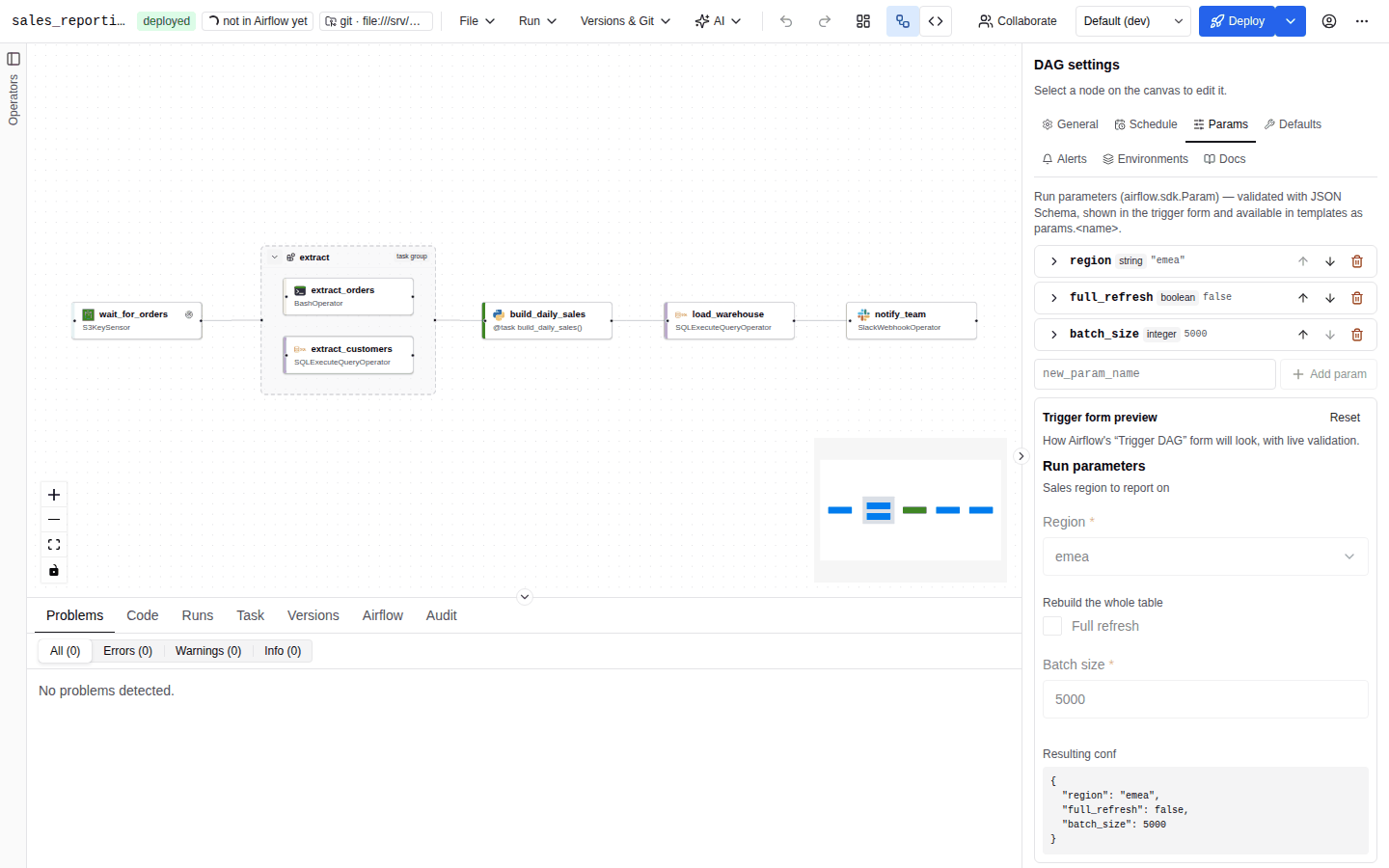
Declaring params
- Select nothing on the canvas so the inspector shows DAG settings, and open Params.
- Type a name in the new_param_name box and press Enter or Add param. Names must be Python identifiers (
Use a Python identifier (letters, digits, _).) and unique (A param with this name already exists.). A new param starts as a string with an empty default. - Expand the param (Edit …) to configure it. Params can be renamed, reordered with Move up / Move down, and removed.
Fields
| Field | Meaning |
|---|---|
| Name | Available in templates as params.<name>. |
| Type(s) | string, number, integer, boolean, array, object, null. Select several to allow a union; include null to make the param optional. Without a declared type the type is inferred from the default and shown as Type inferred from the default: …. |
| Default | A typed input for the primary type, a JSON editor for arrays, objects and unions. A default that does not match the declared types shows The default does not match the declared type(s). With no default, No default: the value must be provided when triggering. |
| Title | Label shown in the trigger form instead of the name. |
| Section | Groups params into collapsible sections of the trigger form. |
| Description | Help text under the field. |
| Description (markdown) | Rendered as Markdown in the trigger form; takes precedence over the description. Edited with the Markdown editor. |
| Format | date, date-time, time, multiline (multi-line text), email, uri, hostname, ipv4, ipv6. Selects the input widget of the trigger form. |
| Allowed values (enum) | Renders a drop-down. Display labels (values_display) show labels instead of the raw values. |
| Minimum, Maximum | Numbers only. |
| Min length, Max length, Pattern (regex) | Strings only. An invalid regular expression is flagged (Invalid regular expression). |
| Item schema | JSON Schema of list items, for example {"type": "string"}. |
| Examples | JSON list of suggestions shown in the trigger form. |
| Constant | JSON value the param must always equal; read-only in the form. |
Generated code
with DAG(
    dag_id="orders_backfill",
    params={
        "region": Param("eu", type="string", enum=["eu", "us"], title="Region"),
        "day": Param(None, type=["string", "null"], format="date", section="Window"),
        "limit": Param(1000, type="integer", minimum=1, maximum=100000),
    },
    ...
) as dag:
Each param becomes Param(default, **schema): min_length and max_length are written as the JSON Schema keywords minLength and maxLength; other fields keep their names.
Using params in tasks
- In templated fields:
{{ params.region }}. Completion lists the declared params; see Jinja templates. - Once a DAG declares params, validation reports
params.<name>references to undeclared params as errors (params.<name> is not a declared DAG param). - Environment overlays can replace param defaults per environment (Param defaults); see Environments.
Trigger form preview
Under the param list, Trigger form preview shows how Airflow's "Trigger DAG" form will look, with live validation:
- Params without a section come first under Run parameters, then one block per section in declaration order.
- Defaults are pre-filled. A param whose types do not include
nullis required. - Strings use the format's widget (
date,date-time,time,email,uri;multilinebecomes a text area). Enums become drop-downs with their display labels. Arrays of strings or numbers get one input per item; other arrays, objects and unions get a JSON editor. Constants are read-only. - Values are validated against the JSON Schema as you type (Ajv), so you see the same errors a user would see before triggering.
- Resulting conf shows the JSON that the form would send as
dag_run.conf. - Reset restores the defaults. The preview also resets whenever the param definitions change.
The preview is an approximation of Airflow's form built with the same JSON Schema; small layout differences with the Airflow UI are expected.
Triggering a run
Once the DAG is deployed, Run → Trigger… (or Trigger… in the command palette) opens Trigger DAG run:
| Field | Meaning |
|---|---|
| Run configuration | A form generated from the params, or Edit as JSON to edit conf directly. Keys matching DAG params override their defaults. The form starts from the param defaults, overridden by the selected environment's param defaults. |
| Logical date | Now (the trigger time), Specific date (in your local time zone) or None (no logical date, for Airflow 3 asset- and partition-style runs). |
| Partition key | Optional; for partitioned DAGs. |
| Note | A note stored on the run. |
| Unpause the DAG if paused | On by default. |
Trigger creates the run in Airflow, selects it and switches the bottom panel to Runs. Triggering needs features.runs, a reachable Airflow and the run:trigger permission. Before the first deploy the dialog only says that the DAG must be deployed first. See Runs.
Trigger snippets
The bottom panel's Airflow tab shows a Trigger endpoint card once the DAG exists in Airflow (after its first deploy has been parsed). It is the "webhook" of the DAG: Airflow's own REST endpoint for creating runs,
POST <Airflow URL>/api/v2/dags/<dag_id>/dagRuns
with ready-to-paste snippets in four tabs: curl, Python requests, JS fetch and Airflow CLI. Copy URL and Copy snippet copy them to the clipboard (the button shows Copied for a moment). The snippets are generated in the browser from the DAG currently open in the editor; nothing is sent to AutoAir or Airflow until you run them.
confis prefilled from the param defaults, overridden by the param defaults of the environment selected in the toolbar. A DAG without params gets noconfkey.- The REST snippets send
"logical_date": null, which every Airflow 3 version accepts and which creates a run without a logical date, like None in the trigger dialog. Edit the body if your DAG needs a logical date, adag_run_idor anote. - The Python snippet uses
requestswith a 30-second timeout and prints the newdag_run_id; the JavaScript snippet usesfetch(Node 18 or later, or a browser) and throws on a non-2xx response.
curl -X POST 'https://airflow.example.com/api/v2/dags/orders_backfill/dagRuns' \
  -H "Authorization: Bearer $AIRFLOW_TOKEN" \
  -H 'Content-Type: application/json' \
  -d '{"logical_date":null,"conf":{"region":"eu","limit":1000}}'
- The URL is Airflow as browsers and API clients reach it:
sso.airflow_public_url, elseairflow_url(both reported byGET /api/metaasairflow_public_url). Inside the Airflow plugin without either, the page's own origin is used. Setsso.airflow_public_urlwhen AutoAir reaches Airflow on an internal address that callers cannot use. AIRFLOW_TOKENis an Airflow access token (fromPOST /auth/tokenon Airflow) of a user with Airflow's "DAG run: create" permission on this DAG. AutoAir permissions do not apply: the call goes to Airflow directly.- The CLI snippet (
airflow dags trigger '<dag_id>' --conf '…') must run where the Airflow CLI can reach Airflow's metadata database, for example in the scheduler or a worker container.
Related pages
- Scheduling and assets
- Runs
- Human-in-the-loop (HITL input forms use the same param editor)
- Environments