AI features
AutoAir has optional AI assistance for building, reviewing and troubleshooting DAGs, and an MCP server that exposes DAG authoring to external AI agents. Everything AI-related is off the critical path: the builder, validation, deploys and runs work the same with AI switched off, and several analysis features run deterministic rules without any model at all.
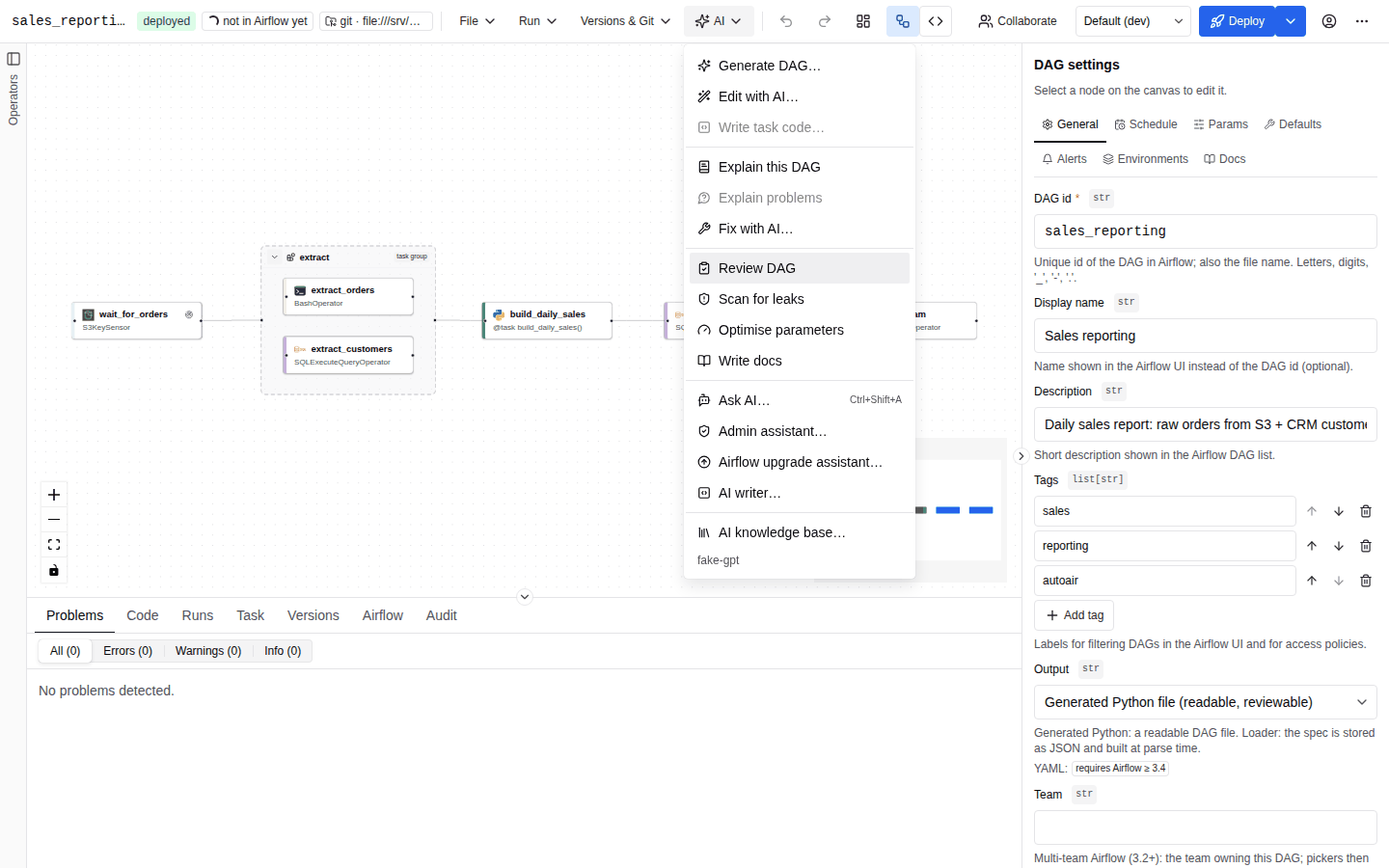
Feature overview
| Feature | Where | What it does | Needs a model |
|---|---|---|---|
| Generate DAG… | AI menu, empty canvas | Builds a DagSpec from a description; the result is validated and repaired before you see it | yes |
| Edit with AI… | AI menu | Proposes a change to the open DAG as a diff you apply or discard | yes |
| Write task code… | AI menu (a python_task selected) | Writes the body of a Python task; syntax-checked and scanned for leaks | yes |
| Explain this DAG / Explain problems | AI menu | Structured walkthrough of the DAG; validation problems in plain language | yes |
| Fix with AI… | AI menu | Root cause and patches from validation problems, an import error or a failed task's log | yes |
| Review DAG / Scan for leaks / Optimise parameters | AI menu | Best-practice review, secret/leak scan, retries/timeouts from run history | no (rules run without a model; Add an AI pass adds one) |
| Write docs | AI menu | Writes doc_md for the DAG | yes |
| AI writer… | AI menu | Specialised code writers (task body, function, Bash, SQL, operator config, custom operator, whole DAG) with validate-and-repair | yes |
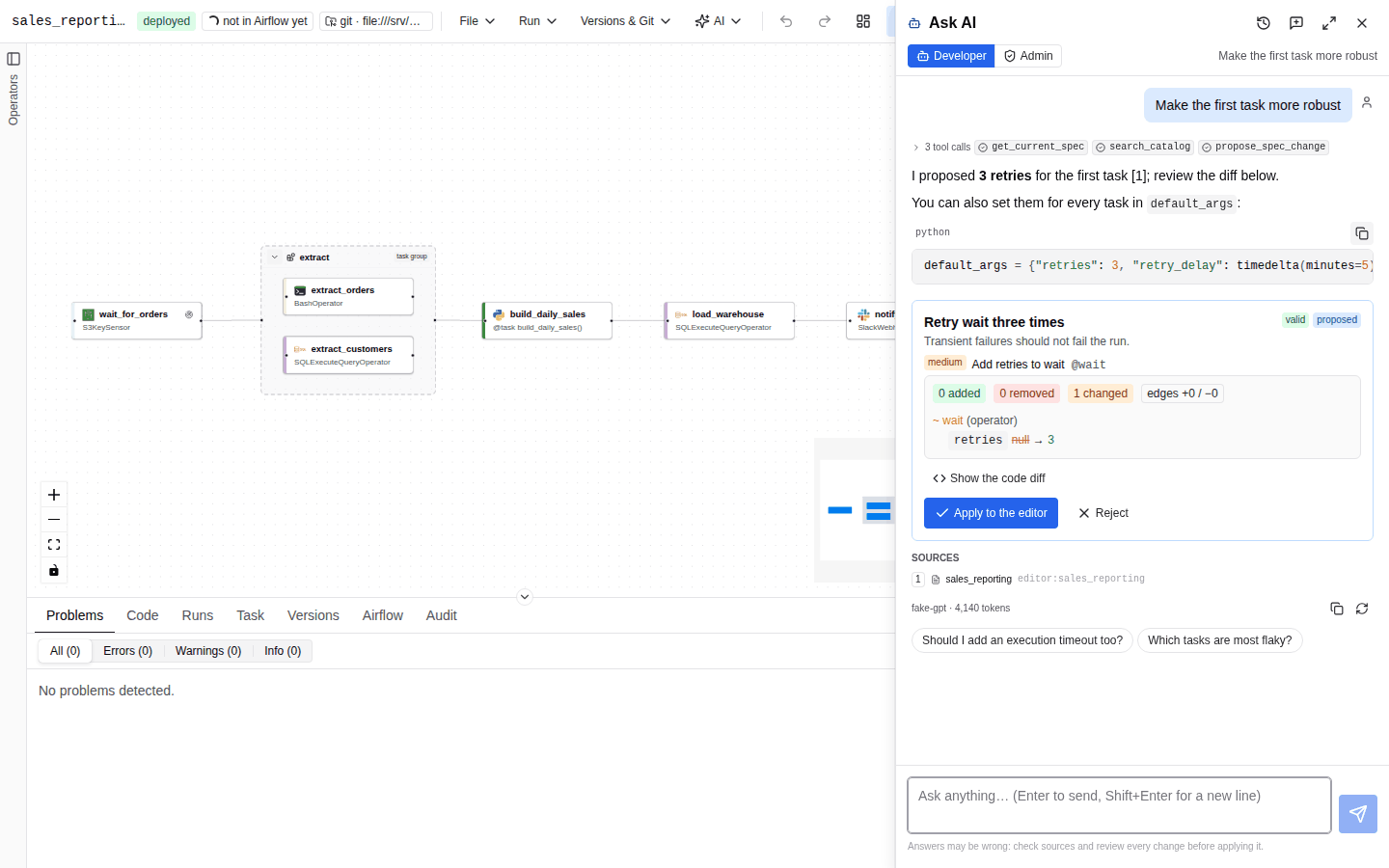
| Ask AI… | AI menu, command palette, Ctrl/⌘+Shift+A | Developer chat assistant with tools and persisted threads | yes |
| Admin assistant… | AI menu (admins) | Read-only chat assistant about configuration, IAM, audit and usage | yes |
| Airflow upgrade assistant… | AI menu | Airflow 2 idioms found by ruff AIR3 rules and AutoAir rules, optional AI pass, proposed as a diff | optional |
| Generate (deploy dialog) | Deploy dialog, PR description | Commit subject and PR body from the spec diff | optional (falls back to a deterministic message) |
| Analyze with AI | Bottom panel, Runs and Task tabs | Agentic root-cause analysis of a failed run with a structured report and reviewable fix | yes |
| MCP server | /mcp | Catalog, validation, specs, Airflow, research and authoring tools for external agents | only for the server-side LLM tools |
The individual features are described in Assist features, AI writers, Chat assistants, Troubleshooting runs and MCP.
Minimum configuration
AI needs one model provider. The smallest working configuration is an API key; the provider and a default model are inferred from it:
# Anthropic (default model claude-sonnet-5-5)
AUTOAIR_AI__API_KEY=sk-ant-...
Equivalent explicit form, and the same in YAML:
AUTOAIR_AI__PROVIDER=anthropic
AUTOAIR_AI__MODEL=claude-sonnet-5-5
AUTOAIR_AI__API_KEY=sk-ant-...
# /etc/autoair/autoair.yaml
ai:
  provider: anthropic
  model: claude-sonnet-5-5
  api_key: sk-ant-...   # prefer the environment variable or an Airflow connection for secrets
Instead of a key in AutoAir's environment, the credentials can live in an Airflow connection
(AUTOAIR_AI__LLM_CONN_ID). OpenAI-compatible endpoints, Gemini, Ollama, per-user keys and
embeddings are covered in Providers and models.
When no model is configured, the AI menu shows AI assistance is not configured on the server and,
for users with ai:use, a Set up AI… item. Administrators who can open the configuration page
(admin:config and AUTOAIR_EXPOSE_CONFIG not false) are taken there; everyone else sees a hint
naming AUTOAIR_AI__PROVIDER, AUTOAIR_AI__MODEL and an API key. Review, leak scan, optimise and search keep working.
GET /api/ai/status reports what the server can do for the caller: whether a model is configured,
the provider and model, the selectable models, the LLM mode, retrieval mode (bm25 or hybrid),
reranker, agent runtime (pydantic-ai), whether online research is on, and the caller's AI role.
When the autoair[ai] extra is missing it answers enabled: false with the install hint as reason.
Switching AI off
There are three levels, from coarse to fine:
| Setting | Effect |
|---|---|
AUTOAIR_FEATURES__AI=false | AI is hidden. Only GET /api/ai/status answers (with enabled: false); every other /api/ai/* route is 404. AI tools are also removed from the MCP server. |
AUTOAIR_AI__ENABLED=false | No LLM client is built. LLM features answer 503; the rules-only features (leak scan, review, optimise, search) keep working. |
| no provider / key configured | Same as above, plus the Set up AI… hint in the menu. |
AUTOAIR_FEATURES__MCP=false | /mcp is not mounted. |
Individual AI areas have their own switches: ai.troubleshoot.enabled,
ai.assistants.developer.enabled, ai.assistants.admin.enabled, ai.rules.enabled,
ai.audit.enabled and ai.mcp.allow_writes (read-only MCP). Feature flags in general are covered in
Feature flags.
Permissions
AI uses AutoAir's IAM permissions (IAM):
| Permission | Grants | Built-in roles |
|---|---|---|
ai:use | Every AI feature, the developer assistant, troubleshooting (with airflow:read), the MCP AI tools | Authenticated, Author, Reviewer, Admin |
ai:admin | Knowledge base, prompt list, AI audit log (GET /api/ai/audit), project rules (PUT/DELETE /api/ai/rules/{scope}), the admin assistant, the admin tool allow-list | Admin |
admin:panel | The admin assistant (alternative to ai:admin), the admin panel's AI usage and MCP servers tabs | Admin |
admin:config | Creating, changing and testing MCP servers in the admin panel | Admin |
code:execute | The editor AI role: agent tools that execute DAG code (deploy dry run, Python import) | Author, Admin |
spec:write | Approving a proposal from a chat or troubleshooting report | Author, Deployer, Admin |
airflow:read | Troubleshooting and the tools that read runs and logs | Authenticated, all view roles |
Each request runs with an AI role derived from these permissions: admin with ai:admin,
editor with code:execute, otherwise viewer. The role selects the agent tool allow-list
(ai.guardrails.tool_allowlist) and is recorded in the AI audit log. Every Airflow call an AI
feature makes uses the caller's own Airflow token, so Airflow's RBAC applies on top.
No AI feature writes a DAG. Proposals are applied to the editor only after an explicit click, and going live always goes through the normal deploy pipeline with its approvals and pull requests.
What data leaves the server
All model traffic goes from the AutoAir server (or the AI service) to the
configured provider endpoint; the browser never talks to a model. Before any text is sent it passes
the guardrail pipeline: secrets are redacted (always on by default), personal
data is masked when ai.guardrails.pii_masking is on, and inputs larger than
ai.guardrails.max_input_chars are refused.
| Feature | Sent to the chat model |
|---|---|
| Generate / Edit with AI | Your description, schemas of the candidate operators from the installed catalog, the current spec (edit) |
| Explain, review, leak scan, optimise, fix, docs | The DagSpec (secrets found by the leak rules redacted), rule findings, generated code; for fix and optimise also the failed task's log tail (ai.assist.max_log_chars) and run statistics |
| Writers, task code | Your description, the installed environment profile (Airflow/Python version, installed providers and packages), relevant catalog entries, retrieved reference docs, team conventions and project rules |
| Chat assistants | The conversation (compacted when long), the open spec, tool results (catalog, validation, docs, the caller's runs and logs; admin assistant: masked configuration, IAM, audit and usage summaries) |
| Analyze with AI | The evidence pack: run and task metadata, log tails of each try (scrubbed), spec and generated code, versions; further data only within the scope you choose |
| Deploy message | Only the structured diff between the deployed spec and the one being deployed |
| Upgrade assistant | The spec and its generated code, ruff AIR3 findings (AI pass for a single DAG only) |
Other outbound traffic, all off by default unless noted:
| Setting | Sent where |
|---|---|
ai.embedding.provider | Chunks of the retrieval corpus (operator docs, knowledge base, saved DAG specs, templates) and search queries, to the embedding endpoint |
ai.retrieval.reranker = cohere / voyage / jina | Queries and candidate passages, to that rerank API (llm uses the chat model; cross_encoder runs locally) |
ai.research.online=true | HTTP fetches to ai.research.allowed_domains and PyPI |
ai.llm_mode = per_user / both | The same payloads, to the user's own provider and endpoint |
ai.mcp_client.servers / admin-panel MCP servers | Tool calls the troubleshooting agent makes to external MCP servers you attach |
Prompts are not stored by AutoAir unless ai.audit.include_prompts=true (then redacted). The AI audit
log records metadata of every call: user, role, feature, provider, model, tokens, cost, tools,
guardrail actions, duration and outcome.
Optional extras
The AI runs on pydantic-ai and is itself an extra: install ai plus the
extra of your provider (Extras):
pip install 'autoair[ai,ai-anthropic]'
| Extra | Adds |
|---|---|
ai | The AI runtime (pydantic-ai-slim); without it AI is off and the UI says which extra to install |
ai-anthropic, ai-openai, ai-google, ai-ollama, ai-bedrock, ai-groq, ai-mistral, ai-cohere | The provider SDK (the pydantic-ai-slim extra of the same name; ai-ollama uses openai) |
ai-all | Every provider |
mcp | The MCP server (/mcp, autoair mcp-serve) and the MCP client of the agents |
ai-rerank | Local cross-encoder reranking (sentence-transformers; pulls PyTorch) |
ai-guardrails | LLM Guard as an external guardrail |
format, shell | ruff and ShellCheck for the writers' checks |
Everything is imported lazily: the plugin and the server start without any of them. Without ai the
AI features (including the rules-only review and leak scan, which live in the AI API) are hidden
and features.ai is shown as Not installed in the admin panel; a missing provider SDK fails the first call with the extra to install.