Assist features
The assist features are single-purpose actions in the builder's AI menu. Each one knows its context up front (the open DAG, its problems, a log), so it uses one structured model call or a short validate-and-repair loop instead of an open-ended agent: cheaper, faster and predictable. Open questions go to the chat assistants.
All of them need ai:use. They never save or deploy anything: a result is either shown to you or
offered as a change you apply to the editor and then deploy through the usual
deploy dialog.
The AI menu
| Menu item | Enabled when | Endpoint |
|---|---|---|
| Generate DAG… | a model is configured | POST /api/ai/generate |
| Edit with AI… | a model is configured | POST /api/ai/generate with existing |
| Write task code… | a python_task is selected | POST /api/ai/task-code |
| Explain this DAG | a model is configured | POST /api/ai/explain-dag |
| Explain problems | the DAG has validation problems | POST /api/ai/explain |
| Fix with AI… | a model is configured | POST /api/ai/fix |
| Review DAG | always (rules); AI pass optional | POST /api/review/rules; with the AI pass POST /api/ai/review |
| Scan for leaks | always (rules); AI pass optional | POST /api/lint/secrets; with the AI pass POST /api/ai/leaks |
| Optimise parameters | always (rules); AI pass optional | POST /api/ai/optimize |
| Write docs | a model is configured | POST /api/ai/describe |
| Ask AI… / Admin assistant… | see Chat assistants | POST /api/ai/assistant/chat/stream |
| Airflow upgrade assistant… | always | POST /api/ai/upgrade |
| AI writer… | a model is configured | see AI writers |
| My AI model… | ai.llm_mode is per_user or both | see Per-user models |
| AI knowledge base… | AI role admin (ai:admin) | see Knowledge base |
| Model group | more than one model is selectable | picks the model for your next requests |
Most items are also commands in the command palette (group AI). A disabled item shows why in its
tooltip: AI assistance is not configured on the server, a missing ai:use permission, or a missing
selection.
Generate and edit
Generate DAG… takes a description of the pipeline (the dialog has examples such as Nightly ETL, Wait for a file, Fan-out per file, dbt + checks). The server:
- ranks the installed catalog's operators against the description and lets the model pick the candidates;
- sends only those operators' schemas with the description;
- validates the returned DagSpec and feeds problems back to the model for up to
max_repairsrounds (request field, default 3, at most 5); - returns the best attempt with its validation state, the number of attempts and a graph summary.
Open on canvas loads the result as unsaved work. Edit with AI… sends the current spec with a change request; node ids of unchanged tasks are kept stable, and the result is shown as Proposed changes (a diff) that you Apply or discard.
Explain
- Explain this DAG returns a structured walkthrough: steps linked to nodes, Schedule, Data flow, Connections and Risks, plus Ask a follow-up question.
- Explain problems turns the current validation problems into plain-language explanations.
- Explain current code in the task-code dialog and the code-explanation stream
(
POST /api/ai/explain-code/stream) explain a code block, Bash command or SQL statement; code overai.assist.max_code_chars(40000) is truncated.
Review, leak scan and optimise
These three run deterministic rules first and work without any model. Add an AI pass (request
field use_ai) sends the spec to the model with the rule findings marked as already reported, so the
model spends tokens only on what rules cannot see. Without a model the dialog shows rules only.
The rules-only review and leak scan do not need AI at all. Without the autoair[ai] extra, or with
features.ai off, the AI menu is hidden and Review DAG (rules) and Scan for secrets appear
in the Run menu instead. They call POST /api/review/rules and POST /api/lint/secrets, which
need only builder:use.
| Analysis | Looks for |
|---|---|
| Review DAG | Best practices, Airflow 3 idioms, idempotency, retries, deadlines |
| Scan for leaks | Hard-coded secrets, credentials exposed in logs, rendered templates, XCom or command lines, unbounded resources, missing timeouts |
| Optimise parameters | Retries, timeouts, deferrable mode and concurrency, from Airflow run history when available (p50/p95 durations, flaky tasks, success rate) |
Secret values found by the rules are replaced with ***REDACTED*** before the spec leaves the
server. The rules suggest execution_timeout of ai.assist.default_task_timeout_seconds (3600) for
tasks and timeout of ai.assist.default_sensor_timeout_seconds (21600) for sensors.
Findings
All analyses return findings of one shape:
| Field | Meaning |
|---|---|
severity | critical, high, medium, low, info |
category | secret, security, reliability, performance, cost, correctness, idempotency, airflow3, best_practice, maintainability, documentation |
title, message | What is wrong and why |
node_id, field | Show in editor selects the node and focuses the field |
evidence | The offending text, secrets masked |
source | rule or ai |
patch | RFC 6902 operations with node-id pointers, for example /nodes/@load/retries |
Reports also carry proposed_spec (all patches applied and validated), usage (tokens, cache hits,
cost when ai.pricing is set) and the model used.
Fix with AI
Fix with AI… finds the root cause of validation problems, an import error or a failed task and
proposes patches. The current validation problems are included automatically; you can add a failed
Run id and Task id (the log is read from Airflow with your token), paste a Task log, or
paste an Import error. The log tail sent is ai.assist.max_log_chars (12000 characters). The
server applies the patches and re-validates for up to ai.assist.fix_rounds (2) rounds.
For a failed run, Analyze with AI goes further: it reads every try, other runs and Airflow resources with tools.
Chat panel and threads
Ask AI… (Ctrl/⌘+Shift+A) opens the chat as a right-side panel; Full screen expands it and
Side panel docks it again. The Assistant switch picks Developer or Admin (admin needs
ai:admin or admin:panel). Enter sends, Shift+Enter adds a line, Stop cancels the running
turn, and Regenerate replaces the last answer. New chat starts a thread; Conversations
lists your earlier threads per assistant, where you can Rename or Delete them. Threads are
private: other users' threads answer 404.
Each answer shows the tool calls it made, numbered Sources it cites as [n], suggested follow-up
questions as buttons, and code blocks with Copy code and Insert into … (Python into the
selected python_task, Bash or SQL into the selected operator's bash_command / sql). Proposed DAG
changes appear as proposal cards, reviewed as described below. The full behaviour, settings and API
are in Chat assistants.
Proposals and the spec-diff review
Every AI change, whether from a findings report, a chat answer, a troubleshooting report or the upgrade assistant, is reviewed the same way before it touches the editor.
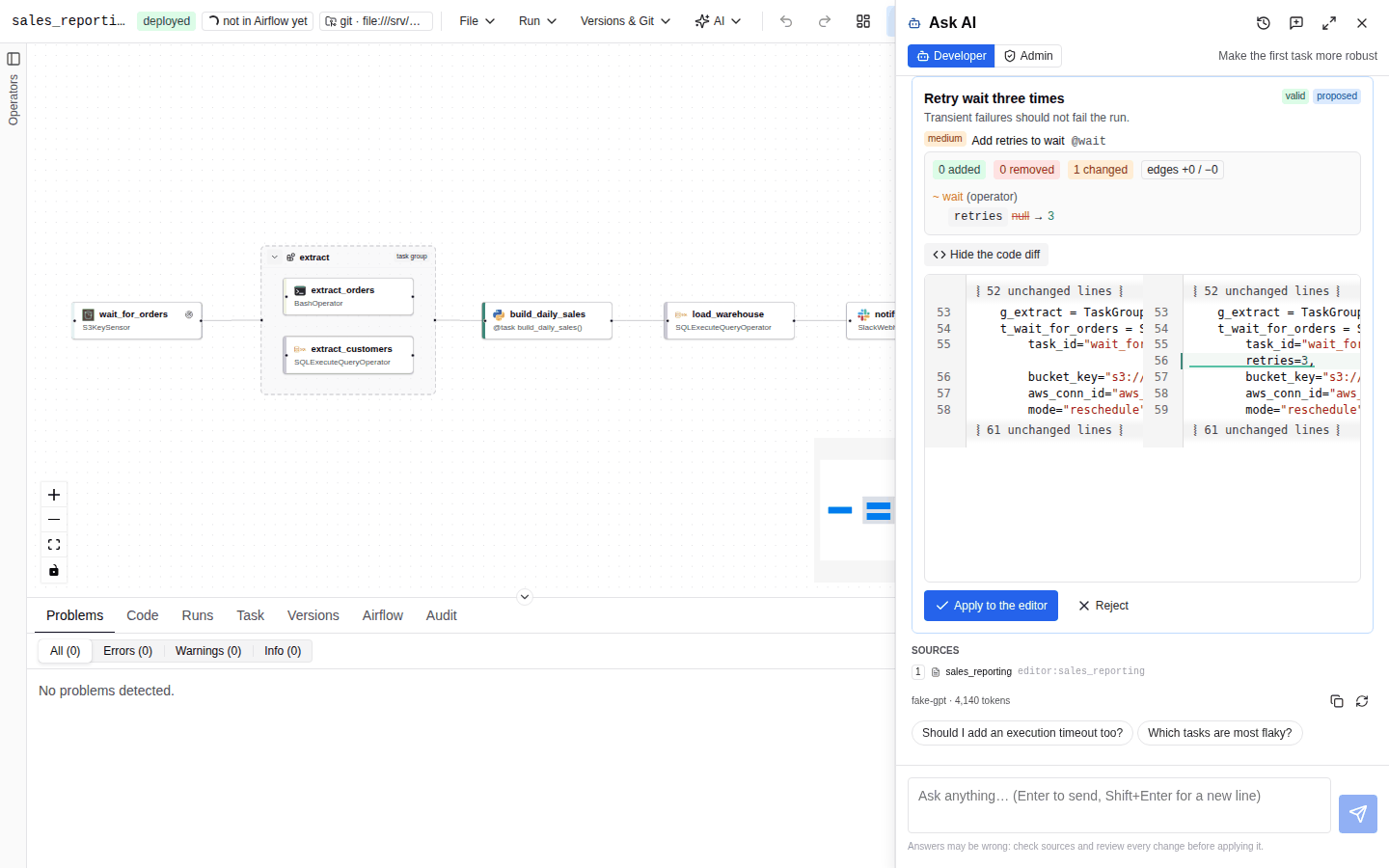
- Review N fixes (findings) or the proposal card (chat) shows the structured spec diff against the base spec, the validation state of the proposal (valid or N validation problems), and on demand Show the code diff: the generated Python file before and after, side by side.
- In findings reports, a checkbox per finding (Include the fix for "…") chooses which patches
to apply;
POST /api/ai/applyapplies the selected ones and validates the result. - Apply to the editor loads the proposal as unsaved work. Nothing is saved or deployed. A
chat proposal needs
spec:writeto apply (Applying a change needs the spec:write permission). - Deploy… opens the normal deploy dialog, with governance, four-eyes approval, pull requests and
the
deploypermission. When the builder reports the DAG saved under a new version or PR, a chat or troubleshooting proposal is recorded asappliedwith the deploy outcome.
A new DAG with nothing deployed shows A new DAG (nothing deployed to compare with). Patches that do not apply to the current spec are skipped and reported (N fixes could not be applied).
Task code and docs
- Write task code… writes the body of the selected
python_taskfrom a description; the result is syntax-checked and scanned for leaks, and Insert into task puts it in place. For other code kinds and full checks (ruff, ShellCheck, import availability) use the AI writer. - Write docs writes the DAG's
doc_md; it asks before replacing existing documentation.
Deploy messages
In the deploy dialog, the PR description has a Generate button (Write the description from the
changes since the deployed version). It calls POST /api/ai/deploy-message, which diffs the
deployed spec against the one being deployed and sends only that structured diff to the model. The
model returns a commit subject of at most 72 characters and a Markdown PR body (Summary, Changes,
Risk). Without a model, or with use_ai: false, a deterministic message is built from the same diff.
The prompt is DEPLOY_MESSAGE_SYSTEM.
Airflow upgrade assistant
AI → Airflow upgrade assistant… finds Airflow 2 idioms (removed template variables, moved imports, deprecated operators, SLA instead of deadlines) and proposes the upgrade as a diff. It combines:
- AutoAir's Airflow 3 rules;
- ruff's rules selected by
ai.upgrade.ruff_rules(default["AIR3"]) on the generated code, task bodies included; - for a single DAG, an optional LLM pass (Add an AI pass, prompt
UPGRADE_SYSTEM).
Choose The open DAG or Every saved DAG (at most ai.upgrade.max_dags, default 100), then
Analyse. The result lists findings (with fixable markers), the validated proposed spec and the
code diff. Apply the upgrade to the editor loads it; deploy it as usual. The API is
POST /api/ai/upgrade with spec, dag_ids or all: true.
AI operators (common.ai)
Airflow's apache-airflow-providers-common-ai provider runs LLM calls and agents inside your DAG, at task run time, with its own Airflow connection. This is separate from AutoAir's AI assistance above: AutoAir does not call the model for these tasks, it only builds them. When the provider is installed next to AutoAir, its operators appear in the palette and the inspector shows a dedicated LLM task section instead of raw parameter fields.
Where the editor appears
- Operators: any catalog operator whose parameters include both
promptandllm_conn_id(LLMOperator,AgentOperatorand related operators). The LLM task section edits the parameters listed below that the operator has; every other parameter, including the LLM connection (llm_conn_id, a connection picker), stays in the regular parameter form. - TaskFlow decorators: a Python task with the decorator
@task.llm,@task.agent,@task.llm_branchor@task.llm_sql. The function body returns the prompt ("The function returns the prompt; the model's answer is the task result."). Above the LLM task section the inspector shows LLM connection (llm_conn_id, required; placeholderpydanticai_default), Database connection (db_conn_id,@task.llm_sqlonly) and Model (model_id,provider:modelsuch asopenai:gpt-5; empty uses the connection's default).
Fields of the LLM task section
| Field | Parameter | Notes |
|---|---|---|
| Prompt | prompt | Operators only (decorators return it). A templated field: Jinja such as {{ ds }}, {{ ti.xcom_pull(...) }} and {{ params.x }} is rendered at run time, with completion. |
| System prompt | system_prompt | Templated instructions that frame every answer. |
| Output | output_type | Text (str) or Structured (pydantic model). See below. |
| Toolsets | toolsets | Agents only (AgentOperator, @task.agent). See below. |
| Require human approval | require_approval | The task defers after generating its output until a reviewer approves or rejects it in Airflow's human-in-the-loop UI. Reveals Approval timeout (approval_timeout, seconds, generated as a timedelta; afterwards the task fails) and Reviewer may edit the output (allow_modifications; the approved, possibly edited, output becomes the task result). Not offered for @task.agent. |
| Iterative human review | enable_hitl_review | Agents only. A reviewer can approve, reject or request changes, and the agent revises its answer. Reveals Max review rounds (max_hitl_iterations, placeholder 5) and Review timeout (hitl_timeout, seconds, generated as a timedelta). |
Turning a switch off removes it and its dependent fields from the task.
Structured output (output-schema builder). With Structured (pydantic model), define the model the answer must match:
- Class name: a Python class name starting with an upper-case letter (
Use a Python class name starting with an upper-case letter (e.g. Sentiment).); Description becomes the class docstring. - One row per field: Field name, Type (
str,int,float,bool,list[str],list[int],list[float],dict), Required, Description shown to the model, and forstrfields Allowed values (the model must answer one of them; generated asLiteral[...]). Add field adds a row. - Generated class previews the Python code.
The code generator emits the class at module level of the DAG file, so Airflow can deserialize the XCom result, and passes it as output_type. Field types come from a closed list and every text is a constant, so the class contains no user code. Identical models in one DAG share one class.
class Sentiment(BaseModel):
    label: Literal["positive", "neutral", "negative"]
    score: float = Field(description="Confidence between 0 and 1")
If output_type holds a value this editor cannot show (for example a Python reference), the field reads output_type holds a value this editor cannot show; edit it in the raw parameters.
Toolsets (agents). SQL toolset and MCP toolset add the tools an agent may call. Each uses an Airflow connection that is resolved only when the task runs:
| Toolset | Fields | Generated |
|---|---|---|
| SQL toolset | Database connection, Allowed tables (empty: every table the connection can read), Schema, Max rows per query, Allow writes (lets the agent run INSERT/UPDATE/DELETE; off means read-only queries) | SQLToolset(db_conn_id=...) |
| MCP toolset | MCP server connection (connection type mcp), Tool name prefix | MCPToolset(mcp_conn_id=...) |
Toolsets written as raw JSON (or another object) in the spec are kept unchanged and counted in a warning.
Validation. Malformed output models and toolsets are errors, a SQL toolset with Allow writes is a warning, and a decorator task without an LLM connection is an error; see AI operator checks. The YAML DAG output cannot express output models or toolsets (an error tells you to use the Python output), and the dag-factory export drops them with a warning.
AutoAir's own AI features can read common.ai / pydantic-ai style Airflow connections for their credentials; see Providers and models.
Limits
| Setting | Default | Applies to |
|---|---|---|
ai.assist.findings_max_tokens | 12000 | review, leak scan, optimise, fix |
ai.assist.explain_max_tokens | 6000 | explain-DAG |
ai.assist.explain_code_max_tokens | 3000 | explain-code |
ai.assist.task_code_max_tokens | 8000 | task code and writers |
ai.assist.max_log_chars | 12000 | log tail sent to fix |
ai.assist.max_code_chars | 40000 | code sent to explain-code |
ai.assist.fix_rounds | 2 | fix patch-and-revalidate rounds |
ai.assist.memory_max_items | 2000 | conventions/preferences kept in the AI memory |
Every call is recorded in the AI audit log. All fields:
ai.assist and
ai.upgrade.