Troubleshooting runs with AI
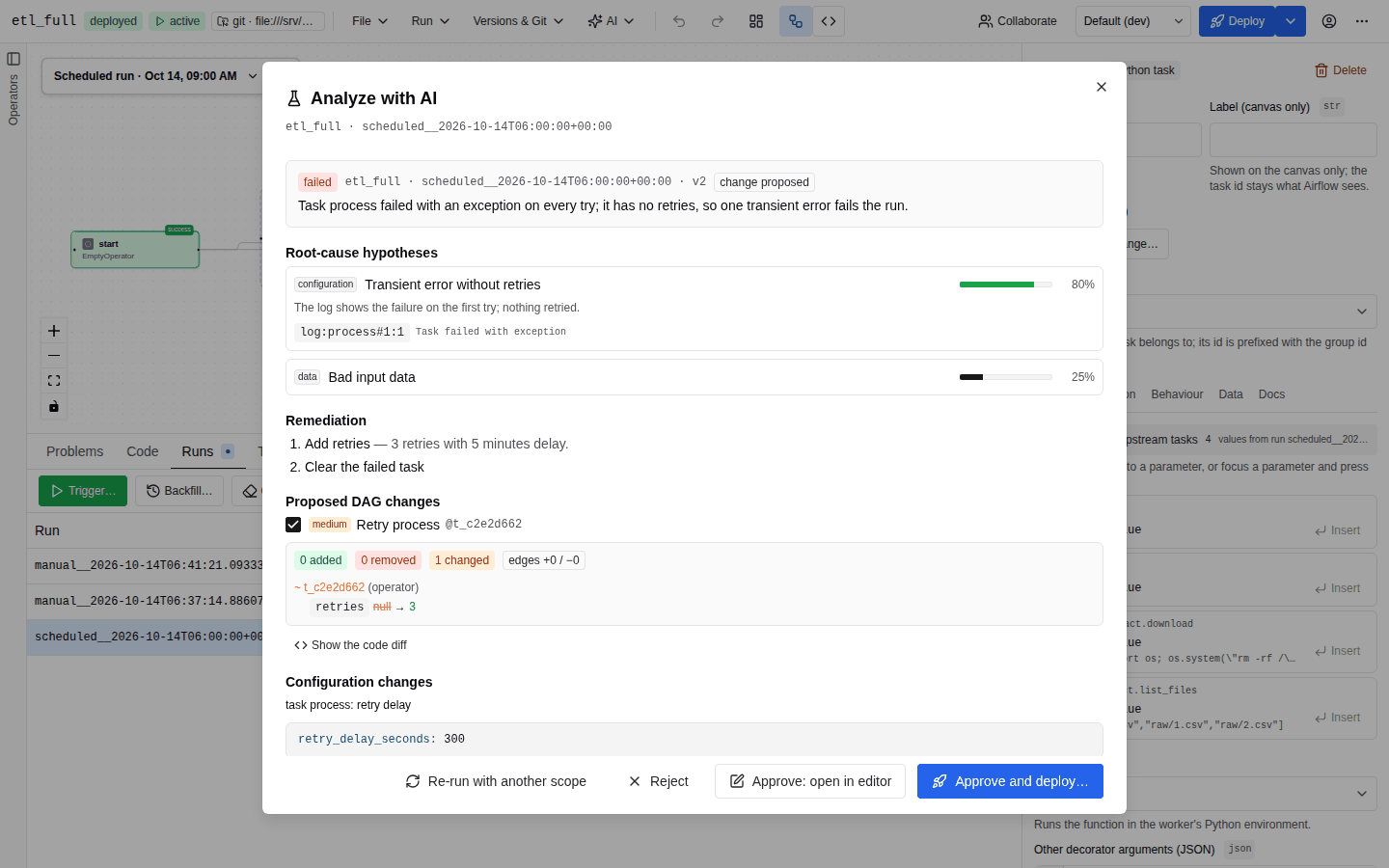
Analyze with AI starts a scoped, read-only, agentic analysis of a DAG run and ends with a structured report: root-cause hypotheses with evidence, remediation steps and proposed changes. Nothing is changed unless you approve it, and an approved DAG change still goes live only through the normal deploy pipeline.
The button is in the bottom panel's Runs tab (for the selected run) and Task tab (for the selected task instance and try); see Runs.
Requirements
| Needed for | Requirement |
|---|---|
| Running an analysis | ai:use and airflow:read, a configured model, ai.troubleshoot.enabled (default on) |
| Approving a DAG change | spec:write |
| Deploying it | deploy, plus governance, approvals and PR mode as configured |
Every Airflow call uses the caller's own token, so Airflow's RBAC applies too. When the analysis is unavailable the button explains why: AI analysis is not available (AI off, no model, or no airflow:read), or Select a run first.
Running an analysis
- Select a failed run in Runs (or a task instance and try in Task) and click Analyze with AI.
- Under What the agent may read, narrow or widen the scope. Logs, task states, the DAG spec and generated code are always included. Options the administrator disabled are greyed out (disabled by the administrator).
- Optionally attach External tools (MCP servers): pick allowed servers, and click a tool to leave it out.
- Optionally ask a Question, for example Why does load_orders time out only on Mondays?
- Click Start analysis. Progress shows Reading the run and its logs…, Connecting tools… and Analysing…, with the tool calls as they happen. Cancel stops the run.
Earlier analyses of this DAG lists stored reports you can Open. Run again repeats the
analysis; Re-run with another scope starts a new analysis linked to the previous one (rerun_of).
What the agent sees
Evidence pack
Collected deterministically before the model runs:
- run metadata: state, type, dates,
bundle_version, and the keys ofconf; - every task instance: state, try number, duration, operator;
- for the failed task instances (or the one you picked), at most
max_tasks(4): the upstream states, the DagSpec node id, the XCom keys, and the log tail of each try (max_tries4,max_log_chars12000 per try) with line numbers; - the DAG version matching the run's bundle version;
- the DagSpec (the open editor's, else the saved one) and the generated code;
- import errors;
- the Airflow version and installed providers.
Logs pass two scrubbers before the model sees them: the secret patterns, and unquoted
password=…, token: … and Authorization: Bearer … assignments. They are then wrapped as
untrusted data, so instructions planted in a log are not followed.
Tools by scope
The server settings set the maximum scope; a request can only narrow it, never widen it.
Scope (ai.troubleshoot.resources.* and your choice) | Server default | Tools |
|---|---|---|
| always | – | get_task_log (any task and try: tail, line window or grep, with line numbers), get_task_instances, get_current_spec, get_generated_code, catalog and validation tools |
other_runs | on | list_other_runs, get_task_history (state, tries and duration of a task across runs) |
connections | on | get_connection_metadata: conn type, host, schema, port and the names of extra fields; never logins, passwords or extra values |
variables | on | list_variable_keys (never values) |
pools | on | get_pools (slots, running, queued, scheduled, deferred, open) |
xcom_keys | on | XCom keys of the analysed run |
xcom_values | off | get_xcom with values, truncated and scrubbed |
import_errors | on | get_import_errors |
airflow_config | off | get_airflow_config (Airflow masks sensitive values; AutoAir scrubs again) |
filesystem | off (no roots) | fs_list, fs_read in the sandbox below |
research / online | on / when ai.research.online | search_docs, read_source, package info; fetch_doc online only |
| MCP servers | allow_external_mcp on | mcp__<server>__<tool> for each attached, allow-listed tool |
GET /api/ai/troubleshoot/options returns what the server allows, the defaults, the filesystem roots,
whether online research is available, and the attachable MCP servers.
Filesystem sandbox
ai.troubleshoot.filesystem.roots lists folders the agent may read, for example Airflow's
base_log_folder; include_dags_folder adds the DAGs folder. Empty roots mean no filesystem access.
- Paths are resolved, so symlinks and
..cannot leave a root; listings skip links that point outside. - The final open uses
O_NOFOLLOW | O_NONBLOCKand only regular files are read. - Every path component is checked against
deny_globs(default:.env,*.env,*.pem,*.key,*.p12,*.pfx,*.kdbx,id_rsa*,id_ed25519*,*secret*,*credential*,*.cfg,*.ini,*.db,*.sqlite*); file names must matchallow_globs(default*). - Files over
max_file_bytes(50 MiB) are only listed; one read returns at mostmax_read_chars(20000) and one listing at mostmax_list_entries(200). - Contents are scrubbed like logs.
ai:
  troubleshoot:
    resources:
      xcom_values: false
      airflow_config: false
    filesystem:
      roots: ["/opt/airflow/logs"]
      include_dags_folder: true
External MCP servers
The agent can call tools of external MCP servers that an administrator allowed for the
troubleshoot agent, configured in ai.mcp_client.servers or the admin panel's MCP servers tab.
Tool results are truncated, scrubbed and treated as untrusted; a server that cannot be reached is
reported and the analysis continues without it. Configuration and security are described in
MCP client. A tool the server does not mark read-only pauses the analysis until you approve the call (Tool-call approval).
The report
The agent's final answer (prompt TROUBLESHOOT_SYSTEM) contains:
summary: the root cause;hypotheses(Root-cause hypotheses), sorted by calibratedconfidence, each with acategory(DAG, code, configuration, infrastructure, data, dependency, platform, unknown) andevidenceitems:source(for examplelog:load#2),lineand the verbatimquote;remediation: ordered steps;- three kinds of change:
- Proposed DAG changes: findings with JSON patches. The server applies them to the spec,
validates the result into
proposed_spec, and renderscode_before/code_afterfor the code diff. Checkboxes choose which patches to apply; - Configuration changes: retries, timeouts, pools or connection extras as YAML, JSON, env or text snippets;
- In Airflow: clear or retry a task instance, clear the run, mark a task or the run success/failed, or a manual step such as fixing a connection. Whether AutoAir runs them depends on the Airflow actions mode.
- Proposed DAG changes: findings with JSON patches. The server applies them to the spec,
validates the result into
The dialog also lists the tool calls, the numbered sources and the tokens and cost. A report's status is one of change proposed, no change proposed, approved, rejected or deployed.
Airflow actions
ai.troubleshoot.airflow_actions decides what happens with the proposed Airflow actions. The
section header in the report shows the mode as a badge:
| Mode | Badge | What happens |
|---|---|---|
read_only (default) | read-only | Instructions only: AutoAir does not run them for you. |
hitl | approval needed | Each runnable action has Execute and Dismiss. It runs only when you click Execute. |
apply | automatic | The runnable actions run when the analysis completes. Their progress streams into the dialog, and the Action log lists each result. |
When the server allows more than read-only, the setup form has an Airflow actions choice. You can
pick the server's mode or a stricter one, never a more permissive one. Without the run:manage
permission, or with features.runs off, actions are always read-only.
Log content is untrusted: a log line can try to talk the model into "mark everything successful". AutoAir treats the model's proposals as data and checks each one. An action is shown as blocked, with the reason, when:
- its type is not in
ai.troubleshoot.allowed_actions(defaultclear,retry,clear_run;mark_success,mark_failed,mark_run_successandmark_run_failedneed an explicit opt-in); - it targets another DAG, or another run unless
actions_other_runsis on; - it clears upstream tasks (off by default) or downstream tasks (on by default) when that is not allowed;
- the analysis already has
max_actionsrunnable actions (default 5); - you lack
run:manage, or run operations are switched off.
An action runs with your own Airflow token, through the same calls as the builder's run
operations, so Airflow's own permissions apply as well. Before it changes anything it checks the
current state. A task that is already running or queued is not cleared again, a retry of a task that
did not fail is skipped, and a target already in the requested state is not marked again. A clear is
first counted with a dry run and refused when it would reset more than
max_cleared_task_instances task instances (default 20). Each result (done, skipped or
failed, with a message) is stored with the analysis. If two people (or two AutoAir replicas) execute the same action at the
same moment, it runs once: the first approval marks it running, and the other one is told that
it is already running.
The developer and admin assistants in the chat never propose Airflow actions (they propose DAG changes and configuration snippets), so these modes apply only to troubleshooting.
Approve, reject, apply
- Approve: open in editor applies the selected patches and loads the validated spec as unsaved work (The fix is in the editor).
- Approve and deploy… does the same and opens the deploy dialog. When the builder reports the
DAG saved under a new version or pull request, the analysis is marked
applied(deployed) with the outcome. - Reject records the decision and changes nothing.
If an approved change cannot be applied automatically, the dialog says so and you follow the instructions instead.
| Endpoint | |
|---|---|
GET /api/ai/troubleshoot/options | Allowed scope, defaults, filesystem roots, MCP servers |
POST /api/ai/troubleshoot/stream | Run an analysis (SSE: status stages collect, analyze, mcp; tool events, tokens, usage; then the troubleshoot result) |
GET /api/ai/troubleshoot/analyses[?dag_id=] | The caller's stored analyses |
GET /api/ai/troubleshoot/analyses/{id} | One analysis |
POST /api/ai/troubleshoot/analyses/{id}/decision | approve (optional finding_ids, default all; returns the patched, validated spec and its code; needs spec:write) or reject; optional comment |
POST /api/ai/troubleshoot/analyses/{id}/applied | Records that the approved change was deployed (version, etag, PR URL, environment) |
POST /api/ai/troubleshoot/analyses/{id}/actions/{action_id} | execute or reject one Airflow action (execute needs run:manage, features.runs and a hitl or apply analysis) |
Analyses are stored in the ai_troubleshoot collection (ai.troubleshoot.store_url, default
<state>/ai-troubleshoot, SQL rows with a database backend). Every step is audited:
- the analysis: AI audit feature
troubleshootwith user, model, tokens and cost, tools used, sources, run ids, scope and attached MCP servers; - each approval, rejection and applied change: features
troubleshoot:approve,troubleshoot:rejectandtroubleshoot:applied, also in the builder audit trail astroubleshoot_approve,troubleshoot_rejectandtroubleshoot_applied; - Airflow actions:
troubleshoot:actions_proposed(all actions with their status, block reason and the mode),troubleshoot:action_approved,troubleshoot:action_executed(result, message, whether apply mode ran it) andtroubleshoot:action_rejected, also in the builder audit trail (with_instead of:).
Settings
| Setting | Default | |
|---|---|---|
ai.troubleshoot.enabled | true | Offer Analyze with AI |
ai.troubleshoot.max_tasks | 4 | Failed task instances whose logs are pre-loaded |
ai.troubleshoot.max_tries | 4 | Tries per task instance whose logs are read |
ai.troubleshoot.max_log_chars | 12000 | Tail of each try's log |
ai.troubleshoot.max_steps | 12 | Model turns per analysis |
ai.troubleshoot.timeout_seconds | 420 | Wall clock per analysis |
ai.troubleshoot.allow_external_mcp | true | Let users attach allowed external MCP servers |
ai.troubleshoot.store_url | <state>/ai-troubleshoot | Where analyses live |
ai.troubleshoot.resources.* | see the scope table | Maximum scope |
ai.troubleshoot.filesystem.* | no roots | Read-only sandbox |
ai.troubleshoot.airflow_actions | read_only | read_only, hitl or apply |
ai.troubleshoot.allowed_actions | ["clear", "retry", "clear_run"] | Action types that may run |
ai.troubleshoot.max_actions | 5 | Runnable actions per analysis |
ai.troubleshoot.max_cleared_task_instances | 20 | Largest clear (checked with a dry run) |
ai.troubleshoot.allow_include_downstream | true | A clear may include downstream tasks |
ai.troubleshoot.allow_include_upstream | false | A clear may include upstream tasks |
ai.troubleshoot.actions_other_runs | false | Actions may target other runs of the DAG |
The system prompt TROUBLESHOOT_SYSTEM can be replaced or extended like every prompt
(Prompts). Give proxies in front of AutoAir a read timeout
above timeout_seconds, since the analysis streams for its whole duration. All fields:
ai.troubleshoot,
ai.troubleshoot.resources,
ai.troubleshoot.filesystem.
For quick fixes without the agent, Fix with AI… in the AI menu takes a run id and task id and proposes patches from the log tail; see Assist features.