Git bundles and git-sync
Production Airflow usually reads DAGs from git: either a GitDagBundle (Airflow 3's versioned DAG bundles) or a git-sync sidecar that keeps a checkout of the repository in the DAG folder. In both cases AutoAir must commit to that repository; files written into the DAG folder directly are overwritten by the next sync.
The git deploy target (storage.mode=git) writes, per DAG:
<dag_id>.autoair.json, the spec (written first),- the generated DAG file (or the loader stub / YAML file, depending on the spec's output mode, written last),
into storage.git.subdir of the repository, as one commit. AutoAir never overwrites files it did not create and refuses to overwrite generated files that were edited by hand ("ejected") unless the deploy is forced.
Choose GitDagBundle or git-sync
GitDagBundle | git-sync sidecar | |
|---|---|---|
| How Airflow reads | The DAG processor clones the repository and tracks a ref (tracking_ref), refreshing every refresh_interval | A sidecar keeps a checkout in the DAG folder; Airflow reads it as a LocalDagBundle |
| Versioning | Each DAG version records the commit SHA as its bundle_version; runs execute the code of that commit | None: the folder is whatever is checked out when a task starts |
| AutoAir discovery | Every GitDagBundle in [dag_processor] dag_bundle_config_list is offered in the deploy-target dialog | Offered when the DAG folder is a git checkout with an origin remote |
| AutoAir settings | AUTOAIR_STORAGE__GIT__USE_AIRFLOW_BUNDLE=true reuses repository, branch, folder and connection | Set repo, base_branch, subdir explicitly |
| Recommended | Yes, for Airflow 3 | Existing installations |
Configure with environment variables
Reusing a GitDagBundle
# Airflow configuration (Helm chart `config:` block, or airflow.cfg)
config:
  dag_processor:
    dag_bundle_config_list: >-
      [{"name": "dags", "classpath": "airflow.providers.git.bundles.git.GitDagBundle",
        "kwargs": {"git_conn_id": "git_dags", "tracking_ref": "main", "subdir": "dags",
                   "refresh_interval": 60}}]
AUTOAIR_STORAGE__MODE=git
AUTOAIR_STORAGE__GIT__PROVIDER=github          # REST API used for commits and pull requests
AUTOAIR_STORAGE__GIT__USE_AIRFLOW_BUNDLE=true  # repo, branch, subdir, connection from the bundle
AUTOAIR_STORAGE__GIT__BUNDLE_NAME=dags         # optional: default is the first GitDagBundle
AUTOAIR_STORAGE__GIT__SUBDIR=dags/autoair      # optional: default is the bundle's subdir
AUTOAIR_STORAGE__GIT__MODE=pr
With use_airflow_bundle, explicit settings win: repo, base_branch and subdir are taken from the bundle only when unset, and the connection is forced_conn_id, else conn_id, else the bundle's git_conn_id. When no GitDagBundle is configured AutoAir fails to build the target with use_airflow_bundle is set but no GitDagBundle is configured.
Keep subdir inside the bundle's own subdir, otherwise Airflow never sees the files. A dedicated sub-folder (dags/autoair) keeps AutoAir's files apart from hand-written DAGs.
Explicit repository (git-sync or no bundle)
AUTOAIR_STORAGE__MODE=git
AUTOAIR_STORAGE__GIT__PROVIDER=gitlab
AUTOAIR_STORAGE__GIT__API_URL=https://gitlab.acme.io/api/v4   # self-hosted
AUTOAIR_STORAGE__GIT__REPO=data-platform/airflow-dags          # project path or numeric id
AUTOAIR_STORAGE__GIT__BASE_BRANCH=main                         # the branch git-sync checks out
AUTOAIR_STORAGE__GIT__SUBDIR=dags/autoair
AUTOAIR_STORAGE__GIT__CONN_ID=git_dags                         # Airflow connection with the token
The same values can go in a configuration file:
storage:
  mode: git
  git:
    provider: gitlab
    api_url: https://gitlab.acme.io/api/v4
    repo: data-platform/airflow-dags
    base_branch: main
    subdir: dags/autoair
    conn_id: git_dags
Configure from the UI
Administrators (permission admin:deploy_target) can pick the target at runtime without a restart: Versions & Git → Deploy target…, or click the storage chip in the toolbar. The chip turns orange when Airflow reads DAGs from git but AutoAir still writes local files.
The dialog lists the options found in this Airflow:
- DAG folder (local files),
- every
GitDagBundle("Airflow reads DAGs from this repository (GitDagBundle). Deploy here so they go live."), - Git repository of the DAG folder when the DAG folder is a git checkout, for example git-sync ("files written locally are overwritten; deploy to its repository").
Choose Git hosting, Repository, Branch Airflow reads, Folder in the repository, Pull requests or Push to branch, and the Credentials (Airflow connection). Test checks access; Save & use applies it; Back to server settings resets to the environment configuration.
The choice is stored as deploy-target.json in the state folder (or as a database row with a SQL backend) and overrides the configured storage and storage.git settings. Tokens and keys are never stored by AutoAir: the API rejects them, and credentials always come from the Airflow connection. With a SQL backend, other replicas apply the change within database.sync_seconds; with the file backend they need a restart.
Administrators can restrict what the dialog may choose:
| Setting | Effect |
|---|---|
AUTOAIR_STORAGE__ALLOWED_TARGETS='["git"]' | Only git targets are offered and accepted (storage.mode must be in the list) |
AUTOAIR_STORAGE__GIT__FORCED_CONN_ID=git_dags | Every git deploy uses this connection; shown read-only in the dialog |
Providers
storage.git.provider | storage.git.repo format | Pull requests | Authentication |
|---|---|---|---|
local | Remote URL (https://... or git@...) | No: PR mode pushes the pending branch; open the merge request yourself | Token (HTTPS), ssh_key_file, or the connection's private_key; uses the git CLI with a clone cache (cache_dir, fetch_interval) |
github | owner/name | Yes | GitHub App (github_app_id, github_installation_id, github_private_key or github_private_key_file; recommended) or a fine-grained token |
gitlab | Project id or path | Yes (merge requests) | Project or personal access token |
bitbucket | workspace/repo (Bitbucket Cloud) | Yes | Access token, or app password with storage.git.username |
azure | organization/project/repository | Yes | PAT, or an Entra ID bearer token with storage.git.azure_bearer=true |
gitea | Remote URL (Gitea or Forgejo) | Yes: the branch is pushed with the git CLI (like local), the pull request opened with POST /api/v1/repos/{owner}/{repo}/pulls | Access token from the Airflow connection (password), sent as Authorization: token …; never stored by AutoAir. api_url defaults to <scheme>://<host>/api/v1 of an HTTP(S) remote (set it for SSH remotes) |
storage.git.api_url points the REST client at GitHub Enterprise, a self-hosted GitLab or Azure DevOps Server. The API providers need no local clone, which keeps API-server replicas stateless.
When credentials come from an Airflow connection AutoAir reads host (repository URL), login, password (token), and the extras key_file, private_key, github_app_id, github_installation_id: the same fields Airflow's git connection uses for the bundle.
Connection credentials are not frozen at startup: AutoAir re-reads the connection every storage.git.credentials_ttl seconds (default 60) and immediately when the host rejects them (HTTP 401/403 or a git authentication error), then retries the operation once, so rotating a token in Airflow needs no restart. Per-user connections are read on every deploy. If the target cannot be built at all when AutoAir starts (say the connection does not exist yet), AutoAir still starts; /api/ready and the deploy-target panel show the error, and the next deploy builds the target again.
Live verification exists for GitLab (push and PR modes against GitLab CE in Docker); GitHub, Bitbucket Cloud, Azure DevOps and Gitea are covered by contract tests against fake servers (the git compose demo profile runs against a real Gitea). Test against your own host before relying on a provider in production.
Pull requests or direct push
storage.git.mode | What a deploy does | Goes live |
|---|---|---|
pr (default) | Commits to a per-DAG branch (branch_template, default {branch_prefix}{environment_path}{dag_id} with branch_prefix=autoair/) and opens or updates one pull request per DAG | When the pull request is merged and the bundle refreshes |
push | Commits straight to base_branch | On the next bundle refresh / git-sync pull |
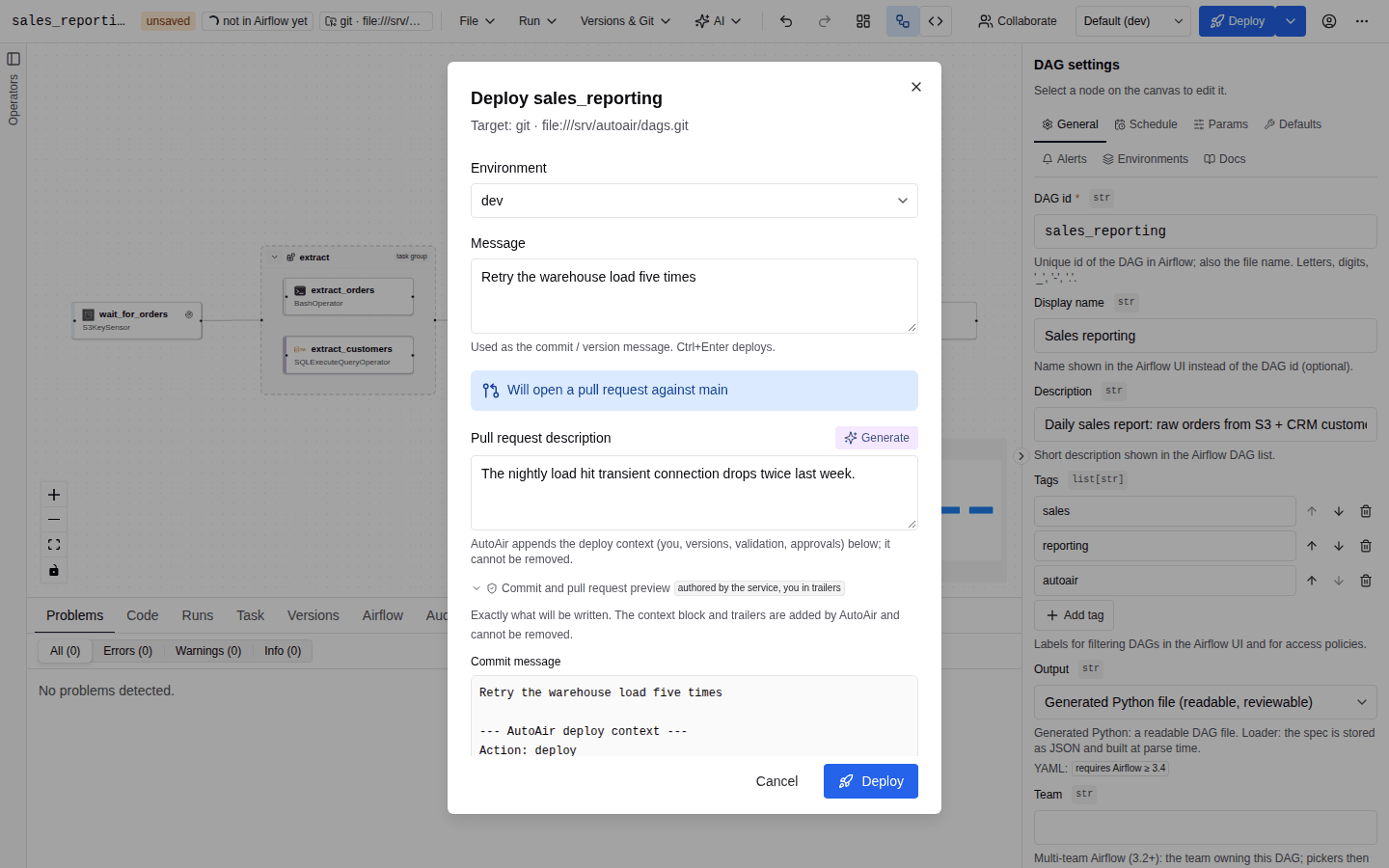
Who may bypass a pull request is governed by IAM:
deploy:direct_pushlets a user senddirect_push: truein PR mode. It goes to the roles inAUTOAIR_IAM__DIRECT_PUSH_ROLES(default["Admin"]);AUTOAIR_STORAGE__GIT__DIRECT_PUSH_ROLESoverrides the list for this target ([]means nobody).AUTOAIR_IAM__FORCE_PR_WITHOUT_DIRECT_PUSH=trueturns push mode into PR mode for users withoutdeploy:direct_push.- With
AUTOAIR_IAM__REQUIRE_APPROVAL=truea deploy first becomes a proposal that another user approves.
Pull-request details:
| Setting | Default | Purpose |
|---|---|---|
pr_title_template, pr_body_template | AutoAir: update DAG {dag_id}, {message} {description} Opened by AutoAir. | Title and body; the context block is always appended |
commit_message_template | AutoAir: update DAG {dag_id} | Commit subject when the user gives none |
pr_labels, pr_reviewers, pr_draft | [], [], false | Labels, requested reviewers (GitHub logins or org/team, GitLab usernames, Bitbucket account UUIDs, Azure identity ids, Gitea usernames), draft PRs (Gitea: a WIP: title prefix) |
delete_branch_after_merge | true | Asks GitLab, Bitbucket and Azure DevOps to delete the source branch on merge (a repository setting on GitHub) |
max_attempts | 3 | Retries when the branch moves between read and commit |
Every commit carries git trailers (X-AutoAir-User, X-AutoAir-User-Name when a display name is known, X-AutoAir-Dag, X-AutoAir-Environment for an environment deploy, X-AutoAir-Spec-Etag, X-AutoAir-Base-Etag, X-AutoAir-Validation, X-AutoAir-Version, one Approved-by per approval, and Co-authored-by when the service identity authors the commit) and a context block naming the user, validation result and target; see Deploy and Configuration.
Credentials per user
AUTOAIR_STORAGE__GIT__CREDENTIALS_MODE=per_user commits with the deploying user's own Airflow connection (user_conn_id_template, default git_{username}), read with the user's token so Airflow's RBAC decides. AutoAir stores no credentials; reads (history, pending pull requests) keep the shared credentials. This needs AutoAir to see Airflow's connections: plugin mode, or standalone with Airflow installed and configured.
Tokens typed per deploy
AUTOAIR_STORAGE__GIT__REQUEST_TOKEN (off · optional, the default · required) lets users
type their own git token in the deploy, promote and delete dialogs. It travels only in the
X-AutoAir-Git-Token header of that request and is never stored, cached, logged or audited.
optional: the token, when given, replaces the configured credentials for that write.required: every git write needs one. The configured connection, if any, only serves reads; with none, reads are anonymous (public repositories) and the target still starts.- A forced connection (
forced_conn_id) wins unlessAUTOAIR_STORAGE__GIT__REQUEST_TOKEN_OVERRIDES_FORCED=true; until then the header is refused. - Team targets (
team_storage.<team>.git) have their own setting;offglobally disables tokens everywhere. - Every provider: GitHub, GitLab, Bitbucket and Azure DevOps use it for the REST API;
localandgiteapush over HTTPS with it ashttp.extraHeaderBasic credentials passed through the environment (never the remote URL or.git/config), and Gitea opens the pull request with it. SSH remotes andhttp://hosts are refused. - AutoAir only accepts the header over HTTPS or from a loopback client. Behind a reverse proxy
that terminates TLS, list the proxy in
AUTOAIR_SERVER__FORWARDED_ALLOW_IPSsoX-Forwarded-Proto: httpsis trusted.AUTOAIR_STORAGE__GIT__REQUEST_TOKEN_ALLOW_INSECURE=trueis for test setups only. - A rejected token is a 401/403 (
git_token_rejected), never retried with other credentials. - MCP: off unless
AUTOAIR_STORAGE__GIT__MCP_REQUEST_TOKEN=true, and then only as the header of the MCP HTTP request (configured in the MCP client), never as a tool argument.
Token types and scopes: GitHub fine-grained PAT with contents:write + pull_requests:write;
GitLab api; Bitbucket access token with repository:write + pullrequest:write; Azure DevOps
PAT with Code (Read & write); Gitea write:repository (+ read:user for audit attribution).
See Configuration and IAM.
Environments and promotion
AUTOAIR_STORAGE__GIT__ENVIRONMENTS='{"dev": "dev", "prod": "main"}' maps environment names to branches. Each environment's Airflow tracks its own branch; Versions & Git → Promote environment… opens a pull request from one branch to the other (promote_branch_template, default {branch_prefix}promote/{from_env}-to-{to_env}/{dag_id}). See Environments.
bundle_version and run history
With a GitDagBundle, Airflow stores the commit SHA a DAG version was parsed from as its bundle_version, and each DAG run records the bundle_version it executes. AutoAir shows both:
- the Versions panel lists Airflow's DAG versions as
<bundle_name> @ <bundle_version>, - the Runs panel shows each run's
bundle_version, - AI troubleshooting matches a failed run to the DAG version with the same
bundle_version.
In push mode the bundle_version is the SHA of AutoAir's own commit (verified end to end against GitDagBundle). In PR mode it is the SHA of the commit on the tracked branch after merging, which differs from AutoAir's branch commit when the host squashes or rebases. git-sync deployments (a LocalDagBundle) have no bundle_version.
Concurrency and conflicts
AutoAir reads the spec at a known etag and commits against the branch head it read. On GitHub this is an atomic compare-and-swap (GraphQL createCommitOnBranch with expectedHeadOid); GitLab's commit API has no such parameter, so AutoAir checks the head right before committing, which leaves a small race window. When someone else changed the same DAG in the meantime, the deploy answers with a conflict and the editor offers a three-way merge at spec level instead of losing either change. When the branch moved for an unrelated file, AutoAir retries up to storage.git.max_attempts times.
Failure behaviour
| Situation | Result |
|---|---|
| Token lacks write access | Deploy fails with the host's error; nothing is written |
| Repository unreachable | Deploy fails; /api/ready reports the storage check as failed (unless server.ready_check_storage=false) |
| Pull request already open for the DAG | The new commit is added to the same branch and pull request |
| Pull request merged or closed | The next deploy starts a fresh branch from base_branch |
| File in the target folder not created by AutoAir | Refused; AutoAir never overwrites foreign files |
| Generated file edited by hand | Reported as ejected; overwriting needs an explicit force |