Admin panel
The admin panel is a full-screen view of this AutoAir's server state, its users, AI usage and maintenance actions. It works the same in plugin and standalone mode.
Opening it
Open the user menu (the person icon in the top bar) and choose Admin panel. The entry is shown only to users holding admin:panel; the built-in Admin role has it. Every /api/admin/* route requires admin:panel, and actions that change something need their own permission as well (listed per tab below). See IAM.
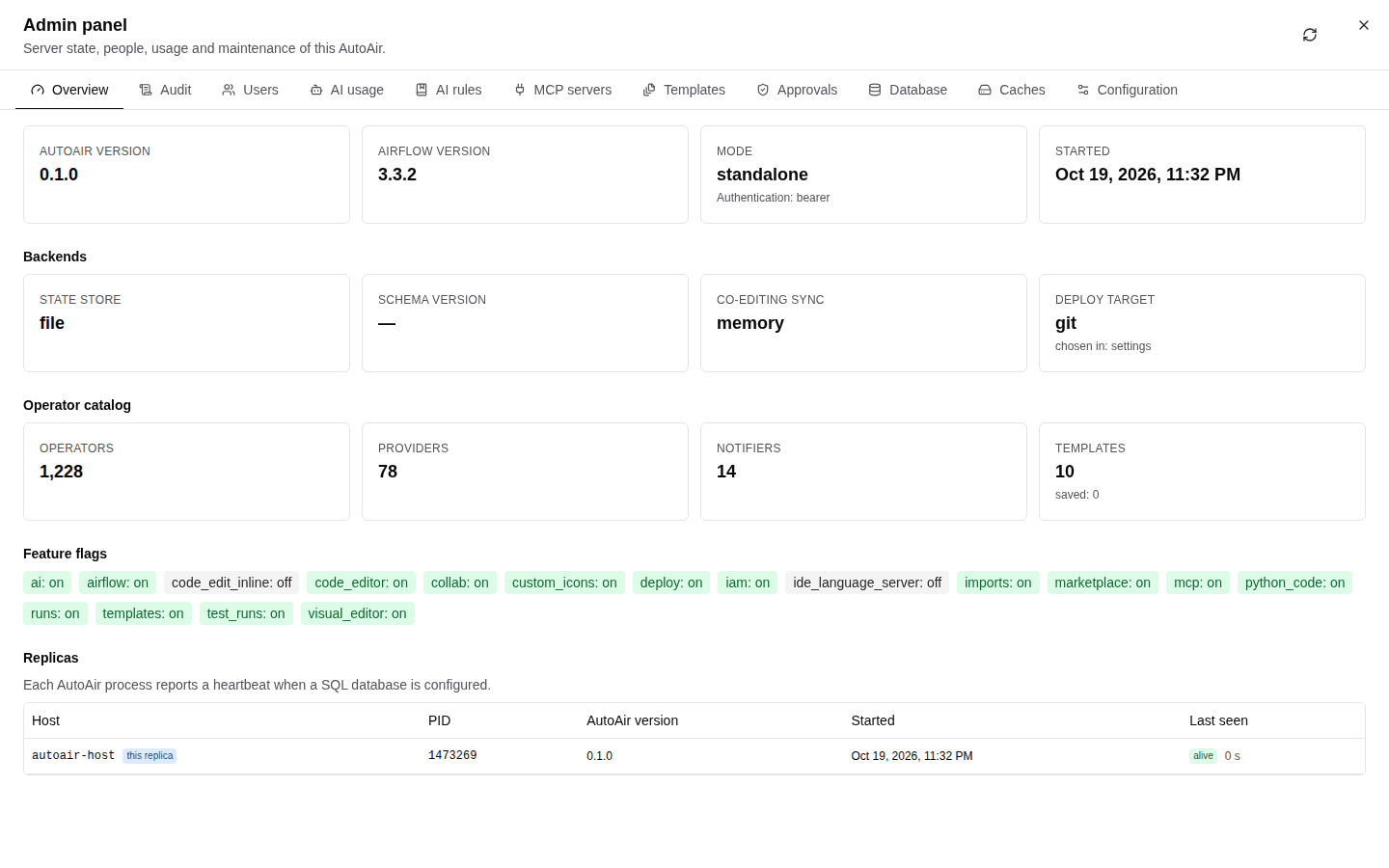
The header shows Admin panel and "Server state, people, usage and maintenance of this AutoAir." The Refresh button reloads every tab's data. The tabs are, in order: Overview, Features, Audit, Users, AI usage, AI rules, MCP servers, Templates, Approvals, Database, Caches, Configuration. The panel is available in English and Turkish, following the UI language.
Some data is per process: Caches and the Overview catalog statistics describe the replica that served the request, and cache actions apply only to that replica. With a SQL state store, the Replicas list shows all of them. See Scaling.
Overview
GET /api/admin/overview
| Card | Content |
|---|---|
| Versions | AutoAir version, Airflow version, Mode (plugin, standalone, local), Authentication (how the caller authenticated: airflow, bearer, none), Started |
| Backends | State store (file, sqlite, postgresql), Database URL (credentials masked), Schema version (current and latest), Co-editing sync (memory, database, redis or off), Deploy target (kind, and "chosen in: settings" or "chosen in: ui") |
| Feature flags | Every effective features.* flag as on/off (see Feature flags) |
| Replicas | Host, PID, Last seen, alive/stale, and which one is this replica. "Each AutoAir process reports a heartbeat when a SQL database is configured." With the file backend only the current process is listed |
| Operator catalog | Operators, Providers, Notifiers found by the catalog |
| Templates | Number of templates, and how many are saved (not built-in) |
Use it to confirm, after a rollout, that every replica runs the same version, that the schema is current and that the backends are the ones you configured.
Features
GET /api/admin/features, PUT /api/admin/features/{name}
Every feature flag with its Configured value, runtime Override, Effective value (what the server obeys now) and the last change (who, when, why). Admins with admin:config switch a flag with its toggle, or Reset it to the configured value; each change asks for a reason and is audited as feature_override. Flags listed in features_locked or set through the environment (AUTOAIR_FEATURES__<NAME>) are shown as Locked and cannot be changed. A flag kept off by the allow_python_code policy switch or by a missing extra is marked as such. Other replicas apply a change within features_override_ttl seconds. See Switching flags at runtime.
Audit
GET /api/admin/audit, GET /api/admin/audit.csv
The audit browser over the whole audit trail (all DAGs), newest first, 50 rows per page.
- Filters: User, Action (exact action name such as
deploy,permission_denied,review), DAG, From and To (dates; From inclusive, To exclusive). Apply filters runs the query, Reset clears it. - Table: Time, User, Action, DAG, Details (the record's JSON details, which depend on the action: for example the deploy context, or the permission and path of a denial). Previous and Next page through the results.
- Export CSV downloads the filtered trail (
admin.export_defaultrows, 10,000 by default; a request may ask for up toadmin.export_limit, 50,000 by default) asautoair-audit-<date>.csv. Cells that look like spreadsheet formulas are neutralised.
Action names and record contents are listed in Audit.
Users
GET /api/admin/users
"Users who used AutoAir (with their AutoAir roles when last seen) and the users found in the audit trail." Columns: User, AutoAir roles ("unknown" for users only known from the audit trail), Permissions (count), Last seen, Audited actions (count), Last action.
AutoAir has no user database: this list is built from requests it has seen and from the audit trail. Roles are those resolved at the user's last request; change them in Airflow (see IAM).
AI usage
GET /api/admin/ai-usage?days=N
Requests, tokens and cost per user and model, from the AI audit log. Period: last 1, 7, 30 (default), 90 or 365 days. Columns: User ("(anonymous)" without a user), Model, Requests, Input tokens, Output tokens, Cost, Errors. "Cost is known only for models with configured pricing" (ai.pricing). With a SQL backend the aggregation runs in the database; with files the most recent records are scanned. The data comes from the AI audit log, so nothing is counted while ai.audit.enabled is false. See AI usage and audit.
AI rules
Project rules are Markdown text added to every AI authoring and writing prompt: generation, review, fixes, code writers and the developer assistant.
- Scope:
global("All teams") applies to everyone;team:<name>applies to that team's server (multi-team). Other values are refused ("Use global or team:<name>"). - Add rules creates a scope; each entry has Rules (Markdown), Enabled, Preview and Edit, and shows who updated it and when.
- Saving and deleting need
ai:admin; others see the rules read-only.
ai.rules.enabled and ai.rules.max_chars (8000) bound what is injected. See AI guardrails.
MCP servers
External MCP servers the AI agents may use as tools, for example metrics, tickets or runbooks. Users choose which allowed servers and tools to attach before an analysis.
- Add server opens a form: Name (lowercase letters, digits,
-and_, at most 40), Description, URL, Transport (HTTP or SSE), Allowed tools (comma-separated names or patterns;*= every tool), Timeout (s) (1 to 600, default 30), Agents (Troubleshooting, Developer, Admin), Headers (for exampleAuthorization) and Enabled. - Header values are stored encrypted (with the
ai.user_llm.encryption_keyFernet key) and never shown again. When editing, leave***to keep a stored value. - Test connection connects and lists the server's tools.
- Source shows where a server comes from: "configuration" (
ai.mcp_client.servers, read-only here) or "admin panel". Servers from the admin panel are offered only whileai.mcp_client.database_servers=true(default). - Adding, editing, deleting and testing need
admin:config. Changes are audited.
See Assistants and MCP integration.
Templates
GET /api/admin/templates, DELETE /api/admin/templates/{id}
"Saved templates can be deleted; built-in ones ship with AutoAir." Columns: Title, ID, Kind, Category, Origin (built-in or saved). Saved templates are listed first. Delete asks for confirmation ("This cannot be undone."), needs template:write, and is audited as template_delete. See Templates and fragments.
Approvals
GET /api/admin/proposals
- Four-eyes deploys: "required" or "not required" (
iam.require_approval). - Pending proposals: DAG, Version (etag), Author, Submitted, Message, Approved by. "No pending proposals." when there are none.
- Recent reviews: DAG, Version, Reviewer, Verdict (approved, changes requested, comment), Comment, Submitted (the latest 200).
The tab is read-only: reviewers approve in the builder and deployers deploy proposals there. See Reviews and approvals and IAM.
Database
GET /api/admin/database, POST /api/admin/database/upgrade
- File backend: "State is kept in files under
<state>. Configure database.backend = sqlite or postgresql to share it between replicas." - SQL backends: Backend, URL (masked), Reachable, Schema version (with the latest), Connection pool status, Pending migrations (or "Up to date"), Applied migrations (version, Description, Applied), and Tables with Rows per table.
- Apply migrations runs the pending migrations, like
autoair db upgrade. It needsadmin:configand is audited asdb_upgrade. In multi-replica production, prefer an init job (see Database).
Caches
GET /api/admin/caches, POST /api/admin/caches/{cache}/clear
"Caches live in each replica's memory; actions apply to the replica serving this page."
| Cache | Entries | Action |
|---|---|---|
| Operator catalog | operators, providers, whether it was loaded from cache or built | Rebuild catalog: rebuilds it from the installed packages |
| Marketplace indexes | fetched indexes | Clear: forget them; they are fetched again on next use |
| AI retrieval index | indexed documents (knowledge, operators, specs, templates) | Rebuild index: the index is rebuilt on the next AI request (404 when AI is off) |
Actions need admin:config and are audited as cache_clear. Behind a load balancer, repeat the action until every replica has handled it, or restart the replicas.
Configuration
The effective configuration from GET /api/config: Setting (with its description), Value (secrets masked) and Source, with a search box. It needs admin:config and expose_config set to true or non-sensitive-only; otherwise the tab says "The configuration is not exposed (AUTOAIR_EXPOSE_CONFIG=false)." The AutoAir configuration page in the user menu shows the same data grouped by section, with types and defaults. See Configuration.
Permissions summary
| Action | Permission |
|---|---|
| Open the panel and read every tab | admin:panel |
| Read the Configuration tab | admin:panel + admin:config, and expose_config not false |
| Delete a saved template | template:write |
| Save or delete AI rules | ai:admin |
| Add, edit, delete or test MCP servers | admin:config |
| Apply migrations, rebuild or clear caches | admin:config |
| Switch feature flags at runtime | admin:config |
A dedicated auditor role that can browse without changing anything:
AUTOAIR_IAM__ROLES='{"Auditor": ["builder:use", "spec:read", "audit:read", "admin:panel"]}'
In plugin mode with FAB and the custom_view strategy, the permission is can_read on AutoAir Admin Panel; run autoair iam sync-fab after upgrading so it exists.